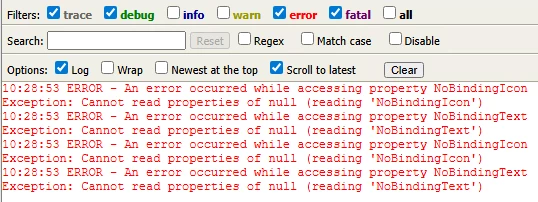
Hi @KD_12819803
The error message "An error occurred while accessing property NoBindingIcon and NoBindingText" in ThingWorx 9.7.1 indicates a potential issue with the bindings in your mashup, particularly concerning the properties of the components you are using.
Here are some things to check for identifying the cause:
Check Bindings: Verify that the properties NoBindingIcon and NoBindingText are correctly bound to the appropriate data source. Ensure that these properties are set to display values based on the selected row in your grid.
Debugging: Utilize the debug information dialog in the mashup runtime. Click on "Show/Hide Debug Info" on the runtime toolbar to identify any additional errors or issues that may provide more context.
Review Expression Functions: If you are using custom JavaScript expressions, ensure they are implemented correctly and can handle scenarios where the expected data might not be available.
Check for Null Values: Ensure that the properties are not being accessed before the data is fully loaded. This can lead to errors if the data is not yet available when the properties are accessed.
Log Messages: Implement logging using TW.log.warn() or TW.log.error() to capture the state of your variables and bindings at runtime, which can help pinpoint where the issue arises.
If the problem continues after these checks, consider reviewing the overall mashup design for any potential issues with data flow or bindings.
If you're unable to make any progress on identifying the cause of the issue, a case might be the best next step. I'm happy to open one on your behalf but you will need to private message me with your PTC support credentials.
Regards.
--Sharon