
Turn on suggestions
Auto-suggest helps you quickly narrow down your search results by suggesting possible matches as you type.
Showing results for
Please log in to access translation
Turn on suggestions
Auto-suggest helps you quickly narrow down your search results by suggesting possible matches as you type.
Showing results for
- Community
- ThingWorx
- ThingWorx Developers
- Re: Tomcat version upgrade
Translate the entire conversation x
Please log in to access translation
Options
- Subscribe to RSS Feed
- Mark Topic as New
- Mark Topic as Read
- Float this Topic for Current User
- Bookmark
- Subscribe
- Mute
- Printer Friendly Page
Tomcat version upgrade


Jan 13, 2026
08:58 PM
- Mark as New
- Bookmark
- Subscribe
- Mute
- Subscribe to RSS Feed
- Permalink
- Notify Moderator
Please log in to access translation
Jan 13, 2026
08:58 PM
Tomcat version upgrade
Hello I have followed all the steps as mentioned in the article, I have installed the new tomcat 9.0.110 but my thingworx is still redirected to older tomcat version if I stop that thingworx page is not loading Two questions 1) do we need to use older(9.0.88) web.xml and server.xml and copy into new tomcat webapps 2) I was not able to understand point 6 in the article https://www.ptc.com/en/support/article/CS272588 as it says directly copy the older ones and paste into new tomcat folder VS Point 19 and 20 says that we need to edit web.xml and server.xml https://support.ptc.com/help/thingworx/platform/r9/en/index.html#page/ThingWorx/Help/Installation/Installation/install_java_and_apache_tomcat.html#wwID0E4KGM do we need to remove the older tomcat folder from C:\Program Files (x86)\ThingWorxFoundation\tomcat
Labels:
- Labels:
-
Install-Upgrade
-
Troubleshooting
1 REPLY 1


Jan 15, 2026
09:07 AM
- Mark as New
- Bookmark
- Subscribe
- Mute
- Subscribe to RSS Feed
- Permalink
- Notify Moderator
Please log in to access translation
Jan 15, 2026
09:07 AM
Hello @VV_9240359 ,
I am a little confused by the statement that you are getting redirected back to the original Tomcat install.
When you go to the directory which contains your Tomcat I would expect you see something like this:
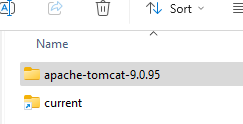
If you have 2 Tomcats installed there my be 2 tomcat directories. If this is the case my question is Where does "current" point? If you are trying to switch Tomcats you need to update the link "current"
The Article you reference CS272588, identifies configuration files which you could have changed as part of the original install. These need to be reviewed for changes and you need to determine if the changes are required for the new Tomcat.
I am guessing that you are running windows. Have you configured the services correctly? You can not have 2 versions of Tomcat running on the same machine. (Ok if you work really hard you might be able to do that)
There is a utility in <Tomcat>/current/bin directory. "tomcat9w.exe" You should run this from the command line with Administrator privileges. The command looks like:
The key piece of information is the service name. I have circled below. The left hand box is the properties display for the service. The right display is the configurations for the service. The parameters //ES// are required to edit the service. You need to verify that everything is pointing to the proper lactation. 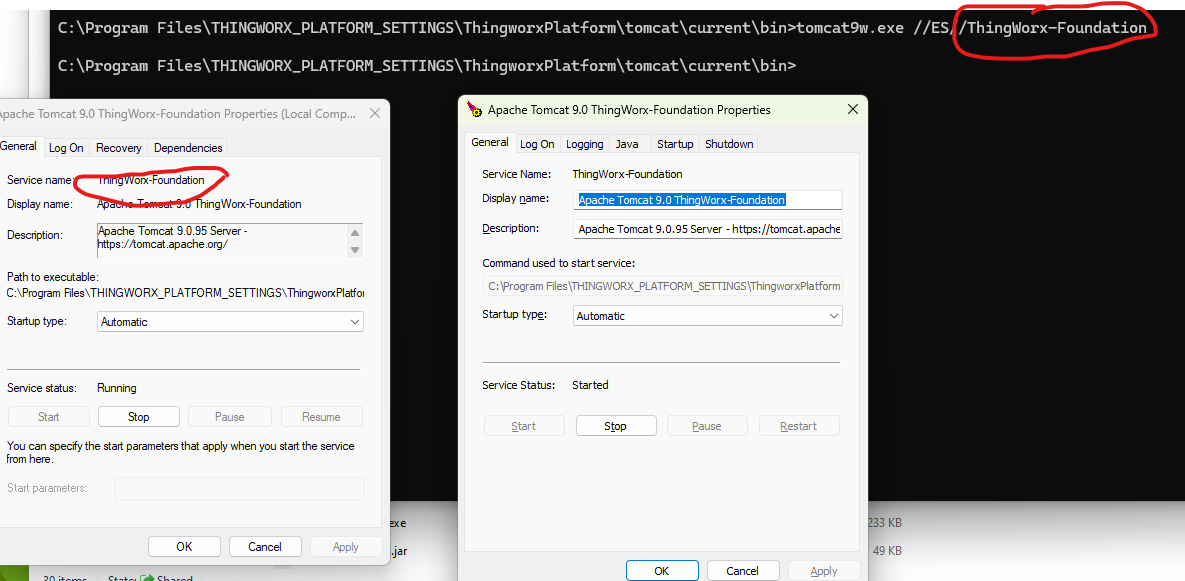
You may see the path containing "current" This is not an actual directory but a symbolic link. If you update the symbolic link "current" to point to the new location you do not need to update the configuration files which use "current" vs an absolute path.
I hope this helps let me know if you have questions
Regards,
Pehowe


