
1-Visitor
August 18, 2016
Solved

calculate Max and min value from QueryPropertyHistory

  • August 18, 2016
  • 1 reply
  • 5118 views

I have computed values on a day which is temp_min, temp_max

these are stored in value stream

is there anyway to get the max and min values logged into query property history on a particular day ?

example
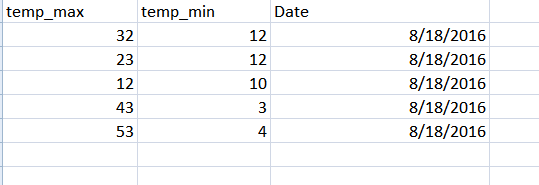
when i compute min and max value in query property history on date 8/18/2016

the result should be

temp_min : 3

temp_max : 53

am very new to thingworx .please and kindly tell me is there is any way to compute this way in query property if so please give me the example code snippet


Best answer by tcoufal

If you are using ValueStream in let say myThing than you can add me.anyDataChange as source or you can pick only property that you are logging (you know, to spare some resources..)

1 reply

1-Visitor
August 18, 2016

There are two ways ho to achieve this non if which with standard query service.

You can create one service which queries your source (pre-defined or dynamic) does the calculation and returns back the result.

Or you can tether up two services together so it is easier to use in mashups. (my favorite )

Start with creating Thing let say MinMaxCalculator

create a service in that thing called calculate

create three input parameters:

propertyName1:"string"

propertyName2:"string"

values:"infotable"

snippet:

var valuesRowCount = values.getRowCount();

var min = 1000000; // some ridiculously high min

var max = -1000000; // some ridiculously low max

var count = 0;

for (var i=0; i < valuesRowCount; i++)

{

    if (!y || !z){continue;}    // skip empty cells - that does happen with value streams

     min = (values.rows[propertyName2] < min) ? 'values.rows[propertyName1]' : 'min';   

     max = (values.rows[propertyName2] > max) ? 'values.rows[propertyName2]' : 'max';

     count++; // that is not always the same as valuesRowCount

}

// output form schema

var params = {

  infoTableName: "tempInfoTable" /* STRING */

};

var table = Resources["InfoTableFunctions"].CreateInfoTable(params);

table.AddField({name: "min", baseType: "NUMBER"});

table.AddField({name: "max", baseType: "NUMBER"});

table.AddField({name: "from", baseType: "DATETIME"});

table.AddField({name: "to", baseType: "DATETIME"});

table.AddRow({min: min, max: max, from:values.rows[0].timestamp, to: values.rows[count-1].timestamp});

var result = table;

This should do the trick, sorry made it in hurry.

I recomend that you create a DataShape as well which corresponds with above schema. (i.e min,max,from,to) and assign this datashape to output parameter of your service which must be type of infotable of coarse.

Now you can call QueryPropertyHistory (or QueryStreamEntriesWithData, or even QueryDataTableEntriesWithData) and take its result as input parameter for your calculate function, than you only need to set the PropertyName1 and 2 to which columns you want to use.

Hope that helps.

Let me know it that is working, havent tried it.

1-Visitor
August 18, 2016

For a related question...

What is the process to add an alert on a streaming signal?  I.e. conduct real time MAX/MIN query and send a value that passess a pre-determined threshold as an alert?

Thanks

1-Visitor
August 18, 2016

Sorry dont quite follow your question.

What do you mean by real time Min/Max query?

Well you can add a subscription on dataChange or on anyDataChange on Stream that you are using to store your data.

Hovever anyDataChange event is not fired when storing entries into the stream, so you will have to add an additional property lets say:

count

in your code which handles the storing procedure you can increment "count" value.

You can use that property as the source for your subscription. Than you will run your services, something like this:

var query = yourqueryhere

params

{

your params here

}

var myData = Things["myStream"].QueryStreamEntriesWithData(params);

params

{

PropertyName1:"min",

PropertyName2:"max",

values:myData

}

var result = Things["MinMaxCalculator"].calculate(params);

if (result.min < 10) { fire a custom event};

if (result.max > 20) { fire a custom event};

This is not a functional code..... But it should give you some ideas.

Than you can create your custom event, with your custom properties that you want to pass on as parameters to your subscribed Entities.

In those subscription you can make any steps that you want..