
Turn on suggestions
Auto-suggest helps you quickly narrow down your search results by suggesting possible matches as you type.
Showing results for
Please log in to access translation
Turn on suggestions
Auto-suggest helps you quickly narrow down your search results by suggesting possible matches as you type.
Showing results for
Community Tip - Learn all about the Community Ranking System, a fun gamification element of the PTC Community. X
- Community
- PLM
- Windchill Discussions
- Re: Does anyone else............
Translate the entire conversation x
Please log in to access translation
Options
- Subscribe to RSS Feed
- Mark Topic as New
- Mark Topic as Read
- Float this Topic for Current User
- Bookmark
- Subscribe
- Mute
- Printer Friendly Page
Does anyone else............


Dec 23, 2011
12:42 PM
- Mark as New
- Bookmark
- Subscribe
- Mute
- Subscribe to RSS Feed
- Permalink
- Notify Moderator
Please log in to access translation
Dec 23, 2011
12:42 PM
Does anyone else............
.....hate Windburn, er, Windchill, as much as I do? At the 3 different compaines I've worked for now that have gone to it, we've had NOTHING but trouble. I can't think of a single instance where W/C is even close to the equal of Intralink in terms of productivity, let alone faster. In fact, in every metric that I've tried, it's 2 to at least 4 times more difficult to do anything, if not impossible to actually do it. I get to hear all my new Pro/E users coming from Solidquirks complain about Pro/E, when in fact it's Windchill they're having issues with. I want my Intralink back......NOW!
Labels:
- Labels:
-
Other
29 REPLIES 29
Dec 23, 2011
04:30 PM
- Mark as New
- Bookmark
- Subscribe
- Mute
- Subscribe to RSS Feed
- Permalink
- Notify Moderator
Please log in to access translation
Dec 23, 2011
04:30 PM
I just tried to revise a dwg, and the top-level assembly that was the model for the drawing. When I tried to advance the revision of ONLY those 2 files, this HAL9000 monstrosity tried to revise almost ALL the filles in the assembly, literally, a hundred or so. I could not unselect anything because of a "script error" pop-up that stopped me dead. By changing the view to "Structure", HAL9000 let me unselect the files......but then went and advanced all of them anyways! So now, I have almost a hundred files where I need to delete ONLY the revision the system created today through this error. And, worse, I'm absolutely sure that the system will not even be capable of doing that without deleting ALL the versions of the file.
Words in any language cannot express how furious I am with this "product" because of the frustration and wasted money and man-hours.


Dec 29, 2011
02:16 AM
- Mark as New
- Bookmark
- Subscribe
- Mute
- Subscribe to RSS Feed
- Permalink
- Notify Moderator
Please log in to access translation
Dec 29, 2011
02:16 AM
I hear ya... but the system can remove those files and get you back to where you were very easily. As for speed... when things are properly set up, you should have numerous advantages with Windchill. First, during some processes in the old system (checkin) you were locked out of using Pro/E until Pro/INTRALINK finished it's work. The new system works asynchronously and often you CAN resume work while background processes like checkins are occurring.
With one notable exception (related to renaming), you can do everything in Windchill that you could do in Pro/INTRALINK 3.4. It's just the growing pains that get you. I admit those pains can be significant. Still, the new system can do things the old one could only dream of.
I completely get the frustration because I've cussed out WIindchill, too... but it does get better. And if you have specific questions, post them. I'll help any way I can.
Jan 03, 2012
09:49 AM
- Mark as New
- Bookmark
- Subscribe
- Mute
- Subscribe to RSS Feed
- Permalink
- Notify Moderator
Please log in to access translation
Jan 03, 2012
09:49 AM
Dunno man, I've been on it almost 3 years now, and it's the only software I hate MORE the more I use it. Growing pains shouldn't get worse. I know for a fact that the file vaulting I have to do was done far easier in Intralink, with far less screens to go thru and far less input from the users. IF, I can even get w/C to perform the task at all. Now I've got a TON of extra work to do to remove those revisions the HAL 9000 created. And, worst of all, I totally don't trust the system. I have absolutely zero confidence that it did what I wanted and didn't somehow screw something up. In my professional opinion, I'd recommend staying on Intralink even if it meant staying on WF4, or getting a different vaulting system. My experience with it has been that bad, in 3 different companies now.
Jan 03, 2012
08:45 PM
- Mark as New
- Bookmark
- Subscribe
- Mute
- Subscribe to RSS Feed
- Permalink
- Notify Moderator
Please log in to access translation
Jan 03, 2012
08:45 PM
I definitely can relate to your problems with Windchill. Yet I absolutely couldn't recommend another vaulting solution for Creo and Pro/E files.
Many of the issues you're mentioning have shortcuts. In the old Pro/INTRALINK, you always had to set the folder before you could check a file into the Commonspace. If you wanted to "lock" a file to prevent others from modifying it while you made changes, you had to do this manually. In the new system the default folder is automatically set and locks are implicit with the checkin/checkout system.
There are several shortcuts you can take advantage of in the new system. You can check files in/out and revise them directly through Pro/E. You can also view the Commonspace properties of any file right from the Pro/E window. You have the ability to compare two versions of the same part with very little effort in the same Pro/E session, too. In addition, you have shortcuts for searching embedded directly in Pro/ENGINEER rather than having to launch Pro/LOCATE and run it as a separate application.
Believe me when I say I understand your frustration. But after really digging into the software for a few years, I think I can honestly say that for almost every familiar feature you lost, you really did gain some new ones that make up for it. The trick is finding those features and learning how to exploit them. I'll be glad to offer whatever tricks I know to help smooth out the rough spots.
Jan 04, 2012
09:59 AM
- Mark as New
- Bookmark
- Subscribe
- Mute
- Subscribe to RSS Feed
- Permalink
- Notify Moderator
Please log in to access translation
Jan 04, 2012
09:59 AM
'Morning Brian
I definitely can relate to your problems with Windchill. Yet I absolutely couldn't recommend another vaulting solution for Creo and Pro/E files.
I'd recommend staying on Intralink, and staying on WF4. We were using "Vault", and it took Pro/E files, and seemed to work better from what the other users told me.
Many of the issues you're mentioning have shortcuts. In the old Pro/INTRALINK, you always had to set the folder before you could check a file into the Commonspace. If you wanted to "lock" a file to prevent others from modifying it while you made changes, you had to do this manually. In the new system the default folder is automatically set and locks are implicit with the checkin/checkout system.
Yes, but that was easy, and quickly done. Adding a "lock" in I/L was just as easy as doing a check-out in W/C, and, from what I've seen, a lot less troublesome. I have guys here on W/C accidently checking-out stuff all the time when they simply want to "add to Workspace", especially since now, when you do something in Pro/E it wants to check things out, where it didn't do that in I/L. And checking stuff back in is FAR, FAR more difficult. On large assemblies, it's usually a total nightmare. I'm having trouble simply advancing the rev on 2 files. something that would take less than 5 min in I/L I've, frankly, found it impossible to do in W/C. To the point where I'm advocating circumvnting the system with a simple parameter. That's how bad it is.
There are several shortcuts you can take advantage of in the new system. You can check files in/out and revise them directly through Pro/E. You can also view the Commonspace properties of any file right from the Pro/E window. You have the ability to compare two versions of the same part with very little effort in the same Pro/E session, too. In addition, you have shortcuts for searching embedded directly in Pro/ENGINEER rather than having to launch Pro/LOCATE and run it as a separate application.
I always kept a workspace and a Commonspace window up at all times, so this is not any advantage. In addition, I've been told by PTC that the internal web browser is buggy anyways, and that we should really be using a separate window, so it kinda defeats that purpose. I tried to look at a BOM structure the other day and found it so difficult, I just ended up opening the drawing and looking at which models the dwg called out. In I/L, there was this awesome graph feature. It was SO nice and easy. I liked the search engine much better as well. For instance, in I/L, if I did NOT have the filter for "latest revision" on, I got ALL the revisions and their iterations. In W/C, if you do not set that filter you get.......ONLY the latest iteration of all the revisions. VERY confusing and dangerous. What I had to do was go into the part itself and look at the version history. EXTREMELY tedious and time-consuming for all the files I had. Also, once a rev get's advanced, you're stuck and even an admin couldn't change it, resluting in lost work. I remember that my old I/L admin WAS able to back-rev a file in I/L for me when another user had screwed up.
Believe me when I say I understand your frustration. But after really digging into the software for a few years, I think I can honestly say that for almost every familiar feature you lost, you really did gain some new ones that make up for it. The trick is finding those features and learning how to exploit them. I'll be glad to offer whatever tricks I know to help smooth out the rough spots.
I'm glad it works for you, but, man, I have had NOTHING but problems with this software, from day one, regardless of which company it's been for. I went into it with an open mind, despite all the horror stories, and now I'm living them...... I can honsetly say that most of my day is wasted trying to resolve W/C issues instead of getting work in Pro/E done, things that wouldn't even BE issues in I/L. And, a lot of that, is internet issues that didn't exist in I/L.
I sat down with a guy from PTC for about 3 hours of my free time a while back and showed him all the issues we face. He was actually surprised. This is the real world, and these real-world problems were what I showed them. Maybe it all worked in their in-house tests, but out here, it does nothing but waste our time and create problems. I'm going to see if we can't get someone out here to attempt to make the system run better.
Jan 04, 2012
04:59 PM
- Mark as New
- Bookmark
- Subscribe
- Mute
- Subscribe to RSS Feed
- Permalink
- Notify Moderator
Please log in to access translation
Jan 04, 2012
04:59 PM
Hi Frank...
It sounds like you have a combination of issues causing you some grief. I believe the first step might be to have someone evaluate your physical Windchill setup and perhaps tune the system for optimum performance. It really shouldn't be slower than Pro/INTRALINK 3.4 Even if you had a Workspace and Commonspace open in the previous version, they'd lock up during checkin/checkout and those transactions prevented you from working in Pro/E. In the new version, you can check in objects and go back to work while the system is churning away. That alone should be saving time.
The PTC internal browser is really the only way to access Workspace information in the new system. You can open a standalone browser but you won't be able to see your local cache (local Workspace). You'll only be able to see your "Server Side" workspace. For this reason you're rather forced to use the internal browser. That internal browser is just a session of either Microsoft Internet Explorer or Mozilla Firefox. You can actually switch which one is being used if you like! My non-scientific tests provided data that suggests the embedded Microsoft Internet Explorer is actually faster. Check the value of the config.pro setting windows_browser_type and make sure it's set to ie_in_process for best performance.
To address the search issue, I was able to create a search for All Iterations and All Versions. I saved this search so I could use it later. This is similar to the way you saved searches in Pro/INTRALINK 3.4 The search worked well. I added a mapkey to pop the search window. It works... but not consistently (not sure why yet). There's an option to toggle searching all iterations of an object during a search. While this doesn't give you ALL iterations, it does give you the latest iteration of ALL revisions. This might offer you some semblance of searches the way you used to see them. If you have revisions A, B, C, D, and E... this option will list all of them (but only the highest iteration of each). If you want ALL iterations of ALL revisions, the "Saved Search" is the way to go.
One final thing that might help... for the BOM, I have a couple of tips here. First, go to the Structure menu and expand the entire BOM. Export the result to a CSV file using File->Export to CSV. This will open the BOM structure in Excel (at least it should if Excel is set as the default for CSV files). You can then process the BOM further in Excel.
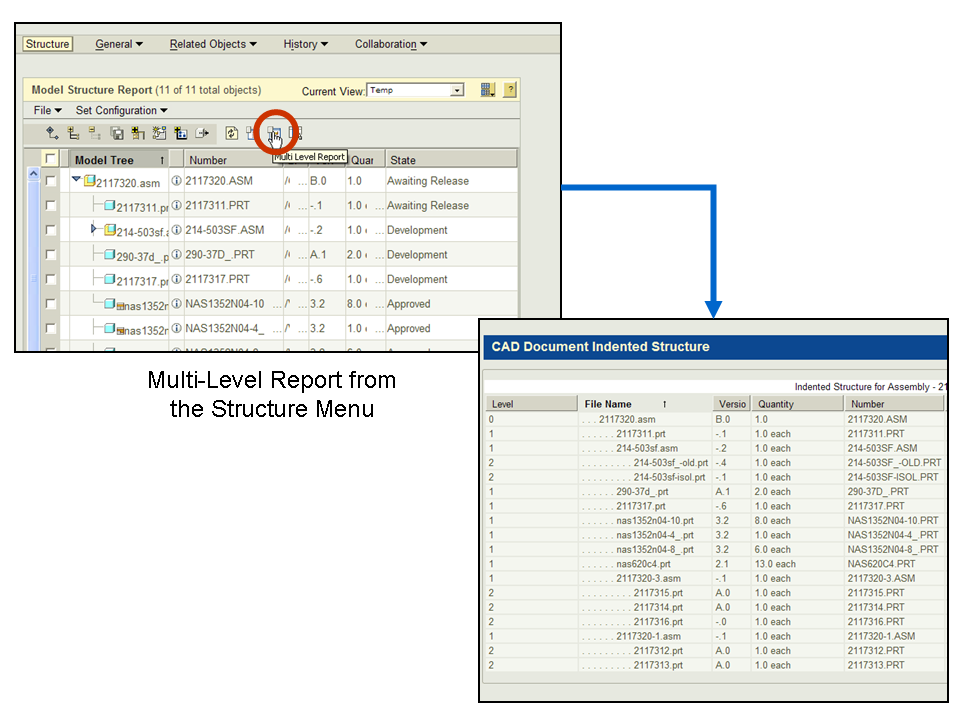
A second idea is to get to the Structure menu and use the multi-level report button which gives you an indented list as shown below:
I'm not sure if ANY of these things makes life any easier... but if you keep letting me know where you're the most frustrated with the tool, I'll keep giving you whatever tips I have to try to save your sanity.
The nifty graph tool was a nice touch... that's one I don't have an answer for! 
Take care...
-Brian
Jan 05, 2012
09:39 AM
- Mark as New
- Bookmark
- Subscribe
- Mute
- Subscribe to RSS Feed
- Permalink
- Notify Moderator
Please log in to access translation
Jan 05, 2012
09:39 AM
Top O' the mornin' to ya Brian!
I remember the system working while check-in etc. in Intralink, and yes, I couldn't use Pro/E then, but the same assemblies were slower in W/C even though theoretically you could work in Pro/E while doing W/C in the background. You guys must be set up a LOT better than we are, because I can tell you in the 3 different companies and installations I've used W/C, it has been nothing BUT slower, in all aspects. It just seems like a logical conclusion that, since it's i-net based, that every little software/hardware/data line glitch is going to affect things, and always in a negative fashion. I'm constantly getting my system hanging up.....only for 15 minutes later or so, getting the error that it "can't find the server", which, since it always appears BEHIND all the other windows, makes it that much more difficult to select a response. Then, immediately after I select "No" in response to working offline, it comes back tthat it magically found the server. I'm tempted to work offline at all times, until I need to try and transfer data. I had one of my users that was having more trouble than I do try that and it worked very well for her. Now she does it all the time.
I'm gooing to try your suggestion and see if I can't get all iterations and all versions, but I didn't see those options. All I got was the last iteration of all the revisions, which is xxxxxxxx and totally misleading.
I also took a quick look at the "windows_browser_type" and I don't see it in our current config.pro, so, thanks, and I'll look into that.
I'm not real happy with the company that did our migration, and I'd be open to suggesting to my boss that we try someone else to fix our problems. Interested?
Yeah, I TOTALLY miss the graph. That was an awesome tool!
Thanks again, have a great day, and I'll be sending some files to ya soon as we discussed!
Frank
Jan 05, 2012
05:51 PM
- Mark as New
- Bookmark
- Subscribe
- Mute
- Subscribe to RSS Feed
- Permalink
- Notify Moderator
Please log in to access translation
Jan 05, 2012
05:51 PM
Hi Frank...
Actually if you're seeing the "work offline" dialog box frequently that points to a problem with network latency or server connectivity. The fault tolerance of the entire system has been upgraded since Pro/INTRALINK 3.4 Previously if the server hung or network connectivity was inconsistent, the old Pro/INTRALINK 3.4 would just sort of sit there churning away without giving any feedback. With the better fault tolerance, you'll immediately see the 'work offline' dialog box if there are server or network connectivity issues. This is supposed to be a helpful tool in that you can elect to work offline until (presumably) the problems are resolved.
The fact that you're seeing that box pop up frequently tells me something's amiss. I think it's another clue that may eventually help us figure out what's causing some of these problems.
Thanks!
-Brian
Jan 05, 2012
09:41 AM
- Mark as New
- Bookmark
- Subscribe
- Mute
- Subscribe to RSS Feed
- Permalink
- Notify Moderator
Please log in to access translation
Jan 05, 2012
09:41 AM
Oh, and I forgot, funny, but my maternal grandfather's last name is "Martin". He was the deputy police chief in Middletown CT for many years.

Jan 05, 2012
11:32 AM
- Mark as New
- Bookmark
- Subscribe
- Mute
- Subscribe to RSS Feed
- Permalink
- Notify Moderator
Please log in to access translation
Jan 05, 2012
11:32 AM
Hi Frank,
I wanted to respond earlier, but was afraid I'd come across as sounding defensive or whiny or something worse. However, I feel like something needs to be said at least to let you know that PTC designers always willing to listen and learn from customers.
Believe it or not, PTC desingers do not set out to alienate existing users. We run new designs by existing customers at the TC's, user convferences, customer visits, surveys, interviews and through specific User Experience testing. User feedback and input is vital to good designs, and increasing efforts are being made to increase exposure to customer's issues. We do understand that changes impact productiviity for an initial period, but we do believe that User Experience is improved with most changes in user interface.
You were generous enough to give a good part of one day to provide feedback to someone from PTC. As someone who is often seeking customer feedback, I do understand what those hours mean. I assume that information made it back to the designers and decision makers so that your comments were noted.
This discussion has been uncomfortable for me to follow, but I'm encouraged by the Brian's advice and encouragement.
I hope I at least did not come across as unsympathetic. So far, I could not offer any better advice than Brian already has, but I'll continue to listen and try to provide help and answers if possible.
Jan 05, 2012
12:48 PM
- Mark as New
- Bookmark
- Subscribe
- Mute
- Subscribe to RSS Feed
- Permalink
- Notify Moderator
Please log in to access translation
Jan 05, 2012
12:48 PM
Thank you Celia, and no, you don't sound defensive. I don't believe PTC sets out to alienate it's core/experienced users, but, unfortunately, that is what's happened to a lot of us. I don't want to make it sound like I'm adverse to change, only change for the sake of change that has no net gain. I've been using Pro/E since Dec '96, and using 4 different vaulting systems since then: CMS, the old PDMLink, Intralink, and now W/C. I never had or needed any formal training in any of them except W/C, yet was able to easily and quickly perform most admin duties as a librarian at several companies. I'm being honest when I say that I've had nothing but problems with W/C. I think that not only is there a much steeper learning curve, there are also serious flaws in the system, starting with the increased number of screens and pics a user must navigate thru. Every option allows for a mistake to be make. I do not believe that a vaulting systems needs to be this complicated.
The person I talked to was Chris Bergquist, and, frankly, I really liked the guy, and enjoyed showing him via a GoTo meeting all the real-world issues I was having. There have been many times I've felt my conceerns have dismissed off-hand, or the people at PTC and/or the people at the VAR have tried to make me feel like I was an idiot for not understanding W/C, but I got absolutely none of that from Chris, and it was a breath of fresh air. Especially in light of me blasting W/C performance several years ago.....and having PTC then contact my boss and try and get me fired. Further, I have no doubt that incident was part of me getting let go when the layoffs happened some time later. So, to have a guy actually listen, was great. He saw first hand the issues, I showed him all the bugs I found, and he recorded it all. So, I have some hope maybe he has enough pull and the evidence was convincing enough to effect some change. Time will tell. 
But, I DO stand behind my assertions about W/C. I've had a TON of issues, every place I've used it, and some of my other users hatte it more than I do, so that's pretty telling. It seems the only people who support it.....are thos who sell it. Odd, that...... I have been a solid support of Pro/E over the many years I've been using it, and still stand behind it's capabilities, though I hate all these interface changes. But, as mentioned, in light of the issues we're seeing, it keeps getting harder to fend off the solidworks users here.
Best of luck, and thanks again to Brian.
Jan 05, 2012
01:55 PM
- Mark as New
- Bookmark
- Subscribe
- Mute
- Subscribe to RSS Feed
- Permalink
- Notify Moderator
Please log in to access translation
Jan 05, 2012
01:55 PM
Hi Frank,
I am part of the group that drives CAD Data Management in Windchill along with Chris so I'm sure your feedback will come to my attention if it has not already.
I hear your frustration, and I know you are not alone. But we do have users who happy with PDMLink even when using it just as a vaulting system. Windchill is a far more complex tool than Pro/INTRALINK ever was, but as someone who has a hand in driving the direction of Creo-Windchil Interaction, I can assure you that we are taking steps to improve the user experience, which includes making the basic actions more accessible.
Can I get one clarification-- are you saying that because of Windchill -Creo interaction issues, you are having a difficult tiem fending off SW users? Or is it that with tne changing Creo UI?
Thanks,
Celia
Jan 05, 2012
02:08 PM
- Mark as New
- Bookmark
- Subscribe
- Mute
- Subscribe to RSS Feed
- Permalink
- Notify Moderator
Please log in to access translation
Jan 05, 2012
02:08 PM
The users I'm training in Pro/E feel they can do basically everything easier in SW. I disagree, having actually become pretty proficient in SW in addition to Pro/E before I left that company because they were going to force me to switch. I didn't like the SW interface. I don't like these touchy-feely Microsoft-type interfaces. In fact, I much preferred the pre-WF interface. I do not like the "lead vs. follow" workflow idea, or implementation. In the older interface, things were not scattered about based on someone else's idea of "lead vs. follow". All the create funtions were in a pull down, and the edit funtions were in another. Simple. Back then (I started on V.15), we didn't need a weeks worth of training to adapt to a frustratingly new interface, each new version was simply a logical step from the older version, with only the new features being added to the menu. The SW users seem to like "touchy-feely" stuff, even though it takes longer to get thru the menus. All the problems we've been having with W/C just make it worse. I've had to try and explain to them that the problems (SOAP errors, script errors, slow oerformance, etc.) are NOT Pro/E issues per se, but W/C issues. But, being tied at the hip, for them, they see it all as a "Pro/E" problem. And yes, I know that PTC is going to say that it's not a W/C issue but an i-net issue, BUT, Intralink didn't have these issues because it was not i-net based. Simple is always better, and the more performance variables you throw in the mix, the worse off you will always be. Yes, maybe in the perfect world of the PTC W/C fortware developer nothing ever goes wrong, but here in the real world, it does....constantly.
Chris has my contact info if you'd like to contact me directly.
Jan 05, 2012
05:10 PM
- Mark as New
- Bookmark
- Subscribe
- Mute
- Subscribe to RSS Feed
- Permalink
- Notify Moderator
Please log in to access translation
Jan 05, 2012
05:10 PM
Hi Celia...
Thank you for jumping into the discussion. Having worked for a half dozen companies using Windchill or Pro/INTRALINK 8-9, I have a good depth of experience (as does Frank) witnessing user interaction with the tool.
In one specific company, the installation was very poor and I was significantly upset with having to use it. I was working two jobs. My day job used Pro/INTRALINK 3.4 and the evening job used Windchill PDMLink and ProjectLink 8.x. The data management and vaulting at the night job took fully 40% longer than at the day job. Performance was the worst I'd ever witnessed (and I had worked with Windchill previously). From my experience, I knew that Windchill shouldn't be that slow. I also knew that Pro/INTRALINK 3.4 was tremendously faster because I was using both tools daily. I pleaded with management to call in Windchill experts to evaluate our system. After overcoming a great deal of resistance (for various internal political reasons), a comprehensive evaluation was completed. Based upon the results of the investigation, the system architecture was significantly altered and tuned for optimum performance. Overnight system performance skyrocketed and the tool became quite responsive and pleasant to use.
To me, it sounds like Frank has encountered several instances where the system architecture, network configuration, or tuning was insufficient to provide good performance. Some of the other criticisms of the system can be mitigated by implementing shortcuts or by taking advantage of some tips and tricks long time users have developed. My experience with Windchill is generally positive. However, I'm concerned that it's become such a complex system that it can be difficult to troubleshoot and administer... especially for smaller companies without the experienced IT resources to properly manage it. It's definitely a challenge to make such a powerful and intricate piece of software intuitive, fast, easy to use, and easy to administer. Windchill 10 has been a major step in the right direction. I think we can all agree we're making progress... and that more progress is still warranted.
Issues with the user interface always seem to elicit the most passionate response from experienced users. I wholeheartedly believe PTC designers are doing what they believe is right. Consulting the TC's and taking surveys at the user conferences are important ways to gather user feedback and insight. I've joined several of the TC's in an attempt to lend my voice to the chorus. I force myself to use the new interfaces and encourage others to do the same because I feel it makes the entire team more productive.
I support over 200 users in my current role as Pro/E and Windchill support specialist, trainer, and Sr. Mechanical Engineer. The vast majority of those users have been upset by the interface changes. Many have been upset by the switch to Windchill, too but the changes to Pro/ENGINEER have been the biggest problem. Although I truly want to be as supportive and congenial as possible, even I have to admit I've been frustrated by the constant changes to the interface. Like Frank, I am having difficulty justifying the changes to my teammates.
One user said the changes felt random and unneccessary. He likened them to a car company deciding to move the gas pedal to the left of the brake because they did a study that doing so saved a few inches of foot travel. While the data seemed to indicate a change would be a good thing... in reality it would lead to such confusion and anger that ultimately it would be better to leave things as they were- if slightly less efficient. It's difficult to deflect such criticisms in a positive and upbeat manner but I have a job that demands delicate diplomacy. I believe Frank is simply expressing his feelings with more candor and less of that delicate diplomacy.
Thank you so much for contributing to the discussion. Knowing you and your team are listening is gratifying and certainly lends hope to the matter.
Best regards,
-Brian
Jan 05, 2012
05:40 PM
- Mark as New
- Bookmark
- Subscribe
- Mute
- Subscribe to RSS Feed
- Permalink
- Notify Moderator
Please log in to access translation
Jan 05, 2012
05:40 PM
Hah! That's me, "long on candor, short on diplomacy"! Love it!
Thanks for all your help and support Brian. I think you hit several key issues on the head, not the least of which is that no matter how the developer sees this that or the other change as being "better", it is the end-users that should 100% be the deciding vote on whether it truly IS better or not. For instance, for over 20 years the motorcycle industry has played with trying to design a swingarm-type front end for motorcycles. It had some demonstratable benefits in some designs, and theoretically the Engineers declared it "better". The riders, however, universally hated it, because for them, though on paper it might be "better" in a sterile classroom sense, it had an unnatural "feel" to it, and lap times increased dramatically. And, to this day, motorcycles still have a telescopic front end. Me, I want my gas pedal exactly where God intended it.......under my (admittedly heavy....) right foot.
I've known several Intralink admins who had to switch to W/C, and all of them say their work in trying to keep the system running has been exponentially increased. Lets face it, as Engineers and Designers, it is our job to make something as simple as possible that achieves the set goals, not come up with a Rube Goldberg device to use as many parts as possible to screw in a light bulb. So, it's not surprising with the sheer astronomical size increase of the code from I/L to W/C that there are issues. Throw in all the new i-net issues that we never had before and it's a 55-gal drum of worms.
Jan 05, 2012
06:05 PM
- Mark as New
- Bookmark
- Subscribe
- Mute
- Subscribe to RSS Feed
- Permalink
- Notify Moderator
Please log in to access translation
Jan 05, 2012
06:05 PM
I think there are probably tons of users wish they could lend their suggestions and experience to the PTC development teams. I also believe that the people who would probably have the most valuable input are precisely the same people who are too busy to do so. Many of the real power users are out there in the field creating incredible new products and speeding them to market with Creo. Those people are in heavy demand and it can be tough to get their attention.
I don't know what the answer is... but it seems like we need to strive for better lines of communication between the developers and the user community. I'd venture a guess to say the software companies that do this the best probably have the highest customer satisfaction.
When I was in business for myself some years ago, my goal was always to impress the "tough customers". Many people can be dazzled with nothing more than smoke and mirrors... but those discerning pain-in-the-neck customers were the ones I tried to impress. Once I won the approval of the tough customers, my business experienced explosive growth.
Here's a nice, if a bit shallow, article on the important of customer complaints in marketing, support, and product development. They sum it up rather nicely...
http://www.ehow.com/info_7873023_importance-customer-complaints-marketing.html
Thanks!
-Brian
Jan 05, 2012
06:59 PM
- Mark as New
- Bookmark
- Subscribe
- Mute
- Subscribe to RSS Feed
- Permalink
- Notify Moderator
Please log in to access translation
Jan 05, 2012
06:59 PM
II wish I could speak for the Creo team, but although I was once part of their team and still work closely with them, I'm not really in a position to make any statements about their direction other than what you would get from a general Creo over view. Maybe I can convince someone to join the discussion.
Towards my interests, getting the right customer feedback is difficult and you highlighted one of the biggest problems. People are too busy to provide the time. I've considered posting surveys and other feedback opportunites here but was unsure what the response would be. Even if no one responded, the cost would be minimal. The real reason it hasn't happened is because I haven't been able to find the time.
But now I'm feeling more motivated to start posting those requests here. I'll try to get them up in the coming weeks.
Celia
Jan 06, 2012
12:25 AM
- Mark as New
- Bookmark
- Subscribe
- Mute
- Subscribe to RSS Feed
- Permalink
- Notify Moderator
Please log in to access translation
Jan 06, 2012
12:25 AM
Celia thank you again for your participation in the PTC Community and this thread. Just having the chance to speak with someone directly involved with the Windchill team is a rare opportunity for which I'm very grateful.
As I mentioned before, in my current position I'm part of a very small team responsible for Creo and Windchill support for about 200 users. With resources stretched thin it's hard enough just to keep up with the demand for support let alone other tasks such as gathering user feedback.We've placed a premium on efforts at outreach and communication with our people. We want to hear their concerns and focus our efforts on improving their experience with the software. Sometimes this can be achieved through better training and documentation. Other times, we need to work on the system itself (network, architecture, tuning, etc). We have to put in a great deal of extra effort to maintain this outreach. This is a huge challenge for our team because we don't really have the time to do it.
I can only imagine the challenge you and your team face carrying the responsibility for an entire product line. Thank you for your efforts to hear the Windchill users and solicit their feedback. I understand how difficult it can be to maintain those efforts. There never seems to be enough time. I'm sure anything you can do to improve the Windchill user experience will resonate with PTC's customers.
Thank you again for all your hard work...
-Brian
Jan 07, 2012
12:37 AM
- Mark as New
- Bookmark
- Subscribe
- Mute
- Subscribe to RSS Feed
- Permalink
- Notify Moderator
Please log in to access translation
Jan 07, 2012
12:37 AM
No need to thank me, Brian. It's part of my job, and it is a job that I love even though it is filled with challenges.
We often make assumptions about how our customer's work, but we know that we need to get out there and hear the real challenges our customer's face. We are trying to arrange more live visits, but that takes time on both sides.
I have a Diary Study that we've been trying to gather data with for some time. The intent of the study is to gather data over a period of time (2 weeks) from CAD Data Management users. We hope to verify the most common commands (i.e. Check in, Save, File Open, etc...) as well as some other assumptions we make about users. But we also want to find out what cammands are most used
I only ask for your email so that I can track how many times someone responds. We are hoping that you could spend the 5 or less minutes to fill this questionaire out every day for two weeks.
The survey is done through a Google form which can be accessed here:
If you know of others who might want to spend the time providing this data, please share the link. I'll probably post it elsewhere in the community a little later.
Thanks,
Celia
Jan 09, 2012
05:24 PM
- Mark as New
- Bookmark
- Subscribe
- Mute
- Subscribe to RSS Feed
- Permalink
- Notify Moderator
Please log in to access translation
Jan 09, 2012
05:24 PM
Thanks Celia...
I'll take the survey... no problem at all. We use Google Forms at my current employer, too. They're so tremendously easy to use and customize... they're lifersavers!
I can appreciate that you love your job. Your presence here shows you care. Now... if we could just get some of those people on the Creo team to pop in once in awhile, that would be really wonderful.
Take care...
-Brian
Jan 10, 2012
05:15 PM
- Mark as New
- Bookmark
- Subscribe
- Mute
- Subscribe to RSS Feed
- Permalink
- Notify Moderator
Please log in to access translation
Jan 10, 2012
05:15 PM
Ok, so, now my Workspaces have been completely worthless to me for the last week or so. I can't even VIEW them let alone do anything, it just stalls for 20 min or more at a time. I can view Commonspace and even download to workspaces, but can't even look at my workspaces now. Great. So, I'm simply backing up everything to a network drive to be able to continue working. So, the system, as a vaulting system, is now completely worthless to me since I can't even use it as such. AWESOME! WooHoo! Now my day's complete.......
Jan 10, 2012
05:38 PM
- Mark as New
- Bookmark
- Subscribe
- Mute
- Subscribe to RSS Feed
- Permalink
- Notify Moderator
Please log in to access translation
Jan 10, 2012
05:38 PM
Hey Frank...
Just a few thoughts here. The behavior you're describing sounds like it could have several causes. And yes, as we've discussed, some of these causes seem like larger system issues. However, there are literally dozens upon dozens of config settings, options, and other switches which control your workspace and the Windchill environment.
It also occurred to me, maybe you have a "sick" workspace. First... are you clearing your workspace cache regularly? As your workspace cache starts filling up, performance starts to lag. This continues until literally you're stuck with a nonresponsive workspace.
Try this... go to Tools>Server Registry (or Server Manager - they've changed the name over the past few software revs). Select the Cache tab. Note the "Total Cache Used" versus the "Target Cache Limit". There are different settings for managing the cache limit (we can discuss this later). Select Clear. If you're promoted with a message asking you if you're sure you want to clear the cache, select "Yes".
Also... if you're prompted with a dialog box showing your current workspace and a warning about clearing the cache of an active workspace, go ahead and clear it anyway. You may have to select a drop-down box or something to do this in WF4. I'll send you a private email with better instructions (I can't share them as public documentation at this time).
Try that first. Next, make sure you're synchronized your workspace (Tools>Synchronize). Having a workspace that's very far out of sync also causes wreird performance issues.
Finally... how OLD is your workspace? In the old system, you had to contend with the 1.2GB size limit. If you hit that magic number, your workspace was virtually GONE with no hope of getting it back. With Windchill, you don't have to worry about that local.ddb file anymore... but you DO need to clear out workspaces more frequently. There's no written recommendation on this other than to suggest you frequently create new workspaces and delete old ones.
As PTC explains it... workspaces are meant to be transient, temporary repositories for data. Use them for a few days and then remove them. Then make a new one and repeat the process. Ideally, if you had to open a small subassembly one day, you'd make a new workspace JUST for that subassembly. You'd open the file, work on it, check in your work, and then wipe OUT the workspace. THAT is what they mean by "temporary".
In real life, many designers only make workspaces once every week or two. I've seen guys use the same ones for months on end with no bad effects. All I can say is... they're playing with fire. It's kind of like working for hours in Pro/E without saving. We've all done that... and had a crash just moments before we reached for the SAVE icon. Then we kick ourselves for not stopping to save sooner. Well, workspaces are like that. They can get flaky... so use them temporarily and then wipe them out.
Also... just as a side note, are you making your own workspaces? There are also some "default" workspaces made by Windchill (one for each Product/Context). Don't use these. They're known to be a bit flaky. There's a way to stop the system from making them but it's not really necessary. It's just best practice to make your own workspace and frequently clear the cache, synchronize, and remove workspaces you've been using for more than about two weeks.
The more diligent you are with workspace management, the better the system runs.
There are TONS of files on how to milk a bit of extra performance out of the Windchill system. But in my experience, the biggest "bang for the buck" is in workspace management. Keep the workspaces small and clear them out frequently.
Does ANY of this help? Or is any of this information something you haven't heard of before? If so, let me know so I can follow up some of these topics with more information.
thanks!
-Brian
PS: Look in your personal email, too. Thx!
Jan 10, 2012
06:03 PM
- Mark as New
- Bookmark
- Subscribe
- Mute
- Subscribe to RSS Feed
- Permalink
- Notify Moderator
Please log in to access translation
Jan 10, 2012
06:03 PM
There was only about 365meg cache, and there is no cache limit set. I just cleared that, and I'll try rebooting. My workspaces are only a few months old, some less than that. I just got rid of a few actually. So, I usually try and keep all that clean, like I was used to purging frames in I/L. And, supposedly there are frames in W/C, so I thought about clearing those as well but I can't even get into my Workspace.
Thanks!
Whadja think of those models? Did you get a chance to look at 'em? I'm still looking for the .prt files for ya.
Grazie!
Jan 11, 2012
12:19 AM
- Mark as New
- Bookmark
- Subscribe
- Mute
- Subscribe to RSS Feed
- Permalink
- Notify Moderator
Please log in to access translation
Jan 11, 2012
12:19 AM
Sorry for your frustruation. Once again, I had no better suggestions than what Brian already offered.
I hope clearing the cache and/or rebooting worked.
FYI, I did get your recordings from Chris. I hope to review soon and will contact you if need be.
Jan 11, 2012
10:06 AM
- Mark as New
- Bookmark
- Subscribe
- Mute
- Subscribe to RSS Feed
- Permalink
- Notify Moderator
Please log in to access translation
Jan 11, 2012
10:06 AM
So far, no luck. What I've found I can do is check in from WF4, but it still doesn't mean I can easily and safely create a new revision. I'm skating on thin ice here but I need to get things done.
Glad you got the recordings. I'm willing to spend some of my free time helping, as long as something gets done. I'm not going to become an unpaid beta-testing intern for PTC without something for me though, and, as a long-time customer, I do expect that these issues will be resolved. We're paying for software that is not working as advertised. If this was an appliance or I had the position of power to do it, I would have returned it for a refund already. I hope we can get these issues resolved....
Thanks for your help.
Jan 11, 2012
10:16 AM
- Mark as New
- Bookmark
- Subscribe
- Mute
- Subscribe to RSS Feed
- Permalink
- Notify Moderator
Please log in to access translation
Jan 11, 2012
10:16 AM
Frank,
We're just guessing at the problem from your description. To really solve it, you need to file a call and submit the data and logs. Maybe I missed in this thread where you already did that, but you need a more detailed investigation of your issue.
-Celia
Jan 11, 2012
11:29 AM
- Mark as New
- Bookmark
- Subscribe
- Mute
- Subscribe to RSS Feed
- Permalink
- Notify Moderator
Please log in to access translation
Jan 11, 2012
11:29 AM
We have a call in, so, we'll see what happens. Really, what I want is someone that's an "expert" (from a company other than the one that did the migration) to come on-site and fix what can be fixed withing the limitations of the system. We'll see.
Jan 11, 2012
11:57 AM
- Mark as New
- Bookmark
- Subscribe
- Mute
- Subscribe to RSS Feed
- Permalink
- Notify Moderator
Please log in to access translation
Jan 11, 2012
11:57 AM
Hmmm...
Hey Frank let's chat more about this offline. Maybe there are other ways I can help without having to take a flight to Colorado. But if that doesn't work, I know a really great Windchill consultant who lives in Tahoe.
Thanks!
-Brian
Jan 11, 2012
02:44 PM
- Mark as New
- Bookmark
- Subscribe
- Mute
- Subscribe to RSS Feed
- Permalink
- Notify Moderator
Please log in to access translation
Jan 11, 2012
02:44 PM
We need something here, we're all having issues. Just found out we supposedly have an incompatibility issue with our version of Creo and W/C 10. The WF4 I'm using should be ok, but, my Workspace is still totally hosed.
I mean, I've always found it inferior to I/L but this is insane......


