Excluding a component from Windchill WTPart Structure
Version: Windchill 12.0
Use Case: In some cases, we need to add a model in an assembly just for reference or space claim reasons and we do not want the WTPart associated to that reference model to show up in the Windchill WTPart structure and therefore end up to ERP BOM.
Description:
What is the recommended/best practice for excluding items from WTPart structure?
I thought that the preference "Part Structure Override Attribute Name" would be the way to do this, as the description for that preference says that it "Identifies a boolean soft attribute name that determines if the CAD document participates in build. This soft attribute can be on: iteration, master, member link, model item, or model item link. This soft attribute also determines whether to autoassociate the model to a part."
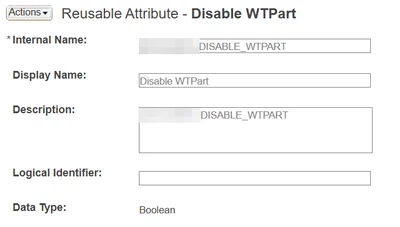
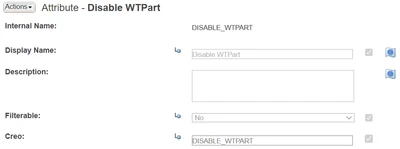
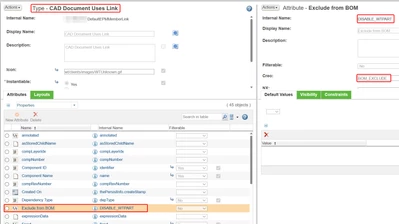
So I created a reusable boolean attribute, added it as a global attribute to the "CAD Document Uses Link" type and inserted the internal name of that attribute to the preference.
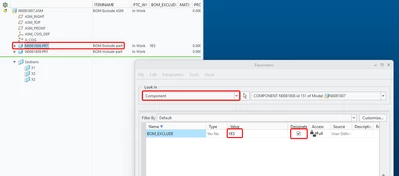
Then I created an assembly in Creo, added few components to it, added a designated component parameter to one of the components with boolean value YES on it and checked the assembly in.
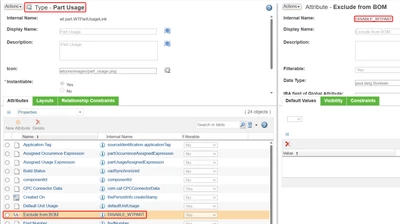
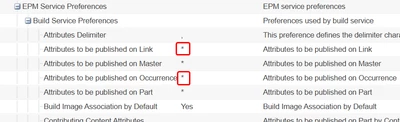
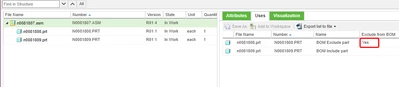
I can see on the CAD assembly in Windchill that the designated component parameter ended up on the usage of the component in the assembly successfully, but that item is included in the WTPart structure. I also tried to add the attribute to the Part Usage type to see if it propagates from the CAD usage to the corresponding Part Usage during build, but for some reason it is not doing that. I also tried to set the preference EPM Service Preferences > Build Service Preferences > Attributes to be published on Occurrence to * just in case but that did not help.
So have I misunderstood something about the Override Attribute preference or have I once again been bamboozled by PTC describing functionalities that do not actually exist?
How are people using Creo + Windchill and WTParts handling this use case? Just by removing the unwanted WTPart manually from the WTPart structure after check in?