15-Moonstone
January 21, 2026
Solved

Excluding a component from Windchill WTPart Structure

  • January 21, 2026
  • 4 replies
  • 551 views

Version: Windchill 12.0


Use Case: In some cases, we need to add a model in an assembly just for reference or space claim reasons and we do not want the WTPart associated to that reference model to show up in the Windchill WTPart structure and therefore end up to ERP BOM.


Description:

What is the recommended/best practice for excluding items from WTPart structure?

I thought that the preference "Part Structure Override Attribute Name" would be the way to do this, as the description for that preference says that it "Identifies a boolean soft attribute name that determines if the CAD document participates in build. This soft attribute can be on: iteration, master, member link, model item, or model item link. This soft attribute also determines whether to autoassociate the model to a part."


So I created a reusable boolean attribute, added it as a global attribute to the "CAD Document Uses Link" type and inserted the internal name of that attribute to the preference.


Then I created an assembly in Creo, added few components to it, added a designated component parameter to one of the components with boolean value YES on it and checked the assembly in.


I can see on the CAD assembly in Windchill that the designated component parameter ended up on the usage of the component in the assembly successfully, but that item is included in the WTPart structure. I also tried to add the attribute to the Part Usage type to see if it propagates from the CAD usage to the corresponding Part Usage during build, but for some reason it is not doing that. I also tried to set the preference EPM Service Preferences > Build Service Preferences > Attributes to be published on Occurrence to * just in case but that did not help.


So have I misunderstood something about the Override Attribute preference or have I once again been bamboozled by PTC describing functionalities that do not actually exist?


How are people using Creo + Windchill and WTParts handling this use case? Just by removing the unwanted WTPart manually from the WTPart structure after check in?
Best answer by N-Pyn

I tried having the CAD Usage parameter coming from Creo with different name as the one which disables item creation but it did not help. I cannot seem to figure out what is wrong with my setup.

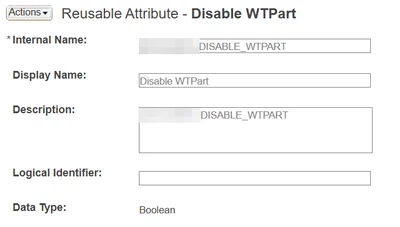
So first of all, I have created a reusable boolean attribute DISABLE_WTPART:

NPyn_0-1769423831483.png

Then I have used that for disabling WTPart auto-association for CAD models which do not need WTParts. So I have added that attribute to the CAD Document type:

NPyn_1-1769423936477.png

And I have set the preference to look at this attribute for overriding auto-association:

NPyn_2-1769423981899.png

This all works just fine.

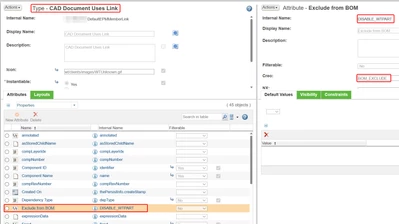
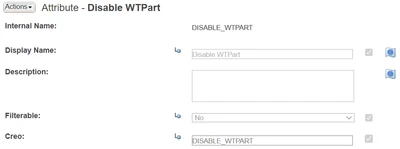
So then I started to configure the BOM exclusion feature for CAD usages in assemblies. First I added the attribute to the CAD Uses Link type:

NPyn_3-1769424202088.png

It uses the same Reusable attribute DISABLE_WTPART but is linked to Creo parameter BOM_EXCLUDE instead.
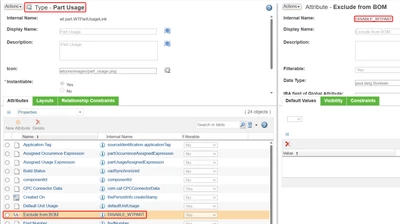
Then I added the same attribute to Part Usage type just in case:

NPyn_4-1769424307733.png

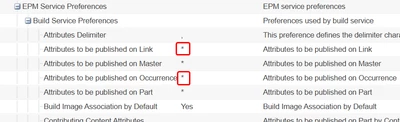
Then I set the Build Service Preferences so that all the attributes on Links and Occurrences are published:

NPyn_5-1769424379773.png

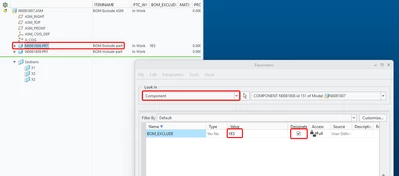
So now it all should work. I open Creo and add the component parameter BOM_EXCLUDE to a component in an assembly and designate it:

NPyn_6-1769424523381.png

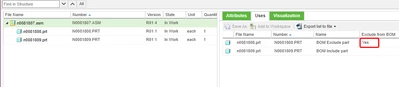
Then I check in the assembly, and the parameter value successfully goes to the CAD document usage in Windchill:

NPyn_8-1769424852574.png


But the item for the excluded component is still there (and the attribute value also):

NPyn_7-1769424637547.png


I just noticed that we have a Custom Class for Auto Associate Part created by a subcontractor. Is it possible that it is not handling the override preference properly? I don't have access to our Windchill server so I cannot check the code myself. Or is there some way to inspect the code via the UI?


4 replies

16-Pearl
January 21, 2026

Hi @N-Pyn,


When you say model, do you mean a CAD model?
Are you looking to keep it only as a reference CAD model and not display it in the part structure?

N-Pyn15-MoonstoneAuthor
15-Moonstone
January 21, 2026

Yes, CAD model.

I want to use a CAD model in a CAD assembly without it being included in the WTPart structure associated to the CAD assembly.

17-Peridot
January 21, 2026
N-Pyn15-MoonstoneAuthor
15-Moonstone
January 22, 2026

Gathering or Phantom parts do not solve this issue as I need the part to be omitted from the structure only in specific BOMs, so the attribute needs to be on the Usage Link. Gathering and Phantom attributes are on the Part Master.

Also Gathering Part is next to useless function also in it's intended use case because it is not handled properly by the ERP Connector. But that is a whole other matter:
https://community.ptc.com/t5/Windchill-Ideas/Gathering-parts-support-in-ESI/idi-p/464177

joe_morton
18-Opal
18-Opal
January 21, 2026

We use a method that sounds really similar to what you're doing. I'm sure you used this guide: https://www.ptc.com/cn/support/article/CS268136?art_lang=en


I don't know if it matters, but we have internal name "NO_PART" for both of the uses indicated there. We used a different display name to help our users, and used this mapping for the part occurrences: 


joe_morton_1-1769013697792.png


Our most recent update was adding a mapkey so users can select the part instance they want to exclude, and it goes through the steps of setting the boolean and marking it as Designated.

N-Pyn15-MoonstoneAuthor
15-Moonstone
January 22, 2026

Okay, so that function should work as I thought it would. What version of Windchill do you have?


I'll have to check my settings again and make sure that everything is properly configured.

joe_morton
18-Opal
18-Opal
January 22, 2026

We're on 13.0 now, but we've had this working going back a few versions. 

5-Regular Member
January 22, 2026

Your original thought process was correct.  If the requirement is "sometimes" the part must be excluded then you CANNOT use the NO_PART functionality because that attribute is defined on the EPMDocument.  You must define the attribute on BOTH the CAD Document Uses Link and the Part Usage Link.  They both must reference the same global attribute.  Then there is a preference (Attributes to be published on Link) that lists what attribute values on the CAD link are propagated to the Part Usage link.


PTC TS Article: https://www.ptc.com/en/support/article/CS26565?source=search


Hope it helps.