
Turn on suggestions
Auto-suggest helps you quickly narrow down your search results by suggesting possible matches as you type.
Showing results for
Please log in to access translation
Turn on suggestions
Auto-suggest helps you quickly narrow down your search results by suggesting possible matches as you type.
Showing results for
Community Tip - Need to share some code when posting a question or reply? Make sure to use the "Insert code sample" menu option. Learn more! X
- Community
- PLM
- Windchill Discussions
- Re: Workspace appears empty
Translate the entire conversation x
Please log in to access translation
Options
- Subscribe to RSS Feed
- Mark Topic as New
- Mark Topic as Read
- Float this Topic for Current User
- Bookmark
- Subscribe
- Mute
- Printer Friendly Page
Workspace appears empty


Jan 28, 2016
08:23 AM
- Mark as New
- Bookmark
- Subscribe
- Mute
- Subscribe to RSS Feed
- Permalink
- Notify Moderator
Please log in to access translation
Jan 28, 2016
08:23 AM
Workspace appears empty
I have one new user with a strangely-acting embedded browser.
When he has CAD docs checked out to his workspace, the embedded browser shows the checked out files and only the checked out files. It shows none of the required children or formats. When he checks everything in, it instead shows nothing.
When we check the workspace in a stand-alone browser all files show up.
When we pick File > Open, all the files show up.
He checked the Views setting and everything is normal.
He changed the View to see if that was it but it was the same.
He created a new custom View but it was the same.
He changed between workspaces but it was the same. (One of the workspaces was relatively new.)
I'm not sure what else to try. Anybody else see this behavior?
Solved! Go to Solution.
Labels:
- Labels:
-
CAD Data Mgmt
ACCEPTED SOLUTION
Accepted Solutions


Jan 28, 2016
08:40 AM
- Mark as New
- Bookmark
- Subscribe
- Mute
- Subscribe to RSS Feed
- Permalink
- Notify Moderator
Please log in to access translation
Jan 28, 2016
08:40 AM
Don,
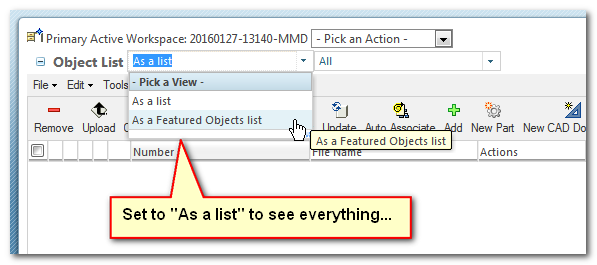
The other setting that affects that is the "As a list" or "As a Featured Objects list". It almost sounds like it is set on "As a Featured Objects list"....
2 REPLIES 2
Jan 28, 2016
08:40 AM
- Mark as New
- Bookmark
- Subscribe
- Mute
- Subscribe to RSS Feed
- Permalink
- Notify Moderator
Please log in to access translation
Jan 28, 2016
08:40 AM
Don,
The other setting that affects that is the "As a list" or "As a Featured Objects list". It almost sounds like it is set on "As a Featured Objects list"....
Jan 28, 2016
08:42 AM
- Mark as New
- Bookmark
- Subscribe
- Mute
- Subscribe to RSS Feed
- Permalink
- Notify Moderator
Please log in to access translation
Jan 28, 2016
08:42 AM
That did it. Thanks!


