
Turn on suggestions
Auto-suggest helps you quickly narrow down your search results by suggesting possible matches as you type.
Showing results for
Please log in to access translation
Turn on suggestions
Auto-suggest helps you quickly narrow down your search results by suggesting possible matches as you type.
Showing results for
Community Tip - Have a PTC product question you need answered fast? Chances are someone has asked it before. Learn about the community search. X
Translate the entire conversation x
Please log in to access translation
Options
- Subscribe to RSS Feed
- Mark Topic as New
- Mark Topic as Read
- Float this Topic for Current User
- Bookmark
- Subscribe
- Mute
- Printer Friendly Page
If statement in a solve block??


Sep 03, 2015
09:45 AM
- Mark as New
- Bookmark
- Subscribe
- Mute
- Subscribe to RSS Feed
- Permalink
- Notify Moderator
Please log in to access translation
Sep 03, 2015
09:45 AM
If statement in a solve block??
MathCAD newbie here so apologies in advance if this is a dumb question,
Is it possible to have a conditional statement inside a solve block? I have a problem setup that I am trying to solve for a variable. But not sure i set it up correctly.
I have a conditional statement inside the solve block, and getting error
Guidance would be appreciated
Labels:
- Labels:
-
Other
3 REPLIES 3


Sep 03, 2015
11:28 AM
- Mark as New
- Bookmark
- Subscribe
- Mute
- Subscribe to RSS Feed
- Permalink
- Notify Moderator
Please log in to access translation
Sep 03, 2015
11:28 AM
Convert your if statement to a function and get it out of the solve block.


Sep 03, 2015
12:29 PM
- Mark as New
- Bookmark
- Subscribe
- Mute
- Subscribe to RSS Feed
- Permalink
- Notify Moderator
Please log in to access translation
Sep 03, 2015
12:29 PM
The problem is not the conditional statement - the error is thrown because you are using an undefined variable xi.
While personally I would prefer Freds solution, here is an alternative approach. You can make xi a searched for variable, too:
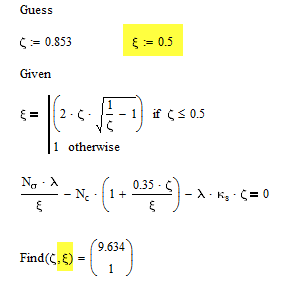
As you are not interested in xi you may also finish the solve block with

As already said, I would rather recommend Freds Solution.
WE
BTW, no need to crosspost -> If statement in a solveblock
Sep 03, 2015
12:40 PM
- Mark as New
- Bookmark
- Subscribe
- Mute
- Subscribe to RSS Feed
- Permalink
- Notify Moderator
Please log in to access translation
Sep 03, 2015
12:40 PM
Here an approach without using xi at all, rearranging the equation and using the conditional statement directly in the equation.

or

Nonetheless, I'd still vote for Fred 😉
WE


