
16-Pearl
September 25, 2023
Question

Creo Parametric Community Challenge 2 - Isogrid on a Curved Surface

  • September 25, 2023
  • 17 replies
  • 19709 views

This month’s challenge is based on a modeling problem I’ve seen throughout my decades in aerospace. An isogrid is a repeating rib structure that adds strength with low additional mass. Although it may appear simple, modeling it in CAD can be difficult, especially when you need to place it on a non-planar surface.
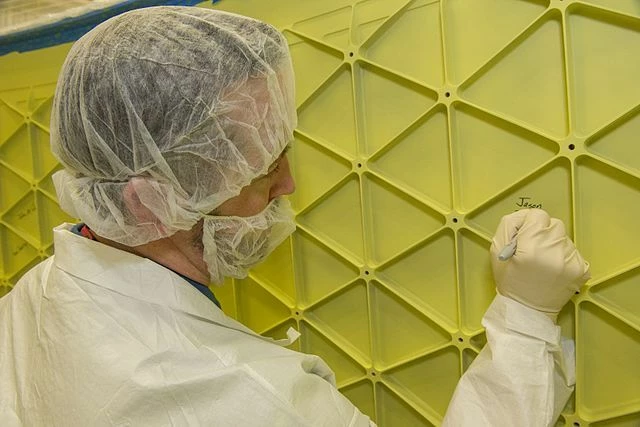
 

DaveMartin_0-1695670569665.jpeg


Public domain image courtesy of NASA and Wikimedia Commons.


Your mission, if you choose to accept it, is as follows:

  • Beginner to intermediate: Model an isogrid on a flat surface.
  • Expert: create an isogrid on a cylindrical, conical, or radome surface. The isogrid can have a size / spacing of your choice and can be placed on the interior or exterior surface. (If placing on the interior, I highly recommend creating a cross section to make it visible.)
  • Optional: add fillets to the interior “vertical” edges.

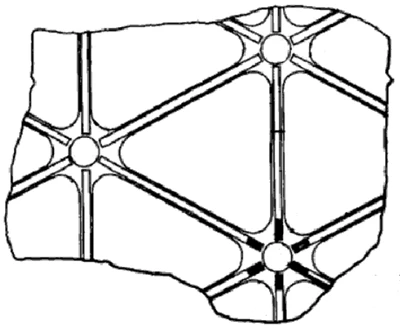
For this challenge, you can choose to ignore the center circular post and hole as depicted in the pictures. You can focus on the vertical sides of the isogrid triangles. (Of course, you can always challenge yourself by including those circular posts and holes.)

How would you do this in Creo Parametric? Would you use a profile rib, trajectory rib, extruded protrusion, extruded cut, datum curves, surfaces, pattern, toroidal bend, or some other feature? (Most likely, it would be a combination of two or more of these.) The sides of the triangles in the isogrid can either be connected or they can be disjointed (as in the image below).

An optional Creo Parametric 2.0 model has been attached with a radome part model as a starting point if you choose to use it. As creating the isogrid all the way to the tip can be challenging to say the least, a suppressed Solidify feature has been included that removes it.
DaveMartin_1-1695670569675.png


Public domain image courtesy of Wikimedia Commons.


Please submit a part or zip file of your submission as a reply to this post and indicate which version of Creo Parametric was used to create it. Also, please include an image in your reply to this post. This challenge will close on Friday, November 6th.

DaveMartin_2-1695670569678.jpeg


Example of a radome on the nose of an aircraft. Image courtesy of Kentaro Iemoto and Wikimedia Commons shared under CC BY-SA 2.0.


Additional examples of isogrids on curved surfaces can be found here and here.


Find the PTC Creo Community Challenge Guidelines here!


17 replies

15-Moonstone
October 17, 2023

I, uh, need to stop this. But I had another idea for the radome and played around some more. This version also has uniform wall thickness, since the walls are made with sweeps. It also gave me some additional control, allowing me to change the pattern as it approached the nose, keeping the triangles from getting too squished together. I'm quite pleased with the pattern; I think it looks lovely. From above, it looks like a flower.


Pettersson_3-1697546055598.png

Pettersson_4-1697546103570.png


Part is made in Creo 9

10-Marble
October 18, 2023

I like your approach, on a varied curvature surface such as the radome it will be difficult to maintain rib length.


However, the means to create the ( physical ) ribs will be a separate challenge.

15-Moonstone
October 23, 2023

I, uh, made two more. Yes, I have a lot of time on my hands at the moment. And it was fun to play around with this challenge. As I kept working I got new ideas!


This first one has horizontal ribs, and then a zigzag curve that gets patterned. The zigzag curve goes up and down between two planes, and by using a table pattern to each time move up the bottom plane each instance, the pattern gets inverted, creating the isogrid pattern. I'm quite satisfied with this solution, and the table pattern means you get a lot of control of exactly how the pattern looks. Each row can be moved individually. It did require a pretty low accuracy setting, and trying to round off the corners made it hugely computationally heavy, so I skipped that part. It does have quite a few geometry checks, but these are all for edges that get cut off by the solidify features, so I don't think they should cause downstream issues. I didn't do any "finishing" work at the tip of this one.


Pettersson_0-1698061319452.png

Pettersson_1-1698061342201.png


The second one is an easier part, since it's a simple cylinder. I read @iDZignit's comments about manufacturability and I wanted to see if I could make one that's easily millable. When I teach Creo, I always caution the students against the temptation to try and make as short a model tree as possible. This time I fell for that temptation myself, and my part consists of one revolve and a pattern of extrude features. The extrudes have a somewhat tricky sketch with some sketch relations that move the triangle up and down as it moves around the cylinder (necessary to keep the rows straight). The result is an isogrid consisting of straight extrudes with planar walls, simple radii and flat bottoms. Of course, that means the wall thickness varies, getting thinner towards the bottom, which might not be ideal, but it should be very simple to manufacture, which was my goal here. Make the triangles smaller in relation to the diameter and the problem should be smaller. Or just add a taper to the extrudes. You could also do the extrudes "up to surface" with an offset and you'd have a bottom that follows the cylinder curvature as well. But I kind of liked the very simple nature of this pattern.


Pettersson_2-1698061828980.png

Pettersson_3-1698061922049.png

Pettersson_4-1698062055184.png


Both parts made in Creo 7.

16-Pearl
October 30, 2023

Everyone, the second Creo challenge will close this Friday, November 3rd. (In my original post, I had accidentally written November 6th.) If you want to participate, please post your solution this week. Thanks!

16-Pearl
November 4, 2023

Thank you to all our participants and people following the challenge. The results blog will be posted in about a week. Stay tuned for the next challenge scheduled to open on November 13th!


1-Visitor
November 17, 2023

Hello fellow engineers! Unfortunately, I have missed this challenge. However, I still would like to share some of my work. This is not an aerospace problem (not a rocket science:) and I am sharing this to simply demonstrate how CREO helped me one day.

I once faced a similar problem with producing a grid, working for plastic roto-moulding facility that produces outdoor furniture. There was a challenging moment with making a tufted couch. I was really amazed how powerful is CREO with patterns. I attach pictures below. 

Simply wanted to share my case and say thanks to CREO team. Great product that allows one to create whatever he or she wants. 

VP_10862166_0-1700214521206.png


VP_10862166_2-1700214575677.jpeg


VP_10862166_4-1700214674096.png


13-Aquamarine
December 6, 2023

Thanks to everyone who participated in the 2nd Creo Community Challenge! Participant badges have been delivered to all who submitted!


Dave's solutions blog is now live on ptc.com: Isogrid on a Curved Surface Solutions


Challenge 03: Isogrids is now live and submissions are open until December 22nd. Give it a try!