1-Visitor
February 20, 2015
Question

Non-symmetric results for symmetric model and load?

  • February 20, 2015
  • 17 replies
  • 24903 views

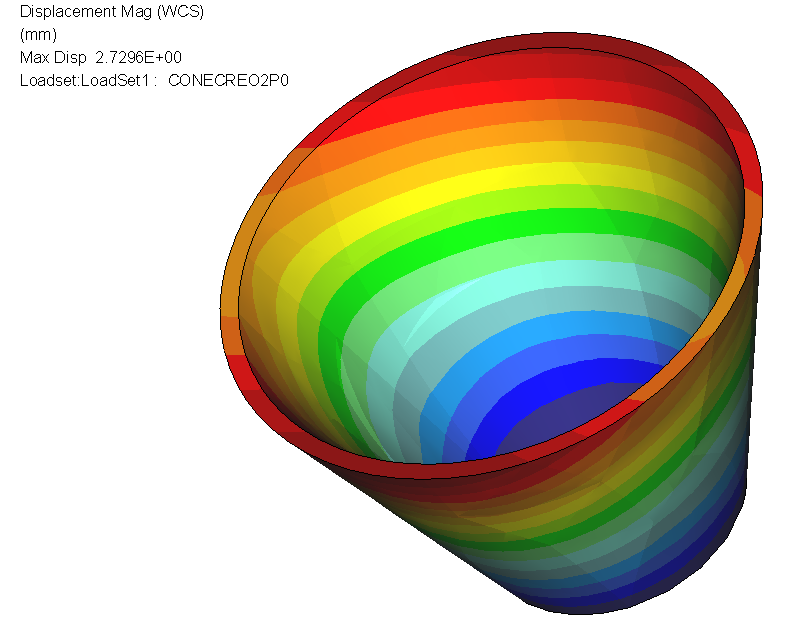
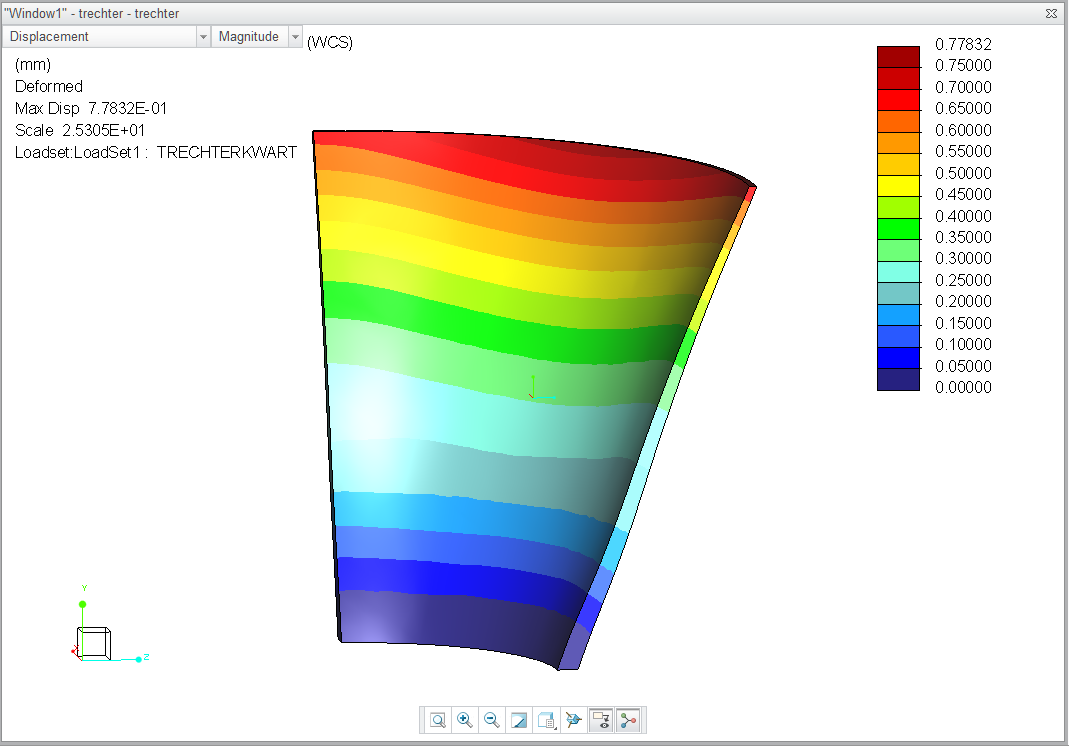
Why is it that displacement for a cone is not rotational symmetric for an internal pressure?

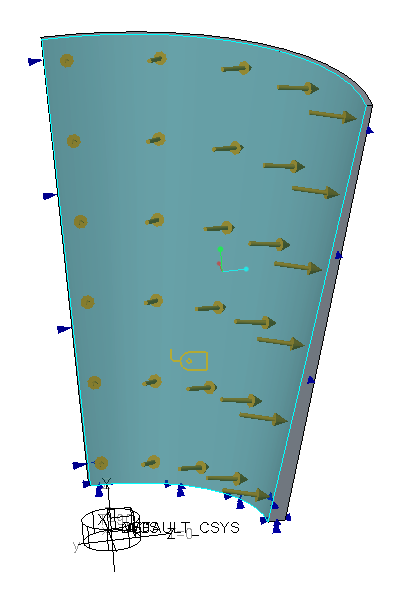
A sample model is attached (Creo 3.0) I've brought it back to the bare minimum. 1/4 cone, symmetry, default mesh etc.

It doesn't help if you refine to enormous amounts of elements, Large deformationm analysis makes it slightly better, but it is never right?


Why is that? it should not happen.

How do we solve this?


Extra: I've added a full 360 degree version in Creo2.0 format
resudisp.PNG


creo2version.PNGsimplecone.PNG

17 replies

1-Visitor
February 23, 2015

I'm not able to open your model as I'm on Creo2, but when creating a similar model i find:

* when constraining the symmetry planes with theta=0 the results look strange

* when constraining the symmetry planes with a carthesian csys the results look okay

Not sure if that is the case in your model, but worth a try?

ehaenen1-VisitorAuthor
1-Visitor
February 23, 2015

Hi Patrick

Thanks for your efforts. There is also a Creo 2.0 model in the attachments. That one is 360 degrees, no use of symmetry BC's, severe non-symmetry in the results though. (see the 360 deg picture). we're studying out-of-roundness for a valve, so this result is thoroughly unacceptable (and totally unexpected). Would appreciate your solution

Erik

1-Visitor
February 23, 2015

Okay disregard my previous message. I was looking at stress, and that looked okay, but displacements were unsymmetric.

The results in your model are unexpected indeed. You should send this to support, they should work with this to improve the software.

A workaround I found is to set the max element size on the pressurised surface to 10mm.

But a simple model like this should not have such bad results using standard settings!

1-Visitor
February 23, 2015

I get symmetric results. I tried both planar constraints on symmetry surfaces, aswell as constraining "theta"-direction in a cylindrical csys. Default mesh + SPA gives a small deviaiton from perfectly symmetric results, mapped mesh (as in the picture) gives perfectly symmetric results.

/Mats L/

See attached model (Creo2)

Capture.JPG

ehaenen1-VisitorAuthor
1-Visitor
February 23, 2015

Hi Mats

Very good of you to join!

your model looks like it shows much better results, however: If I plot radial displacements of the top-edge, I get the following

Mats_unround_200MPa.PNG

It's only .5% unroundnes. But should be zero.

if I alter the diameter of your cone from 200 to half that, the calculated unroundness increases to 2.8%

Mats_unround_200MPa_smaller.PNG

I've attached your model again, with added cylindrical coordinate system and in the smaller diameter.

Please dig further. We need to solve this.

A colleague found the same effect in Wildfire 2.0, so it's been in there for quite some time.

1-Visitor
February 24, 2015

Indeed strange results... File an SPR-report at PTC support... Are there any PTC developers following this forum?

1-Visitor
March 2, 2015

2015-03-02 16_32_00-Simulate Results - PTC Creo Parametric.tiff

I've tested with Creo 3.0 M030 today, and the problem still exists in this version...

13-Aquamarine
March 2, 2015

Does anyone reading this thread have access to Nastran, Ansys or similar to test an equivalent model in a 'traditional' FE code?

Given that this is a numerical solution I'd expect some imperfections, but it seems easy to get results that are significantly wrong!

ehaenen1-VisitorAuthor
1-Visitor
March 2, 2015

I'll try and run my original version in Abaqus tomorrow.

1-Visitor
March 3, 2015

In Abaqus it was perfectly symmetrical, already tried it (and threw away the results after checking).

ehaenen1-VisitorAuthor
1-Visitor
March 3, 2015

Tried it in Abaqus too. Made pictures before I threw away the result.

Made very coarse meshes in both hexa's and tets.

Differences in radial displacement around the circumference were less than 1% for both versions.

ABQCoarsehexmesh.jpg

ABQCoarsettmesh.jpg

Erik

ehaenen1-VisitorAuthor
1-Visitor
March 3, 2015

To keep the followers informed: the SPR has been submitted to PTC customer support almost a week ago (wednesday 25 feb). Today they gave the following status report


This is to notify you that I am still investigating your case C12421022. I will keep you informed of my progress.


I find their response disappointingly slow.

Erik

1-Visitor
March 4, 2015

Dear Steven,

Could you provide you're test model, because I cannot explain why you seem to get good results while we all get bad ones...

1-Visitor
March 4, 2015

Agnes, here is a file I created for Creo2. Mapped mesh with small deviation in displacement. Still, there is a small deviation where there shouldn't be any. The displacement is smaller where the planar constraints are located. Do the constraints add stiffness somehow?

Capture.JPG

/Mats L/

1-Visitor
March 4, 2015

Hi Mats,

I have ran you're model last week increasing the convergence criteria and geometric tolerance in Creo 2 and in Creo 3 m030. It showed the same (small) deviation in symmetry.

Indeed, the constraints seem to be the problem. And in de 360 model it seems to be the way Creo always cuts cylinders in half when selecting. The stiffness in the 360 model is at the location between the half's.

I hope PTC support comes with an explanation/solution. (I am working with Erik Haenen on this case).

1-Visitor
March 11, 2015

Hi all,

PTC has finally acknowledged this is a fault in the software. It is registered under SPR 2258467 in the knowledgebase.

Hopefully it will be fixed in the next datecode!

Regards,

Agnes

1-Visitor
March 11, 2015

 I see its not in the knowledge base, you can only find it with the 'spr tracker' (if you have access to it, I'm not sure if all customers or only resellers can get there).


Description is; 'Unsymmetrical results for a rotational symmetric cone model and load'


To answer your last question; NO, as many people have demonstrated in this discussion, (very small) mapped mesh and all kinds of symmetry constraints do make the problem smaller (for some but not all geometry), but the root of the problem cannot be solved with those variables.

ehaenen1-VisitorAuthor
1-Visitor
March 11, 2015

Well done Agnes

Anxious to find out what PTC will report on SPR 2258467. It should not have been possible. Everybody runs the majority of analyses with a default mesh and SPA. This should give decent results, especially in displacements. It is the basis of Creo Simulate that you should not worry about meshing. There is no such thing as a margin of safety in this case. we are investigating out-of-roundness for valves, PTC's answer can not be trusted now. (that's a period I just typed)

We'll wait (hopefully only very short)

Erik

1-Visitor
June 8, 2015

Hi All,

PTC has promised a solution to this problem in Creo 2.0 M170, which should be available on Juli 14th.

Also the SPR number has been updated (they have changed their system). You can now also find it with the new number: 2873817

SPR2873817 / 2258467
StatusOpen
SeverityHigh
Created Date 11-MAR-2015
DescriptionUnsymmetrical results for a rotational symmetric cone model and load
Affected PlatformAll


Reported ProductCreo Simulate
ModuleCreo Simulate
Reported ReleaseCreo 2.0
Reported DatecodeM130
Resolution Status
ReleaseStatusDatecode
Creo 2.0PlannedM170
Creo 3.0Evaluating-
Creo 4.0Evaluating-


1-Visitor
July 1, 2015

I checked again the SPR today. No new information yet.

1-Visitor
February 5, 2016

I just ran into this same problem using Creo 3.0 M070.  I looked up the SPR and looks like it hasn't been updated.  Disappointing.