
Turn on suggestions
Auto-suggest helps you quickly narrow down your search results by suggesting possible matches as you type.
Showing results for
Please log in to access translation
Turn on suggestions
Auto-suggest helps you quickly narrow down your search results by suggesting possible matches as you type.
Showing results for
Community Tip - Did you get an answer that solved your problem? Please mark it as an Accepted Solution so others with the same problem can find the answer easily. X
- Community
- Creo+ and Creo Parametric
- 3D Part & Assembly Design
- Apply Drawing Update 2202279
Translate the entire conversation x
Please log in to access translation
Options
- Subscribe to RSS Feed
- Mark Topic as New
- Mark Topic as Read
- Float this Topic for Current User
- Bookmark
- Subscribe
- Mute
- Printer Friendly Page
Apply Drawing Update 2202279


Mar 29, 2016
11:13 AM
- Mark as New
- Bookmark
- Subscribe
- Mute
- Subscribe to RSS Feed
- Permalink
- Notify Moderator
Please log in to access translation
Mar 29, 2016
11:13 AM
Apply Drawing Update 2202279
Trying to figure out the new Text Note Feature Control Frame. For legacy drawings PTC suggests applying drawing update 2202279. PTC neglects to tell you how to do this. Does anyone know?
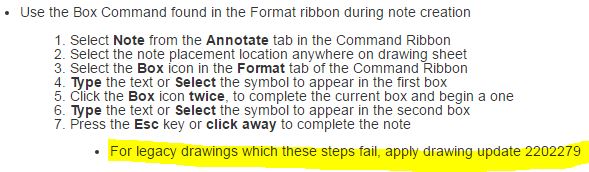
This thread is inactive and closed by the PTC Community Management Team. If you would like to provide a reply and re-open this thread, please notify the moderator and reference the thread. You may also use "Start a topic" button to ask a new question. Please be sure to include what version of the PTC product you are using so another community member knowledgeable about your version may be able to assist.
Labels:
- Labels:
-
General
3 REPLIES 3


Mar 29, 2016
11:19 AM
- Mark as New
- Bookmark
- Subscribe
- Mute
- Subscribe to RSS Feed
- Permalink
- Notify Moderator
Please log in to access translation
Mar 29, 2016
01:16 PM
- Mark as New
- Bookmark
- Subscribe
- Mute
- Subscribe to RSS Feed
- Permalink
- Notify Moderator
Please log in to access translation
Mar 29, 2016
01:16 PM
Thank you, I found this information specifically for 2202279 which fixes the following Text Note GD&T:
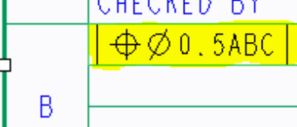
1. Open the drawing in Creo
a. Select File>Prepare>Drawing Properties
b. Under Detail Options, select change
i. In the Option field, enter update_drawing
ii. In the Value field, enter 2202279
c. Select Add/Change>Apply>Close
d. Close the Properties Window
2. In the Review tab of the drawing
a. Select Update Sheets


Mar 29, 2016
01:21 PM
- Mark as New
- Bookmark
- Subscribe
- Mute
- Subscribe to RSS Feed
- Permalink
- Notify Moderator
Please log in to access translation
Mar 29, 2016
01:21 PM
Thanks for spelling that out for us, Don.


