
Turn on suggestions
Auto-suggest helps you quickly narrow down your search results by suggesting possible matches as you type.
Showing results for
Please log in to access translation
Turn on suggestions
Auto-suggest helps you quickly narrow down your search results by suggesting possible matches as you type.
Showing results for
Community Tip - Visit the PTCooler (the community lounge) to get to know your fellow community members and check out some of Dale's Friday Humor posts! X
- Community
- Creo+ and Creo Parametric
- 3D Part & Assembly Design
- Creo 2.0 Surface Finish Symbols
Translate the entire conversation x
Please log in to access translation
Options
- Subscribe to RSS Feed
- Mark Topic as New
- Mark Topic as Read
- Float this Topic for Current User
- Bookmark
- Subscribe
- Mute
- Printer Friendly Page
Creo 2.0 Surface Finish Symbols

Sep 11, 2013
09:06 AM
- Mark as New
- Bookmark
- Subscribe
- Mute
- Subscribe to RSS Feed
- Permalink
- Notify Moderator
Please log in to access translation
Sep 11, 2013
09:06 AM
Creo 2.0 Surface Finish Symbols
Where can I find a surface finish symbol like this? 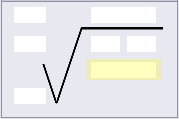
Solved! Go to Solution.
Labels:
- Labels:
-
Surfacing
ACCEPTED SOLUTION
Accepted Solutions


Sep 11, 2013
01:37 PM
- Mark as New
- Bookmark
- Subscribe
- Mute
- Subscribe to RSS Feed
- Permalink
- Notify Moderator
Please log in to access translation
Sep 11, 2013
01:37 PM
On the annotations menu there is a button for surface finish. This has a few basic options for surface finish symbols.
Here is a link containing a good information on using surface finish symbols. http://communities.ptc.com/docs/DOC-3774
1 REPLY 1
Sep 11, 2013
01:37 PM
- Mark as New
- Bookmark
- Subscribe
- Mute
- Subscribe to RSS Feed
- Permalink
- Notify Moderator
Please log in to access translation
Sep 11, 2013
01:37 PM
On the annotations menu there is a button for surface finish. This has a few basic options for surface finish symbols.
Here is a link containing a good information on using surface finish symbols. http://communities.ptc.com/docs/DOC-3774


