Turn on suggestions
Auto-suggest helps you quickly narrow down your search results by suggesting possible matches as you type.
Showing results for
Please log in to access translation
Turn on suggestions
Auto-suggest helps you quickly narrow down your search results by suggesting possible matches as you type.
Showing results for
Community Tip - Need to share some code when posting a question or reply? Make sure to use the "Insert code sample" menu option. Learn more! X
- Community
- Creo+ and Creo Parametric
- 3D Part & Assembly Design
- .DRW not updating when TABLE changed in .FRM
Translate the entire conversation x
Please log in to access translation
Options
- Subscribe to RSS Feed
- Mark Topic as New
- Mark Topic as Read
- Float this Topic for Current User
- Bookmark
- Subscribe
- Mute
- Printer Friendly Page
.DRW not updating when TABLE changed in .FRM


Jan 14, 2026
01:57 PM
- Mark as New
- Bookmark
- Subscribe
- Mute
- Subscribe to RSS Feed
- Permalink
- Notify Moderator
Please log in to access translation
Jan 14, 2026
01:57 PM
.DRW not updating when TABLE changed in .FRM
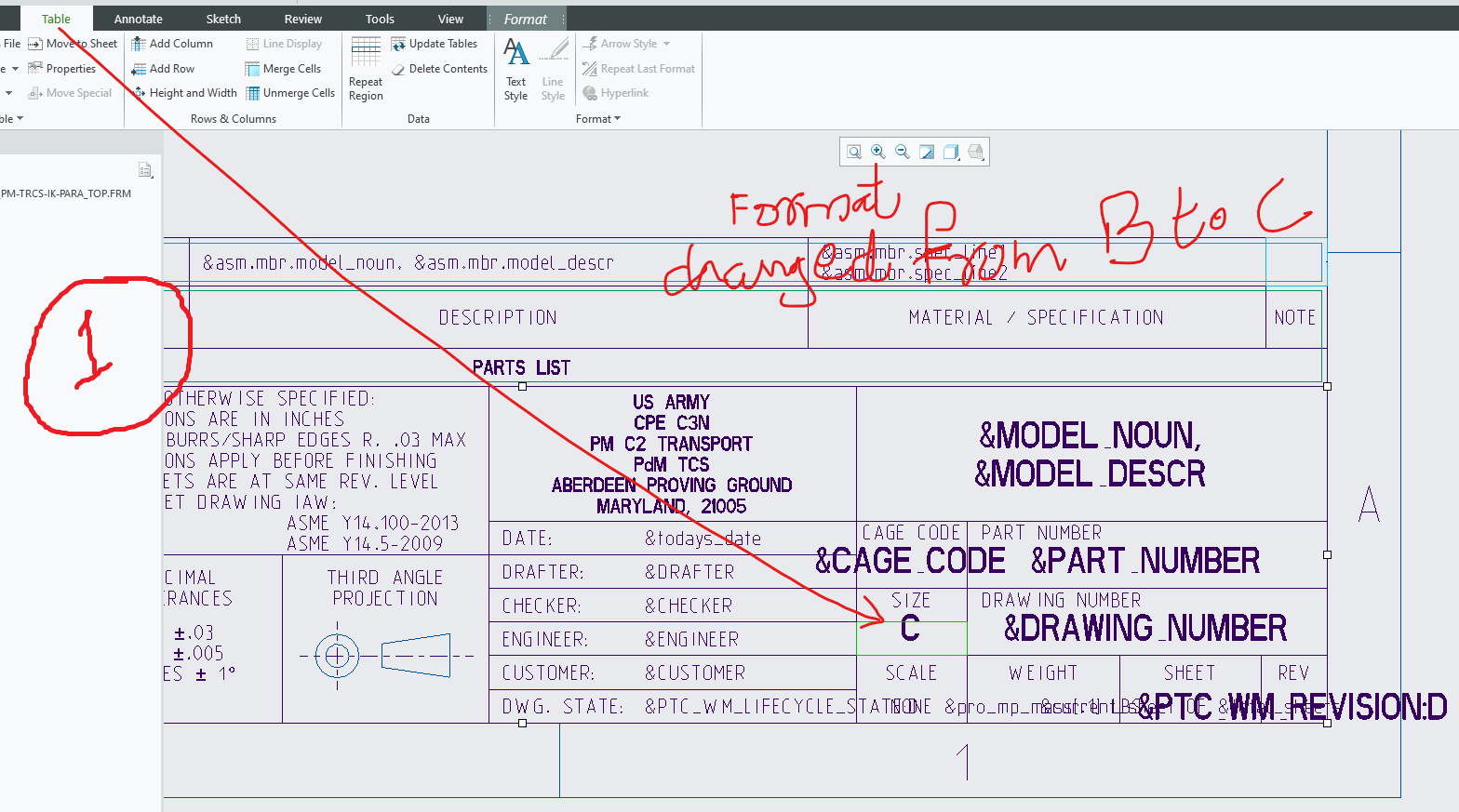
The table in .drw is not updating if I change .frm save and reload. Somrthing in .drw is not updating to see latest format file.
SEE IMAGE of .frm and .drw
Change in .frm [B TO C]
Upadte in .drw still show B
Labels:
- Labels:
-
2D Drawing
3 REPLIES 3


Jan 14, 2026
02:37 PM
- Mark as New
- Bookmark
- Subscribe
- Mute
- Subscribe to RSS Feed
- Permalink
- Notify Moderator
Please log in to access translation
Jan 14, 2026
02:37 PM
Remove the old format file from your workspace and clear it from memory.
Try creating a new drawing and see if the proper C format is utilized.
Is the drawing size hard coded "B" or 'C' or is it using the &format parameter?
Jan 15, 2026
09:28 AM
- Mark as New
- Bookmark
- Subscribe
- Mute
- Subscribe to RSS Feed
- Permalink
- Notify Moderator
Please log in to access translation
Jan 15, 2026
09:28 AM
Update in .frm TABLE does not update in .drw TABLE (SAME CELL). Nothing to do with B or C format size.
In another words,
Once captured table cell input from .frm by .drw NEVER CHANGES even the input in table cell of .frm is deleted/changed.


Jan 15, 2026
06:09 AM
- Mark as New
- Bookmark
- Subscribe
- Mute
- Subscribe to RSS Feed
- Permalink
- Notify Moderator
Please log in to access translation
Jan 15, 2026
06:09 AM
Hi,
you described standard Creo functionality.
When you create new drawing using .frm, Creo copies tables from .frm to .drw. These copied tables are independent on tables defined in .frm.
Suggestion:
- remove current format from drawing ... apply simple frame available OOTB
- do not forget to remove all tables when you are asked
- set new format
Martin Hanák