
Turn on suggestions
Auto-suggest helps you quickly narrow down your search results by suggesting possible matches as you type.
Showing results for
Please log in to access translation
Turn on suggestions
Auto-suggest helps you quickly narrow down your search results by suggesting possible matches as you type.
Showing results for
Community Tip - Need to share some code when posting a question or reply? Make sure to use the "Insert code sample" menu option. Learn more! X
- Community
- Creo+ and Creo Parametric
- 3D Part & Assembly Design
- Re: Exclude one item from the Repeat Region Table
Translate the entire conversation x
Please log in to access translation
Options
- Subscribe to RSS Feed
- Mark Topic as New
- Mark Topic as Read
- Float this Topic for Current User
- Bookmark
- Subscribe
- Mute
- Printer Friendly Page
Exclude one item from the Repeat Region Table


Jan 14, 2019
11:42 AM
- Mark as New
- Bookmark
- Subscribe
- Mute
- Subscribe to RSS Feed
- Permalink
- Notify Moderator
Please log in to access translation
Jan 14, 2019
11:42 AM
Exclude one item from the Repeat Region Table
Hi,
I need help with understanding, how to exclude one item from my Repeat Region Table/
I have hidden one part from my assembly in every view, which is okay.
But my autogenerated BOM table still have all parts.
How to change it to exclude unwanted items and get new numbering within this table?
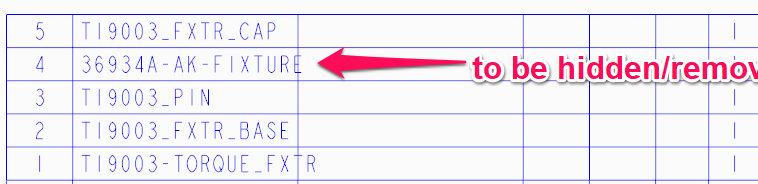
Thank you,
Arek
Creo 3 user
Solved! Go to Solution.
Labels:
- Labels:
-
2D Drawing
ACCEPTED SOLUTION
Accepted Solutions


Jan 14, 2019
11:49 AM
- Mark as New
- Bookmark
- Subscribe
- Mute
- Subscribe to RSS Feed
- Permalink
- Notify Moderator
Please log in to access translation
Jan 14, 2019
11:49 AM
Table Tab:
Repeat Region --> Filters (select the table) --> By Item (select the row(s) to hide) --> Ok --> Done -->Done -->Done.
2 REPLIES 2
Jan 14, 2019
11:49 AM
- Mark as New
- Bookmark
- Subscribe
- Mute
- Subscribe to RSS Feed
- Permalink
- Notify Moderator
Please log in to access translation
Jan 14, 2019
11:49 AM
Table Tab:
Repeat Region --> Filters (select the table) --> By Item (select the row(s) to hide) --> Ok --> Done -->Done -->Done.

Jan 14, 2019
11:50 AM
- Mark as New
- Bookmark
- Subscribe
- Mute
- Subscribe to RSS Feed
- Permalink
- Notify Moderator
Please log in to access translation
Jan 14, 2019
11:50 AM
Table - Repeat Region - Filter - (choose bom table) - By Item - Exclude and you can choose the line you want to exclude.


