

Question
Find dimension and it's symbolic name in Assembly mode?
I'm trying to look for the symbolic name of this distance.
I need to find the symbolic name because I will be using it in Pro/Program.
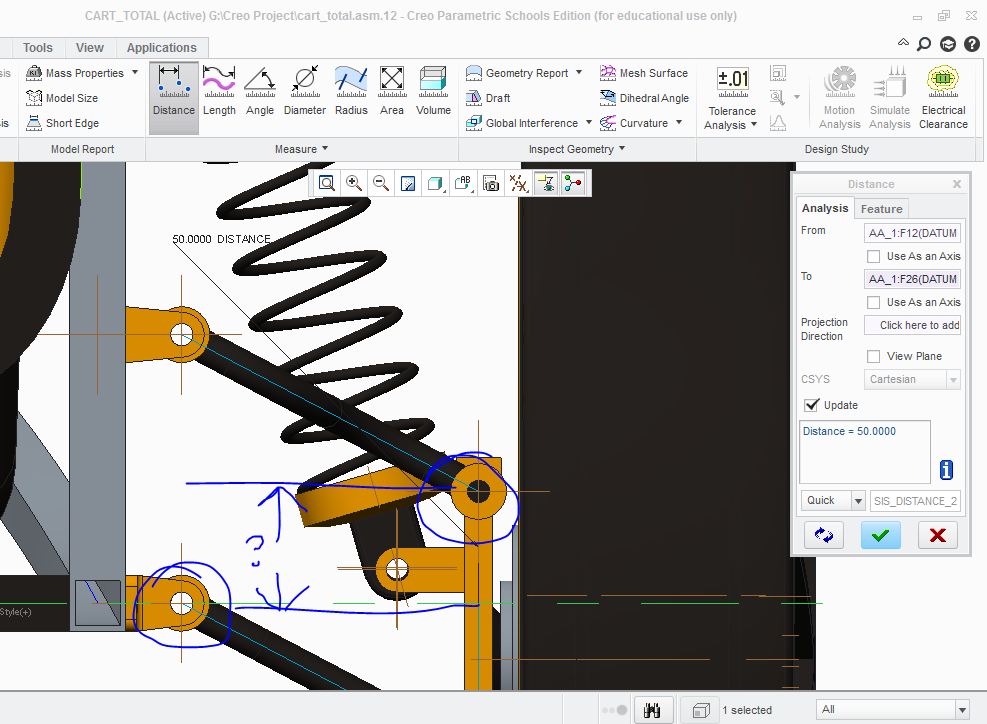
As you can see, I used an extended axis to find the distance between those two points. If this method of finding out the dimension is wrong, then please inform me.
Otherwise, how do I find the symbolic name for that distance in Assembly mode?
I've tried using the sketch mode, but that did not go well with Pro/Program as nothing changed when I inserted a specific value.
And the book I am following refers to a "skeleton curve", any ideas?
Any help is appreciated!
Thank you!
This thread is inactive and closed by the PTC Community Management Team. If you would like to provide a reply and re-open this thread, please notify the moderator and reference the thread. You may also use "Start a topic" button to ask a new question. Please be sure to include what version of the PTC product you are using so another community member knowledgeable about your version may be able to assist.