
Turn on suggestions
Auto-suggest helps you quickly narrow down your search results by suggesting possible matches as you type.
Showing results for
Please log in to access translation
Turn on suggestions
Auto-suggest helps you quickly narrow down your search results by suggesting possible matches as you type.
Showing results for
Community Tip - Your Friends List is a way to easily have access to the community members that you interact with the most! X
- Community
- Creo+ and Creo Parametric
- 3D Part & Assembly Design
- Re: Hide coordinate system in Creo View
Translate the entire conversation x
Please log in to access translation
Options
- Subscribe to RSS Feed
- Mark Topic as New
- Mark Topic as Read
- Float this Topic for Current User
- Bookmark
- Subscribe
- Mute
- Printer Friendly Page
Hide coordinate system in Creo View


Apr 08, 2020
04:13 AM
- Mark as New
- Bookmark
- Subscribe
- Mute
- Subscribe to RSS Feed
- Permalink
- Notify Moderator
Please log in to access translation
Apr 08, 2020
04:13 AM
Hide coordinate system in Creo View
Hi forum,
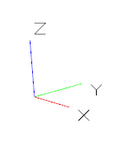
how can I hide the X/Y/Z coordinate system that appears bottom left, when viewing a part/assembly?
Labels:
- Labels:
-
Surfacing
2 REPLIES 2
May 03, 2021
10:35 AM
- Mark as New
- Bookmark
- Subscribe
- Mute
- Subscribe to RSS Feed
- Permalink
- Notify Moderator
Please log in to access translation
May 03, 2021
10:35 AM
I give this a friendly *bump*
Any way to hide the coordinate system axes?


May 03, 2021
10:56 AM
- Mark as New
- Bookmark
- Subscribe
- Mute
- Subscribe to RSS Feed
- Permalink
- Notify Moderator
Please log in to access translation
May 03, 2021
10:56 AM
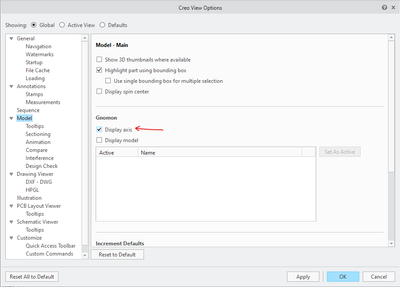
Under the options for Creo View, uncheck Display Axis in the Model group.
There is always more to learn in Creo.


