1-Visitor
October 29, 2015
Solved

Making complex hole patterns

  • October 29, 2015
  • 5 replies
  • 7837 views

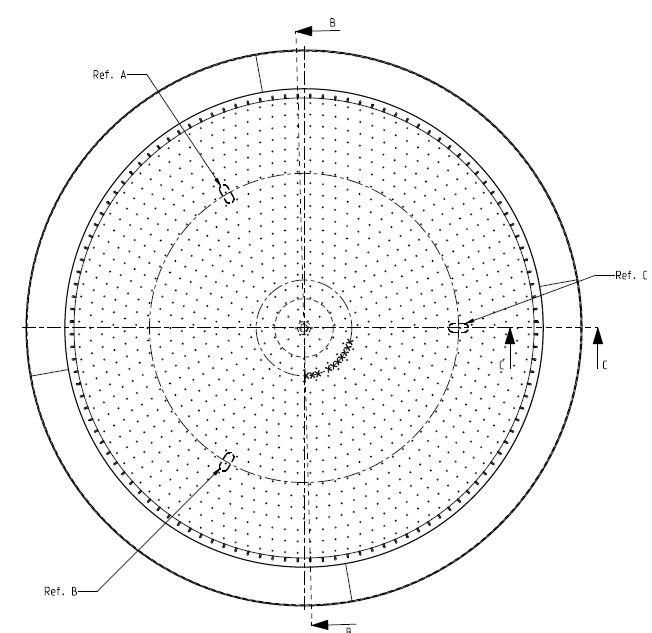
For several customer we need to make complex hole patterns on a concave surface.

If we can use the fill feature we do, this save a hole lot of time.

But in some cases (al lot) we can't use the fill pattern, then this work is very time consuming and Creo will become a bottleneck.

I'm really looking for some help or ideas.

Below a hole pattern and picture for example.

X-start dimensionY-start dimensionQuantity of holes
2.54.336
3.7811.6310
4.0419.0315
3.9826.3821
3.9433.6727
4.0340.9332
3.9948.1938
3.9755.4344
4.0262.6749
469.9155
3.9877.1561
4.0284.3866
491.6172
3.9898.8578
4.02106.0783
4113.389
3.99120.5395
4.02127.76100
4134.99106
3.99142.22112

Capture.JPG


This thread is inactive and closed by the PTC Community Management Team. If you would like to provide a reply and re-open this thread, please notify the moderator and reference the thread. You may also use "Start a topic" button to ask a new question. Please be sure to include what version of the PTC product you are using so another community member knowledgeable about your version may be able to assist.
Best answer by MartinHanak

Peter,

I created "some" files in Excel 2010 and CR2 M070 .

1.) table_pattern.xlsm

  • using x and y values related to the 1st hole I was able to compute circle radius r (column D) and angle a related to the 1st hole (column E)
  • using macro generate_coordinates I was able to generate radius r and angle a of all holes (the very first hole is pattern leader, its dimensions are not included in table)

Sub generate_coordinates()
'
' generate_coordinates Makro
'

'
Dim i, j, k As Integer

Dim q As Integer
Dim r As Double
Dim a As Double

k = 2

For i = 1 To 20
q = Range("C" & Mid(Str(i + 1), 2)).Value
r = Range("D" & Mid(Str(i + 1), 2)).Value
a = Range("E" & Mid(Str(i + 1), 2)).Value

For j = 1 To q
Range("H" & Mid(Str(k), 2)).Value = k - 2
Range("I" & Mid(Str(k), 2)).Value = r
Range("J" & Mid(Str(k), 2)).Value = a
a = a + 360 / q
If a > 360 Then
a = a - 360
End If
k = k + 1
Next j

Next i

End Sub

  • I copied generated output to table3.txt and replaced a) comma characters with decimal point b) tabs with spaces
  • I copied modified contents of table3.txt to table3.ptb

2.) table_pattern.prt

  • I used table3.ptb as driving table of pattern

MH

5 replies

1-Visitor
October 29, 2015

have you tried creating a sketch using those position as geometry points and then pattern the holes as points? You lose the tables but now points can be controlled my relations if you want to get it more automated.

1-Visitor
October 30, 2015

Hi Son,

I like your answer but i 'm sorry to say that i have no clue how to perform this action.

I never worked that way.

1-Visitor
October 30, 2015

What rules are driving the spacing and quantities?

1-Visitor
October 30, 2015

Hi David,

The rules are as the table aboved is.

that's all i get from my customers, and i can't change a single thing.

i normally make the first hole with the hole feature.

and then with table pattern i make the rest of the holes.

Then with geometry pattern i rotated the individual hole around the Z-axis.

After +/- 10 pcd's Creo gets very slow.

1-Visitor
October 30, 2015

Change the pattern type to Identical (whatever the name is now). The default General type allows for pattern members to intersect each other, so each member check on all previous members for possible intersection. Slows things to a crawl.

Not sure what a pcd is.

What is the purpose of modeling the holes? A CNC macro would work better to produce the holes.

1-Visitor
October 30, 2015

You say that sometimes you are able to pattern the holes, have you figures out what determines success and failure of the pattern? I would look to figure out why sometimes it works and sometimes it doesn't before you try to come up with a preferred method.

Maybe relative accuracy?

1-Visitor
October 30, 2015

Hi Dan,

The only time the fill pattern works if the spacing is equal, and the amount of holes is the same.

This happens 1 in the 25 times.

See my reply to David for more info

17-Peridot
October 30, 2015

Do a search for "golf ball" and review a few of the links.

Those discussions my provide some insight.

1-Visitor
October 30, 2015

Peter,

Have you tried working with surfaces?   (Many times I have seen Creo get bogged down with "solid feature" patterns.)  

This will likely cause you to have many "merge" features in your tree,  but in the end you may end up with a part that regenerates much faster. 

Here is how I would go about it...

-Start with your solid plate as you normally would.

-Copy the top surface of the plate (to create a surface)

-Extrude your first hole as a surface cylinder

      - not a solid hole, and not a Hole Feature

      - make your extrude long enough that it protrudes through both sides of the material thickness

-Pattern the Extruded surface cylinder

-Merge all of the surface cylinders to the top surface that you copied earlier

-Use a "Solidify Cut" feature to cut out all the holes at one time.

Not sure if its gonna cure your problem, but it might be worth a try.

Good Luck

Bernie

Bernie Gruman

Owner / Designer / Builder

www.GrumanCreations.com

24-Ruby III
October 30, 2015

Peter,

I created "some" files in Excel 2010 and CR2 M070 .

1.) table_pattern.xlsm

  • using x and y values related to the 1st hole I was able to compute circle radius r (column D) and angle a related to the 1st hole (column E)
  • using macro generate_coordinates I was able to generate radius r and angle a of all holes (the very first hole is pattern leader, its dimensions are not included in table)

Sub generate_coordinates()
'
' generate_coordinates Makro
'

'
Dim i, j, k As Integer

Dim q As Integer
Dim r As Double
Dim a As Double

k = 2

For i = 1 To 20
q = Range("C" & Mid(Str(i + 1), 2)).Value
r = Range("D" & Mid(Str(i + 1), 2)).Value
a = Range("E" & Mid(Str(i + 1), 2)).Value

For j = 1 To q
Range("H" & Mid(Str(k), 2)).Value = k - 2
Range("I" & Mid(Str(k), 2)).Value = r
Range("J" & Mid(Str(k), 2)).Value = a
a = a + 360 / q
If a > 360 Then
a = a - 360
End If
k = k + 1
Next j

Next i

End Sub

  • I copied generated output to table3.txt and replaced a) comma characters with decimal point b) tabs with spaces
  • I copied modified contents of table3.txt to table3.ptb

2.) table_pattern.prt

  • I used table3.ptb as driving table of pattern

MH

1-Visitor
November 3, 2015

Hi Martin,

Thanks for your great idea.

This saves us a lot of time.

Greetings Peter