1-Visitor
November 10, 2021
Solved

Measuring vector components of distance in Creo

  • November 10, 2021
  • 3 replies
  • 7189 views

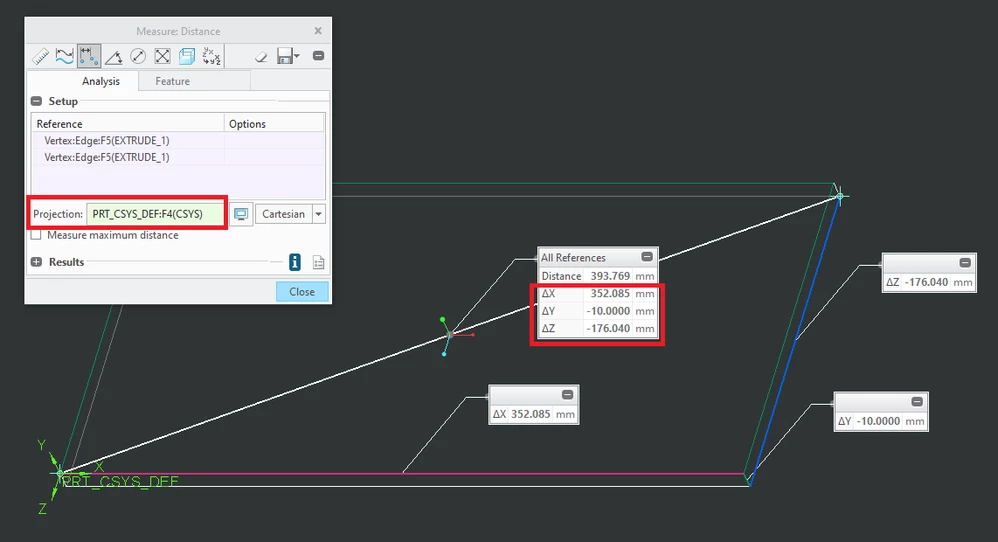
I know how to measure the distance between two entities in Creo, but I would like to know the vector components: dx, dy, and dz. 


Can Creo do this?


Thanks.

Best answer by MartinHanak

deltas.png

3 replies

KenFarley
21-Topaz II
November 11, 2021

I know of no direct way to do this. Kind of annoying because we know Creo has the numbers, since the distance reported is definitely a vector length from point to point.

Two ways I've done the measurement:

(1) Build the x=0, y=0, z=0 planes. Take measurements from each plane to the point of interest.

(2) Create a point at the "from" and "to" positions, write them to a file, calculate the vector components myself.


There are likely other ways to get the numbers, just nothing straightforward that I know of. If there is a more direct way, I hope someone will enlighten me.

1-Visitor
November 11, 2021
Thanks for your reply and detailing a methodology.
I have been using NX and am new to Creo. NX does a much better job of providing vectors for distances and normal, and low-level information about objects.
Thanks,
Paul
24-Ruby III
November 11, 2021

deltas.png

1-Visitor
November 11, 2021

Martin, thanks for your reply.


Paul

tbraxton
22-Sapphire II
22-Sapphire II
November 11, 2021

Yes Creo can do this. I have created a mapkey to streamline the process that was posted by @MartinHanak .


This is an older post that is locked but it explains how to set it up.


https://community.ptc.com/t5/System-Administration/Incremental-delta-x-y-z-measure-tool-in-Creo-2-0-implemented/m-p/433095#M6493 


Below is a video demonstrating how it works.


1-Visitor
November 11, 2021
Thank you for that.

Paul