3-Newcomer
August 1, 2024
Solved

Parameters for individual Parts when multiple are used in the same drawing

  • August 1, 2024
  • 1 reply
  • 2593 views

So I have multiple models in a single drawing, if I just select "&view_scale" it pulls the parameter from I'm not certain.  But IIRC there is a way to select the ID number for the individual component and pull up what that parameter is.


I want to say I used this successfully many years back in a large assembly and/or family table.  Any help would be greatly appreciated.   Please see the image for reference.

Best answer by mkajdan

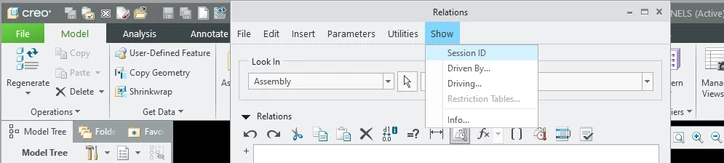
These images are with the assembly open.
 

mkajdan_0-1722543660264.png


mkajdan_1-1722543698376.png


mkajdan_2-1722543730759.png


1 reply

kdirth
21-Topaz I
21-Topaz I
August 1, 2024

If you set the scale in the view properties and not follow the sheet scale, even if the same. Creo will create the note for the view.

kdirth_0-1722537249981.png


There is always more to learn.
3-Newcomer
August 1, 2024

Example_of_what_I_mean.png

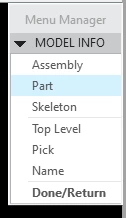
Ok look here how this individual knows that the item they want to show the parameter for is "8."  Where is the tool that you use to deduce that?  I believe I remember a drop down and a selection tool.  Where I would click on a particular component in an assembly.  Alternatively I can just guess until I am right - but still, I'd like to remember how to locate this tool I am describing.

mkajdan14-AlexandriteAnswer
14-Alexandrite
August 1, 2024

These images are with the assembly open.
 

mkajdan_0-1722543660264.png


mkajdan_1-1722543698376.png


mkajdan_2-1722543730759.png