1-Visitor
August 29, 2014
Question

Creo Illustrate 2.0 - Annotations button

  • August 29, 2014
  • 2 replies
  • 5781 views

Hello

Some days ago I started working with Creo Illustrate 2.0 M040 and from first moment after installation my Annotations button is unactivated.

Does anybody know what might be the reason?
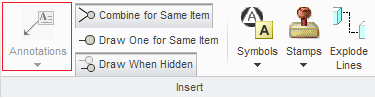
Creo_Illustrate_Issue.PNG

2 replies

1-Visitor
September 5, 2014

Wojciech,

It sounds like your callouts template file might have become corrupted. I suggest you delete (or move) your CalloutTemplates.xml file and restart Creo Illustrate to regenerate a new template.

Your CalloutTemplates.xml can be found in:

%APPDATA%\PTC\Illustrate

1-Visitor
September 5, 2014

Hi Tim

I removed the CalloutTemplates.xml file, but after restart Creo Illustrate, the Annotations button still remains inactive.

1-Visitor
September 5, 2014

Wojciech,

My last suggestion would be to remove all of your Illustrate preferences to see if this solves the problem:

  • Close Creo Illustrate
  • Navigate to %APPDATA%\PTC
  • Rename Illustrate to Illustrate_OLD
  • Start Creo Illustrate

If this does not solve the problem I suggest you contact PTC Tech Support.

Regards

1-Visitor
December 10, 2014

Hello for everyone

The problem was related with the license.

With the new license this problem does not appear.
