
Turn on suggestions
Auto-suggest helps you quickly narrow down your search results by suggesting possible matches as you type.
Showing results for
Please log in to access translation
Turn on suggestions
Auto-suggest helps you quickly narrow down your search results by suggesting possible matches as you type.
Showing results for
Community Tip - Want the oppurtunity to discuss enhancements to PTC products? Join a working group! X
- Community
- Creo+ and Creo Parametric
- Creo Parametric Tips
- Easy Material Assignment
Please log in to access translation
Options
- Subscribe to RSS Feed
- Mark as New
- Mark as Read
- Bookmark
- Subscribe
- Printer Friendly Page
- Notify Moderator
Easy Material Assignment
No ratings
Please log in to access translation
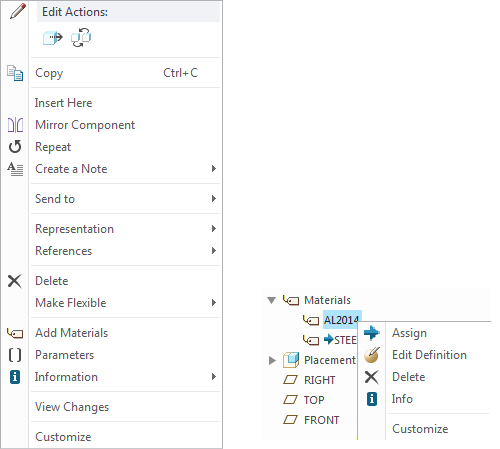
You can now assign material directly from the Model Tree or graphics area, by selecting the component and using the Right Mouse Button (RMB) menu and clicking Add Material.
If the Materials node is already visible in the Model Tree, you can also activate the RMB menu from any of the available materials to edit or assign.
Check the below images and video.
Comments

Jun 16, 2016
06:23 PM
- Mark as Read
- Mark as New
- Bookmark
- Permalink
- Notify Moderator
Please log in to access translation
Jun 16, 2016
06:23 PM
One of the presentations talked about 100 new material files that will be available in Creo 4.0. Are those available in the Sneak Peek?

Jun 17, 2016
07:37 AM
- Mark as Read
- Mark as New
- Bookmark
- Permalink
- Notify Moderator
Please log in to access translation
Jun 17, 2016
07:37 AM
Hey Adam,
The new standard material files are not yet in the system and thus not available in SneakPeek. We are finalizing the specific materials with our partner and will include these in the production release later in the year. If you have specific questions about them, you can always email me at -.
Regards,
Mark

Jun 17, 2016
09:40 PM
- Mark as Read
- Mark as New
- Bookmark
- Permalink
- Notify Moderator
Please log in to access translation
Jun 17, 2016
09:40 PM
what version of CREO do you need to do the add Materail?

