

Question
Simple button in Creo Session
I create a simple button in a creo session using Jlink.
public static void start() throws Exception {
displaymessage("Started");
try {
session = pfcGlobal.GetProESession();
UICommand cmd = session.UICreateCommand("JLHW Btn1_cmd",new MenuButtonListener());
session.UIAddButton(cmd,"File", null, "JLHW Btn1 Label", "JLHW Btn1 Help", "msg_jlinkhelloworld.txt");
}
catch (jxthrowable x) {
x.printStackTrace();
}
}
It working Sucessfully.
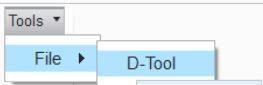
But i want it in a single click.Now i click tools and file and D-tool.I don't wish to do this.I want it in a single button .Please help me to solve my problem.