
cancel
Showing results for 
Search instead for 
Did you mean: 
cancel
Showing results for 
Search instead for 
Did you mean: 

ThingWorx Navigate is now Windchill Navigate Learn More

Translate the entire conversation x

Tag Structure in OPC UA vs OPC DA

FZ_14441100
2-Explorer

Tag Structure in OPC UA vs OPC DA

I am developing an application using OPC DA, but my client wants us to upgrade to OPC UA. The problem is that when the HMI reads the tag structure, it is different. With OPC DA my structure uses dots (.) to separate the path, and in OPC UA it uses backslashes (\) to separate the path. This has never happened to me before. Could you help me?
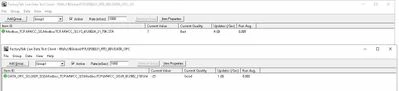
Screenshot 2025-12-22 153041.jpg

1 REPLY 1

Hi @FZ_14441100 ,


OPC DA and OPC UA expose tag paths differently by design. OPC DA uses a flat, string-based ItemID, so dots are commonly used as path separators. OPC UA, on the other hand, exposes a hierarchical address space, and many UA clients render that hierarchy using backslashes to represent folders and nodes. Kepware is publishing the same underlying tags, but the UA client is showing the native UA node structure instead of a DA-style ItemID..


There is no setting to force OPC UA to match OPC DA exactly. The correct approach is to update the HMI or client mapping to use the UA browse path or NodeId, or rely on UA browsing rather than hardcoded strings. Once adjusted, functionality remains identical; only the visual path format changes.


Thanks,

Shashi Preetham,
+91 8099838001 | shashi@psptechhub.com,
PSPTechHub  ||  World of PTC Thingworx  ||  LinkedIn
Announcements


Top Tags