
Turn on suggestions
Auto-suggest helps you quickly narrow down your search results by suggesting possible matches as you type.
Showing results for
Please log in to access translation
Turn on suggestions
Auto-suggest helps you quickly narrow down your search results by suggesting possible matches as you type.
Showing results for
Translate the entire conversation x
Please log in to access translation
Options
- Subscribe to RSS Feed
- Mark Topic as New
- Mark Topic as Read
- Float this Topic for Current User
- Bookmark
- Subscribe
- Mute
- Printer Friendly Page
Excel component not working Mathcad Prime 3.0


Nov 20, 2013
08:25 PM
- Mark as New
- Bookmark
- Subscribe
- Mute
- Subscribe to RSS Feed
- Permalink
- Notify Moderator
Please log in to access translation
Nov 20, 2013
08:25 PM
Excel component not working Mathcad Prime 3.0
Excel componente is disabled in my Mathcad Prime 3.0. Has anyone experienced this problem? In any possible way I try to use this feature it does not become enabled for me to test.
Any comment will be welcome.
reg
Solved! Go to Solution.
Labels:
- Labels:
-
Mathcad Usage
ACCEPTED SOLUTION
Accepted Solutions


Nov 20, 2013
08:57 PM
- Mark as New
- Bookmark
- Subscribe
- Mute
- Subscribe to RSS Feed
- Permalink
- Notify Moderator
Please log in to access translation
Nov 20, 2013
08:57 PM
Strange - this usually only happens if the cursor is inside a region and not on a free space in the sheet. Is this the case?
Which version of Excel do you have installed?
From the help: "To work with an Excel component, you must have Excel 2003 or later installed." But I guess this shouldn't be a problem nowadays.
13 REPLIES 13
Nov 20, 2013
08:40 PM
- Mark as New
- Bookmark
- Subscribe
- Mute
- Subscribe to RSS Feed
- Permalink
- Notify Moderator
Please log in to access translation
Nov 20, 2013
08:40 PM
Do you see this?
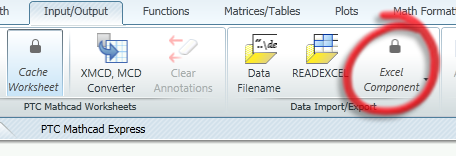
This would mean that you have no valid license and your trial period is over - you are using Prime Express.
In the full version it should look like this
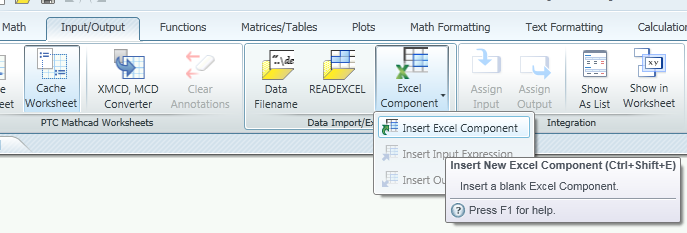
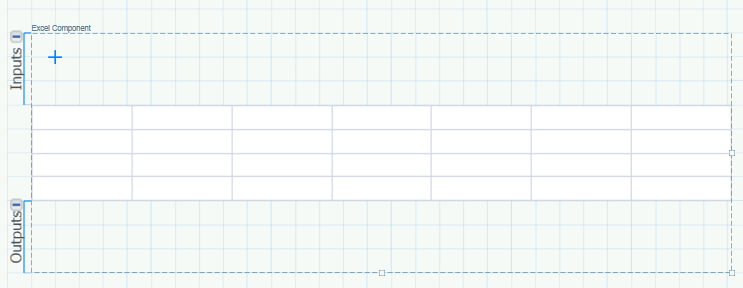
and if you click Insert... you get a template like this
In Express you should still be able to use READEXCEL() and WRITEEXCEL().
Nov 20, 2013
08:50 PM
- Mark as New
- Bookmark
- Subscribe
- Mute
- Subscribe to RSS Feed
- Permalink
- Notify Moderator
Please log in to access translation
Nov 20, 2013
08:50 PM
Hi Werner, is not this problem. I have a full academic licence and it is fully functional, i..e, there is no locker in the excel or any other button of my interface. In my version, when I click on the Excel Component all items in the dropdown menu are grayed, i.e., disabled.
Nov 20, 2013
08:55 PM
- Mark as New
- Bookmark
- Subscribe
- Mute
- Subscribe to RSS Feed
- Permalink
- Notify Moderator
Please log in to access translation
Nov 20, 2013
08:55 PM
This is how it looks like

Nov 20, 2013
08:57 PM
- Mark as New
- Bookmark
- Subscribe
- Mute
- Subscribe to RSS Feed
- Permalink
- Notify Moderator
Please log in to access translation
Nov 20, 2013
08:57 PM
Strange - this usually only happens if the cursor is inside a region and not on a free space in the sheet. Is this the case?
Which version of Excel do you have installed?
From the help: "To work with an Excel component, you must have Excel 2003 or later installed." But I guess this shouldn't be a problem nowadays.
Nov 20, 2013
09:27 PM
- Mark as New
- Bookmark
- Subscribe
- Mute
- Subscribe to RSS Feed
- Permalink
- Notify Moderator
Please log in to access translation
Nov 20, 2013
09:27 PM
It might be that. I have a special excel (MS Excel starter 2010). Would this be the reason? Maybe I have to instal the full office package for the excel feature to work.
Nov 21, 2013
12:51 AM
- Mark as New
- Bookmark
- Subscribe
- Mute
- Subscribe to RSS Feed
- Permalink
- Notify Moderator
Please log in to access translation
Nov 21, 2013
12:51 AM
I am not sure. I would have guessed that starter 2010 should suffice.


Nov 21, 2013
01:59 AM
- Mark as New
- Bookmark
- Subscribe
- Mute
- Subscribe to RSS Feed
- Permalink
- Notify Moderator
Please log in to access translation
Nov 21, 2013
01:59 AM
You need to upgrade from "Starter" version to higher. Mathcad/Mathcad Prime does not work with MS Office Starter.
Nov 21, 2013
04:03 AM
- Mark as New
- Bookmark
- Subscribe
- Mute
- Subscribe to RSS Feed
- Permalink
- Notify Moderator
Please log in to access translation
Nov 21, 2013
04:03 AM
VladimirN. wrote:
You need to upgrade from "Starter" version to higher. Mathcad/Mathcad Prime does not work with MS Office Starter.
Good to know. Is this documented somewhere?
Nov 21, 2013
05:03 AM
- Mark as New
- Bookmark
- Subscribe
- Mute
- Subscribe to RSS Feed
- Permalink
- Notify Moderator
Please log in to access translation
Nov 21, 2013
05:03 AM
No. This is my experience.
Nov 20, 2013
09:28 PM
- Mark as New
- Bookmark
- Subscribe
- Mute
- Subscribe to RSS Feed
- Permalink
- Notify Moderator
Please log in to access translation
Nov 20, 2013
09:28 PM
the cursor is not in any special region, by the way.
Nov 21, 2013
12:52 AM
- Mark as New
- Bookmark
- Subscribe
- Mute
- Subscribe to RSS Feed
- Permalink
- Notify Moderator
Please log in to access translation
Nov 21, 2013
12:52 AM
So I may suggest to contact PTC support.
[EDIT] which now should not be necessary accoring to Vladimir's post above.
Nov 21, 2013
12:32 PM
- Mark as New
- Bookmark
- Subscribe
- Mute
- Subscribe to RSS Feed
- Permalink
- Notify Moderator
Please log in to access translation
Nov 21, 2013
12:32 PM
I bought office 365 and after installing it the excel component worked. Thanks all you guys for your inputs.
Nov 21, 2013
12:43 PM
- Mark as New
- Bookmark
- Subscribe
- Mute
- Subscribe to RSS Feed
- Permalink
- Notify Moderator
Please log in to access translation
Nov 21, 2013
12:43 PM
It should definitely be documented by PTC that the Starter edition doesn't work with Prime!


