
1-Visitor
February 18, 2022
Solved

Follow-up to my 1/18/22 post, "Generating a hemispherical dome surface plot using a cosine function"

  • February 18, 2022
  • 1 reply
  • 1435 views

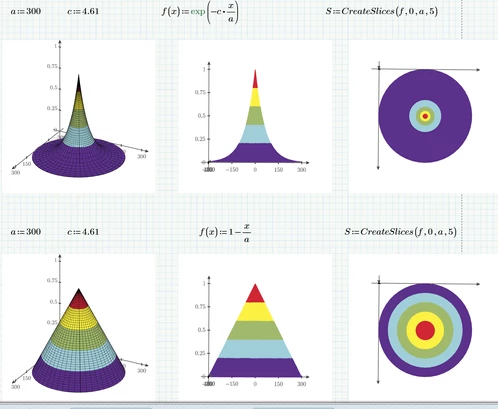
On Jan. 21, 2022, Werner_E provided the solution for creating color-coded mesh surface plots using Mathcad Prime 6.0 for two functions [f1(x) and f2(x)] I had defined [Solved: Re: Generating a hemispherical dome surface plot u... - PTC Community]. Assuming that these instructions could be utilized to create similar plots with any other monotonic function, I defined and inserted two new functions [f3(x) and f4(x)- -see below] in the equation S = CreateSlices(f1, 0, a, 5):


f3 e–cx/a        f4 = 1 – x/a, both over 0 ≤ x ≤ a, with a = 300, c = 4.61


Evidently my simplistic assumption was incorrect- -the Insert 3D Plot command failed to generate the anticipated five-color slice hemispherical domes whose height ranges between 0 and 1.0. Where did I go wrong?


Best answer by Werner_E

The problem was the function "finv" which is a numeric implementation for the inverse function of any arbitrary function. It could not find a solution for the end points. As we know the x-values for those end points it was possible to rewrite the function "CreateSlices" not to use "finv" for them.
So far this seems to work OK for all the demo functions in the worksheet and also for the two you had problems with:

Werner_E_0-1645190714042.png

Prime 6 worksheet attached


1 reply

Werner_E25-Diamond IAnswer
25-Diamond I
February 18, 2022

The problem was the function "finv" which is a numeric implementation for the inverse function of any arbitrary function. It could not find a solution for the end points. As we know the x-values for those end points it was possible to rewrite the function "CreateSlices" not to use "finv" for them.
So far this seems to work OK for all the demo functions in the worksheet and also for the two you had problems with:

Werner_E_0-1645190714042.png

Prime 6 worksheet attached


bobg100x1-VisitorAuthor
1-Visitor
February 19, 2022

Thank you!