
Turn on suggestions
Auto-suggest helps you quickly narrow down your search results by suggesting possible matches as you type.
Showing results for
Please log in to access translation
Turn on suggestions
Auto-suggest helps you quickly narrow down your search results by suggesting possible matches as you type.
Showing results for
Translate the entire conversation x
Please log in to access translation
Options
- Subscribe to RSS Feed
- Mark Topic as New
- Mark Topic as Read
- Float this Topic for Current User
- Bookmark
- Subscribe
- Mute
- Printer Friendly Page
How do I FIND and REPLACE in prime 3.1 (What are the key strokes?)


Nov 08, 2016
06:22 PM
- Mark as New
- Bookmark
- Subscribe
- Mute
- Subscribe to RSS Feed
- Permalink
- Notify Moderator
Please log in to access translation
Nov 08, 2016
06:22 PM
How do I FIND and REPLACE in prime 3.1 (What are the key strokes?)
How do I FIND and REPLACE in prime 3.1 (What are the key strokes?). I want to use find and replace variables in Prime. Where is this functionality?
Solved! Go to Solution.
Labels:
- Labels:
-
Other
ACCEPTED SOLUTION
Accepted Solutions


Nov 09, 2016
08:38 AM
- Mark as New
- Bookmark
- Subscribe
- Mute
- Subscribe to RSS Feed
- Permalink
- Notify Moderator
Please log in to access translation
Nov 09, 2016
08:38 AM
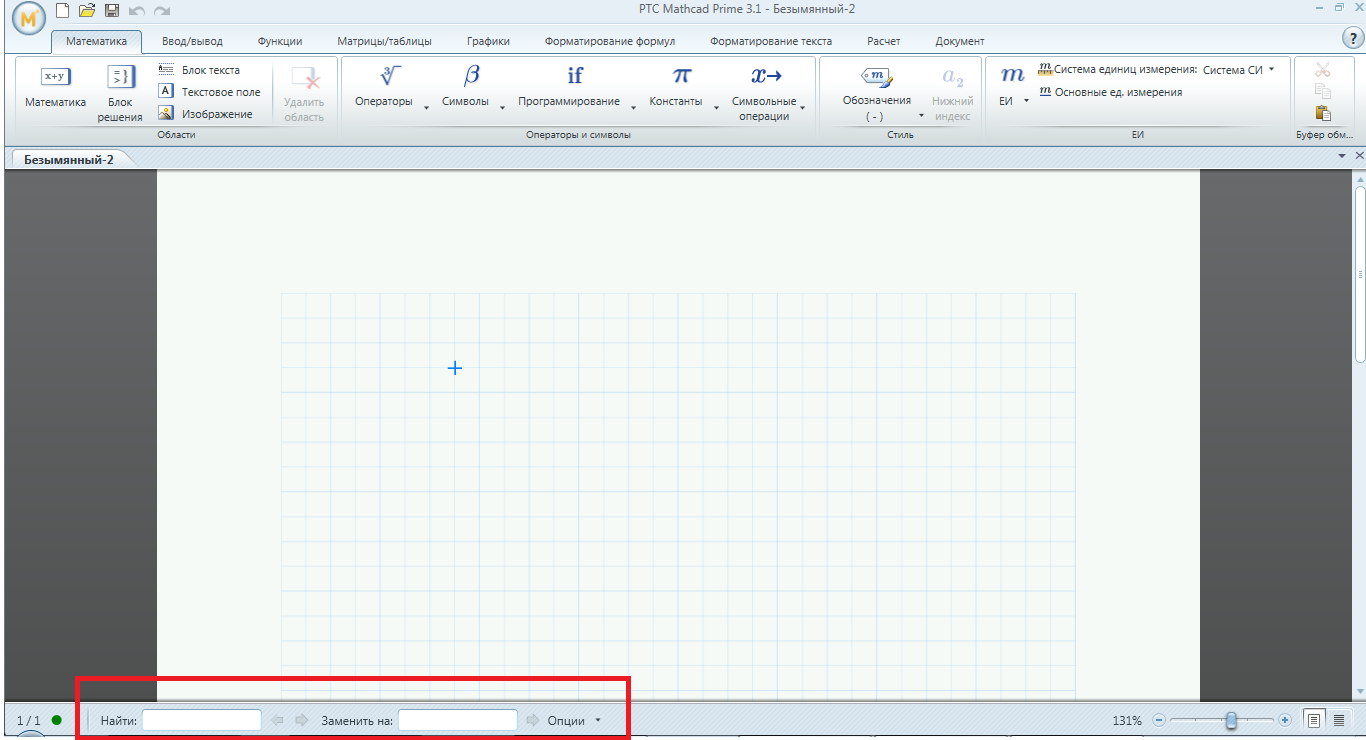
It's [CTRL-F] (as usual) and then you find the search and replace input boxes at the bottom of your Prime window.
Success!
Luc
4 REPLIES 4
Nov 09, 2016
08:38 AM
- Mark as New
- Bookmark
- Subscribe
- Mute
- Subscribe to RSS Feed
- Permalink
- Notify Moderator
Please log in to access translation
Nov 09, 2016
08:38 AM
It's [CTRL-F] (as usual) and then you find the search and replace input boxes at the bottom of your Prime window.
Success!
Luc


Nov 10, 2016
07:24 AM
- Mark as New
- Bookmark
- Subscribe
- Mute
- Subscribe to RSS Feed
- Permalink
- Notify Moderator
Please log in to access translation
Nov 10, 2016
07:24 AM
You can also find this option at the bottom of the document.
Nov 10, 2016
05:57 PM
- Mark as New
- Bookmark
- Subscribe
- Mute
- Subscribe to RSS Feed
- Permalink
- Notify Moderator
Please log in to access translation
Nov 10, 2016
05:57 PM
Thanks.
Nov 12, 2016
08:36 AM
- Mark as New
- Bookmark
- Subscribe
- Mute
- Subscribe to RSS Feed
- Permalink
- Notify Moderator
Please log in to access translation
Nov 12, 2016
08:36 AM
Ah, those input boxes are there always, wasting vertical space on my screen, just as the ribbon is doing. No need to type [CTRL-F], but no way to get rid of 'em either...


