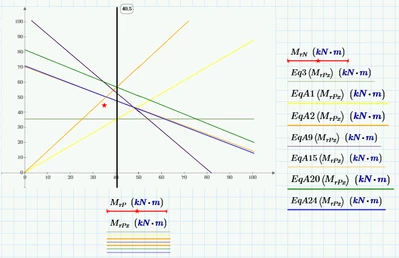
Best answer by Werner_E

Your goal is to limit the lines to duplicate the picture, right?

It may be possible doing so with a couple of range variables (I guess you would need four different ranges to accomplish the task), but I find it more comfortable to define new functions using the if-function to "plot" NaNs where you don't want to see the line.

I added Eq1 which was missing in your plot.
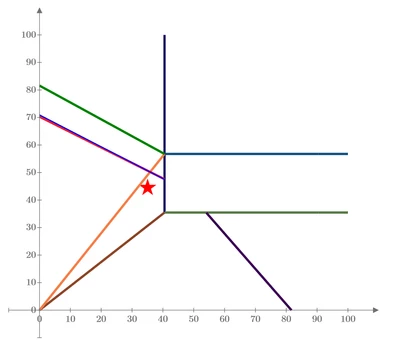
Werner_E_1-1664190496389.png


EDIT: Just for fun I added a way to achieve the same plot using four ranges.


1 reply

Werner_E25-Diamond IAnswer
25-Diamond I
September 26, 2022

Your goal is to limit the lines to duplicate the picture, right?

It may be possible doing so with a couple of range variables (I guess you would need four different ranges to accomplish the task), but I find it more comfortable to define new functions using the if-function to "plot" NaNs where you don't want to see the line.

I added Eq1 which was missing in your plot.

Werner_E_1-1664190496389.png


EDIT: Just for fun I added a way to achieve the same plot using four ranges.


1-Visitor
September 27, 2022

That's great. You made it really nice with 2 different ways, specially 2rd way. Thank you so much.

10-Marble
September 28, 2022

Just be careful not to evaluate the range variable, I have a bug where when I end the range variable for evaluating its array, it crashes everything below it related to it, including graphs. I can evaluate it separately and it works, but it shouldn't have to be separated. I have also run into problems with units in range variables causing similar issues. I am on Prime 7.0, unfortunately. I'm not a fan of any of the Prime series based on the hundreds of bad conversion crashes my converted MathCAD v15 and prior are causing. All other prior MathCAD versions work just fine when evaluating with an "=" sign after a range variable. Only Prime crashes.