12-Amethyst
February 25, 2023
Solved

How to speed up Mathcad Prime for large data sets?

  • February 25, 2023
  • 1 reply
  • 6888 views

Does anyone know how to speed up MCP for processing large data sets?


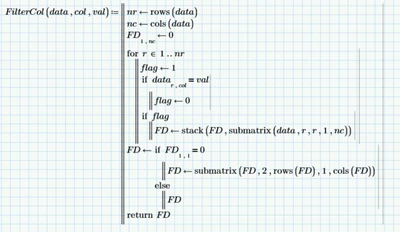
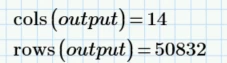
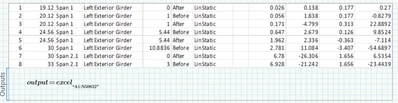
I am working with a 50832x14 size data set that is output in Excel from another program. I would prefer to filter, sort, and manipulate the data in MCP vs Excel. However, trying to execute a simple filter step in MCP on a data set this large has proven impossible. I can't get the function to complete (endless spinning wheel). Whereas I can complete this one step in Excel in about 1sec.


Does anyone know how to speed this up? Or any other tricks for processing large data sets in MCP? I would really, really prefer to avoid Excel but at this point, I'll have to use it.

Thanks!
Andy_C_0-1677346454287.pngAndy_C_1-1677346461019.pngAndy_C_2-1677346507400.pngAndy_C_3-1677346511013.png


Best answer by Werner_E

Give the attached version a try with a larger data set. I am not sure if it would perform OK as of the large vector "mask" (as many rows as the data set itself) which is used.

1 reply

25-Diamond I
February 25, 2023

A matrix of that size should normally be no problem in Mathcad.

But Prime often was reported here as being very slow with larger data sets.

I guess that the "submatrix" command slows down the calculation and you may try to replace it by using the row-selector.

I guess you could replace the whole filter function by a using the built-in "lookup()" function.


BTW, what the reason behind the last step in your function - getting rid of the first row if its first entry is 0? Why the if-statement? The first row will always consist of zeros because thats how you initialize it.

Your function does not cover the case if no row is found containing the given value in the appropriate column. The attempt to get rid of the first row with the last submatrix command will throw an error because there is no row number 2.


EDIT: I gave it a try and using the row operator instead of  "stack" and "submatrix" speeds up the calculation so it takes just half the time. But using match() and trim() (not lookup() as I had written above) really significantly cuts down calculation time to less than one hundredths.


The usage of your variable "flag" is quite complicate and actually you don't need this variable at all.
Your filter function returns all data rows which do NOT contain the given value in the specified column. Is this intended?

25-Diamond I
February 25, 2023

OK, her is the version using the row selector instead of stack and submatrix

Werner_E_7-1677361755706.png


And here is the one using the match and trim functions

Werner_E_1-1677360931623.png

I checked that both would return the same result as your original function (all rows NOT containing "val" in column "col".

I used a smaller data matrix with just 1001 entries.

Werner_E_2-1677361070271.png

Now I used a timer function to compare calculation speed of the three functions. The values seen show the time needed (on my rather slow oldtimer) for 100 calls to the functions.

Werner_E_8-1677361805912.png


Your full original data is now processed by FilterCol3a in about 0,2 seconds.

And because I suspected that you actually wanted the function to return just the rows which actually contain the given string I added a function to do this as well

Werner_E_4-1677361383683.png

and checked if the output of both would combine to the full data set

Werner_E_6-1677361502204.png


Prime 6 worksheet attached


EDIT: I was curious and tried timing the full data set

Werner_E_0-1677363110572.png

As you can see this time it took FilterCol2 not 60 times longer compared to FilterCol3a, but rather nearly 3000 times longer.

I did not wait for the original FilterCol to finish for obvious reasons 😉
But I guess that even FilterCol2 would be much faster if you program it to just return the matching rows and not all rows which don't match.


EDIT2: I rewrote and streamlined your initial FilterCol() function to return only the rows which contain the given value so it does the same as my FilterCol3b. Now there are much less stack() and submatrix()  functions to execute and calc time is significantly more reasonable now (but still 300 times more than FilterCol3b)

Werner_E_1-1677363647712.png


Andy_C12-AmethystAuthor
12-Amethyst
February 25, 2023

Thank you so much @Werner_E !! This is amazing. Huge help. 

I was already working on a lookup-based re-write on your recommendation and just got something working. Now I will digest these new methods which look even better.


I am also trying to re-write a clunky unique values function that is also based on the submatrix function and is failing with this large data set. Do you have any recommendations for that?
Thanks again!

Andy_C_0-1677364686705.png