
12-Amethyst
June 3, 2021
Solved

Linear Interpolation from one column of a matrix

  • June 3, 2021
  • 1 reply
  • 1666 views

Hi,


I have X & Y defined as two matrix variables, which I can do a linear interpolation between them...


How can I perform the same interpolation if I have X & Y in a combined matrix, ?

I am attaching the Mathcad file


Best answer by LucMeekes

You can use the 'column operator' to select/copy a column from a matrix, keyboard shortcut [Ctrl-Shft-C].
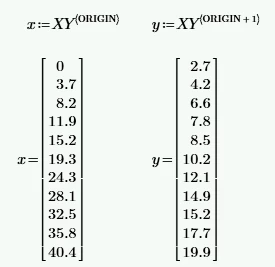
LucMeekes_0-1622754744205.png


See attached.


Success!
Luc


1 reply

LucMeekes23-Emerald IVAnswer
23-Emerald IV
June 3, 2021

You can use the 'column operator' to select/copy a column from a matrix, keyboard shortcut [Ctrl-Shft-C].

LucMeekes_0-1622754744205.png


See attached.


Success!
Luc


12-Amethyst
June 4, 2021

Thanks @LucMeekes  


I wanted to perform interpolation within the matrix, not just splitting it into columns. However, I used your technique and built the next step of the actual interpolation and it works... Thanks a lot.
I just wanted to show you what I did with the interpolation itself in light of your help, which I assume is what you meant; unless you have a different approach just to learn from it ...

Thanks and all the best!


23-Emerald IV
June 4, 2021

You did it correctly. If you don't want to break up the matrix, this:

LucMeekes_0-1622812468010.png

is the way to do what you want.

Note that I used ORIGIN in my example, and you've used it also. It is the safest way to point to the first element (or column or row) of an array.


Success!
Luc