June 29, 2022
Solved

MathCAD function question

  • June 29, 2022
  • 2 replies
  • 1736 views

Hi! I'm trying to make a template for engineering calculation for hydraulic cylinder sizes and was wondering if there was a way to do the following: I have a function that spits out a number. I'd like it to be able to find the closest match to this from an array/matrix that I've already made. For example, lets say the calculation spits out a minimum necessary size of 3.054. The next available hydraulic cylinder sizes that would work is 3.25, then 3.5 then 3.75 then 4. I'd like it to spit out 3.25 as the answer. Thank you!
Best answer by Werner_E

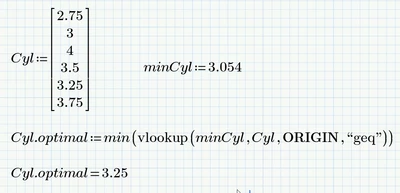
Here is a similar approach using "vlookup" instead of "match".
Its one step less and the vector must not necessarily be sorted (but I guess it would be in your case.

Werner_E_0-1656507164212.png

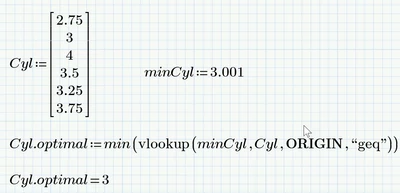
But no matter if you use "match" or "vlookup" - there is a huge drawback in using those functions because they depend on the system variable TOL. The default value of TOL is 10^-3 and using for example 3.001 you get a wrong result:

Werner_E_1-1656507291685.png

Obviously the correct result should be 3.25. You would have to set TOL to a lower value (in the worksheet or via the menu) to get the correct result.


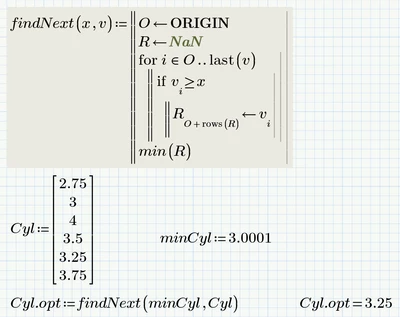
So I would rather suggest not using "match" or "vlookup" and use a small, self written user-defined function to do the job.

Werner_E_0-1656508238877.png

Prime 6 worksheet attached

2 replies

21-Topaz II
June 29, 2022

Hi,

What you are looking for is the match function with the "geq" greater than or equal modifier.

There is no testing to ensure you at least get one match.

Capture.JPG

Werner_E25-Diamond IAnswer
25-Diamond I
June 29, 2022

Here is a similar approach using "vlookup" instead of "match".
Its one step less and the vector must not necessarily be sorted (but I guess it would be in your case.

Werner_E_0-1656507164212.png

But no matter if you use "match" or "vlookup" - there is a huge drawback in using those functions because they depend on the system variable TOL. The default value of TOL is 10^-3 and using for example 3.001 you get a wrong result:

Werner_E_1-1656507291685.png

Obviously the correct result should be 3.25. You would have to set TOL to a lower value (in the worksheet or via the menu) to get the correct result.


So I would rather suggest not using "match" or "vlookup" and use a small, self written user-defined function to do the job.

Werner_E_0-1656508238877.png

Prime 6 worksheet attached

25-Diamond I
June 29, 2022

Here is another, tricky one

Werner_E_0-1656510830870.png

OK, it doesn't work if minCyl is smaller than the lowest value in he vector.

But I would turn it into a utility function anyway and while doing so we could also apply some error checking:

Werner_E_1-1656510939103.png