

Nested Arrays - shape function
It's time for my semi-regular update, rationalization and general cogitation on the whichness and the whereforeness of multi-dimensional arrays (MDAs) in Mathcad. This time, I'm going to start off with a revamp of my Nested Array support functions. To kick off the process, I'd like to present the shape function. shape is intended to specify the structure of a nested array with the intent of being able to both generate and populate an array given this specification.
shape(A😞 returns the number of elements in each dimension of A.
- If A is not an array (eg, a scalar, string or function), then shape returns 0.
- If A is a vector or (non-nested) array, then shape returns a 2-vector giving the number of rows and number of columns in A.
- If A is nested and all the elements of A are arrays of the same shape, then shape returns the shape of (one of) the elements.
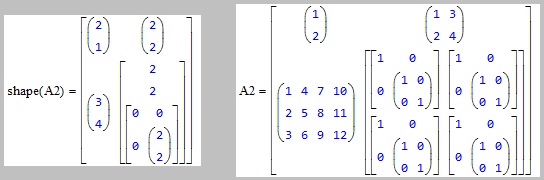
- If A is nested and the elements of A have different shapes, then shape returns an array showing the shape of each nested element.
shape acts recursively on each nested element of A.
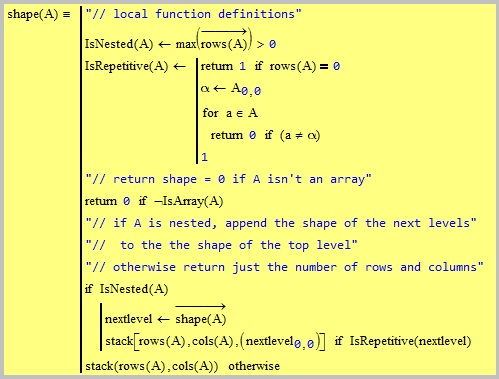
Following the local function definitions, shape checks if A is an array, and if it isn't then it returns 0 (the shape of a scalar, string or range). If A is an array, then shape further checks if A is nested. If A isn't nested, then shape returns a 2-vector giving the number of rows and the number of columns in A.
If A is nested, however, then shape vectorizes itself over A to return an array (the subshape array) containing the shape of each of A's elements. It then checks if those shapes are identical. If they are then, shape returns a single one of the shapes, otherwise it returns the whole of the subshape array.
All comments gratefully received.
Stuart