
15-Moonstone
May 5, 2020
Solved

Piecewise function plot

  • May 5, 2020
  • 5 replies
  • 8601 views

Hello!


I am trying to plot the picewise function (attached).

Do I need to use "if" statement here or are there any other options?

I think that it should be something like this: if 0<x<0.3 then y=2, if 0.3<x<0.8 then y=-((x-0.3)/0.5)+2, if 0.8<x<1 then y=1.

Would anybody, please, help me with this issue?


Best regards,

Sergey
Best answer by Werner_E

You have already been shown the variant using the if-function and also the variant using the Heaviside step function. Both look a little confusing in my opinion. The only advantage of the Heaviside variant is that you can apply symbolic operation (e.g. derivative or integral) to it.
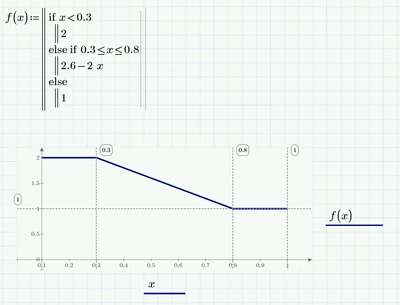
For completeness sake here is the variant using the programmed if-statement:

Werner_E_0-1588722526213.png

BTW, there is no need to define any vectors for x and y. Just plot the function and set the axis limits directly at the axis labeling (you can change the first, second and last value). I set the lowest value on the x-axis to 0.1 to match the picture and also dragged the y-axis to the right accordingly.

P6-worksheet attached

5 replies

21-Topaz II
May 5, 2020

answer to Sergei.jpg

Sergey15-MoonstoneAuthor
15-Moonstone
May 5, 2020

Thank you.


But how do I get y=1 and y=2 in the same graph?


Sergey


23-Emerald IV
May 5, 2020

Just add them.

LucMeekes_0-1588694510993.png

Success!
Luc

23-Emerald I
May 5, 2020

The if statement is  one good way.  You can also use Boolean comparison multipliers.

FredKohlhepp_0-1588697482679.png


21-Topaz II
May 5, 2020

To draw the graph, you can use the step function as shown here:

answer to Sergei 1.jpg

Werner_E25-Diamond IAnswer
25-Diamond I
May 5, 2020

You have already been shown the variant using the if-function and also the variant using the Heaviside step function. Both look a little confusing in my opinion. The only advantage of the Heaviside variant is that you can apply symbolic operation (e.g. derivative or integral) to it.
For completeness sake here is the variant using the programmed if-statement:

Werner_E_0-1588722526213.png

BTW, there is no need to define any vectors for x and y. Just plot the function and set the axis limits directly at the axis labeling (you can change the first, second and last value). I set the lowest value on the x-axis to 0.1 to match the picture and also dragged the y-axis to the right accordingly.

P6-worksheet attached

Sergey15-MoonstoneAuthor
15-Moonstone
May 6, 2020

Thank everyone for the feedbacks, I appreciate your help.

All solutions you gave me are relevant and I will try each one.


Best regards,

Sergey

23-Emerald IV
May 11, 2020

One more alternative":

LucMeekes_0-1589181472144.png

Success!
Luc