15-Moonstone
June 7, 2017
Solved

Simultaneous Equation in Mathcad15

  • June 7, 2017
  • 3 replies
  • 7892 views

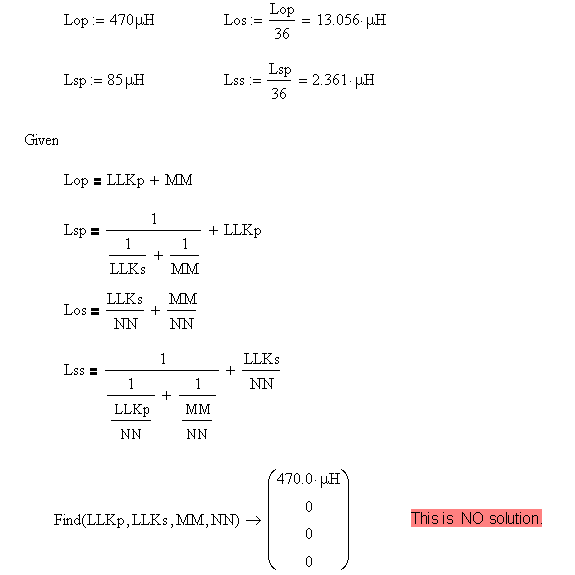
In Mathcad15 , the solution of the following simulataneous equation is  correct ?

Because the solution of MM,NN,LLKs is zero. If so, zero division is in equation.

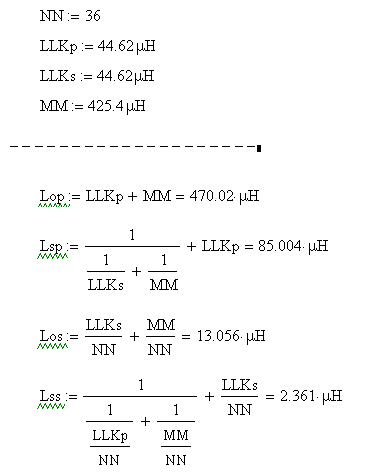
One solution is also attached.

Please advise me.

<< one solution of above equation>>

Best answer by vlehner

Hi Sato,

according to your questions:

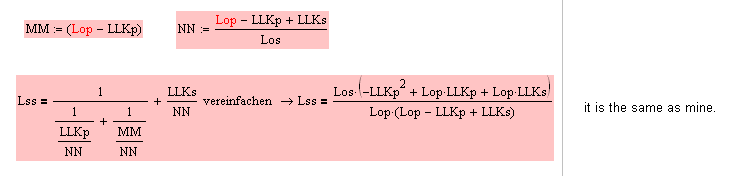
1. Equation Lss: use definition markers (see point three) and you get the same result as mine:

revise your sheet and you can calculate all without memory problems.
2. LLKp1 and LLKp2: they are a result of a quadratic-equation, normally one solution (LLKp1 or LLKp2) is valid.

LLKp can be LLKp1 or LLKp2.

see:

I named this two solutions LLKp1 and LLKp2:

3. rearrange your worksheet. Use for definitions the ":=" symbol, not the boolean "=". and then you can simplify your expressions and get the same result as mine.

4. After you rearranged your worksheet, you should calculate it completely.

Use solve blocks for numerical solutions with initial guess-values. Symbolical makes no sense because of the very large and uncomfortable equations.

MathCad is a powerful tool to transform equations and find solutions with solve-blocks but sometimes the equations are very large and because of this, they can not be displayed.

A couple of days ago, i had the same problem with a mechanical system like you with the electric-transformers: I created  11 equations with 11 unknowns.

First of all, i got different results when changing the guess values. It is not that i got no solution but i got anytime different results.


An equation system must be unambiguous and must not have an infinite number of solutions.

BTW: what we have here, is a non linear equation-system.

So i had to check my equations again and again and when finding and taking a geometrical equation into account i got only one numerical solution-No matter what estimates I have assumed.

That was a "Heureca" for me and i solved the problem completely perfect.

I attached the MC15 sheet revised my way.

Best Regards and sucess, Volker

3 replies

1-Visitor
June 7, 2017

Please attach your Worksheet:

use "advanced Editor" and then you can attach the file.

Btw: you are using a solve block, but there are missing guess-Values for solving your equation system.

best regards, Volker

1-Visitor
June 7, 2017

I tryed to solve it with MathCad Prime4.0

There is no stable solution, you should rearrange your equation system to get a constant result, which means: wheather you choose any guess values you'll get the same results.

ssato15-MoonstoneAuthor
15-Moonstone
June 7, 2017

Volker Lehner-san

Thanks your reply in Mathcad Prime.

The solution is only one ?

Because I want only plus values for all solutions.

ssato15-MoonstoneAuthor
15-Moonstone
June 7, 2017

I attatched the file.

Best Regards.

1-Visitor
June 7, 2017

can you post the cirquit-diagramm please?

ssato15-MoonstoneAuthor
15-Moonstone
June 7, 2017

I attached drawing.

1-Visitor
June 7, 2017

I tryed an analytical solution and that shows, there is no solution.

See attached File please.

The equations, derivated from the cirquit diagramm: It seems to be ok.

Volker

ssato15-MoonstoneAuthor
15-Moonstone
June 8, 2017

Thanks for your reply.

I have some question.

1. Lss (equation 2)

    I calculate Lss by MATHCAD15. The result non-equal to your solution.

2.LLKp1,LLKp2

  LLKp1 is not equal LLKp2.

  If so ,we have two Lss.

3.If my simaltaneous equations has no solution, why Mathcad output no ERROR ?

4. I attached the result above 1 in MATHCAD15.

  And in this file, I calculate analytically LLKp,LLKs , Mathcad output the error "out of memory".

Sato

vlehner1-VisitorAnswer
1-Visitor
June 8, 2017

Hi Sato,

according to your questions:

1. Equation Lss: use definition markers (see point three) and you get the same result as mine:

revise your sheet and you can calculate all without memory problems.

2. LLKp1 and LLKp2: they are a result of a quadratic-equation, normally one solution (LLKp1 or LLKp2) is valid.

LLKp can be LLKp1 or LLKp2.

see:

I named this two solutions LLKp1 and LLKp2:

3. rearrange your worksheet. Use for definitions the ":=" symbol, not the boolean "=". and then you can simplify your expressions and get the same result as mine.

4. After you rearranged your worksheet, you should calculate it completely.

Use solve blocks for numerical solutions with initial guess-values. Symbolical makes no sense because of the very large and uncomfortable equations.

MathCad is a powerful tool to transform equations and find solutions with solve-blocks but sometimes the equations are very large and because of this, they can not be displayed.

A couple of days ago, i had the same problem with a mechanical system like you with the electric-transformers: I created  11 equations with 11 unknowns.

First of all, i got different results when changing the guess values. It is not that i got no solution but i got anytime different results.


An equation system must be unambiguous and must not have an infinite number of solutions.

BTW: what we have here, is a non linear equation-system.

So i had to check my equations again and again and when finding and taking a geometrical equation into account i got only one numerical solution-No matter what estimates I have assumed.

That was a "Heureca" for me and i solved the problem completely perfect.

I attached the MC15 sheet revised my way.

Best Regards and sucess, Volker