1-Visitor
July 11, 2020
Solved

Solving a equation with units

  • July 11, 2020
  • 2 replies
  • 7091 views

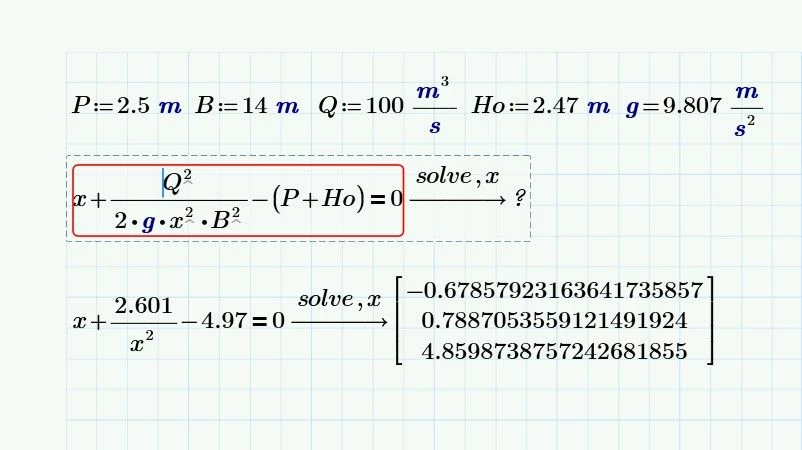
Hi, I'm trying to figure out how to solve a equation with Mathcad, since it keeps displaying the message that no solution can be found. 

In principle it is a cubic equation that needs to be solved, but I don't know why this happens when I input units instead of simple numbers.

FYI it is a weir design for a spillway. Anotación 2020-07-10 202942.jpg

Best answer by Werner_E

I guess you are using Prime 6

PTC introduced a new symbolic engine in this version which is a bit less capable than the old one.

In Prime 6 you still have the option to switch back to the old, legacy symbolic module (calc ribbon, calc options).

This makes your equation work, but due to round off errors the results are non-real values with very tiny imaginary parts. You may use  Sol := Re(Sol) to fix this.


The  symbolic does not know anything about units and treats them as unknown variables. Sometimes it helps if you add a modifier like "assume, m>0" to tell Prime that m is a positive real. It may also help to turn on variables and constants in the same menu where you can switch back to the old symbolics.


Generally its better to use numerical methods like a solve block when you are looking for numerical results. But a solve block would only yield one of the three solutions, depending in the guess value provided.
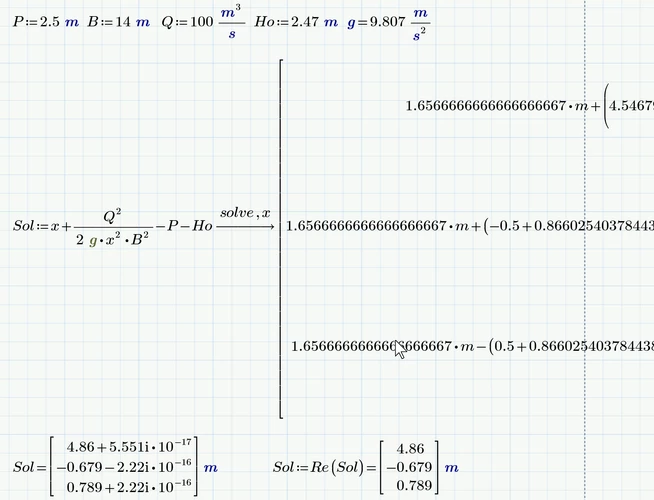
Werner_E_0-1594453180896.png

Prime 6 worksheet attached.

2 replies

Werner_E25-Diamond IAnswer
25-Diamond I
July 11, 2020

I guess you are using Prime 6

PTC introduced a new symbolic engine in this version which is a bit less capable than the old one.

In Prime 6 you still have the option to switch back to the old, legacy symbolic module (calc ribbon, calc options).

This makes your equation work, but due to round off errors the results are non-real values with very tiny imaginary parts. You may use  Sol := Re(Sol) to fix this.


The  symbolic does not know anything about units and treats them as unknown variables. Sometimes it helps if you add a modifier like "assume, m>0" to tell Prime that m is a positive real. It may also help to turn on variables and constants in the same menu where you can switch back to the old symbolics.


Generally its better to use numerical methods like a solve block when you are looking for numerical results. But a solve block would only yield one of the three solutions, depending in the guess value provided.

Werner_E_0-1594453180896.png

Prime 6 worksheet attached.

1-Visitor
July 13, 2020

The Sol command worked, and it solved correctly the equation, however when I try to use it on my original worksheet I get the same problem. I'll run a Re-Install to see what is going on.

However I'll continue working on your file. Thanks a lot.Anotación 2020-07-12 201447.jpg 

25-Diamond I
July 13, 2020

@Descalante815 wrote:

The Sol command worked, and it solved correctly the equation, however when I try to use it on my original worksheet I get the same problem. I'll run a Re-Install to see what is going on.

However I'll continue working on your file. Thanks a lot.


"Sol" isn't a command, its simply a variable name (I was thinking of "solution" when choosing it)


I guess that you forgot to switch over to the old symbolic engine.  Calculation ribbon ...

Werner_E_0-1594630869952.png

You will get a warning telling you that the old symbolic will not be available in future versions and you must recalculate the sheet (F5 or fF9) to see the effect!


You may also consider switching on "constants and variables in symbolic calculations" but as you can see in the screen shot this wasn't necessary for me in case of your equation.


If it still doesn't work I suspect a problem with Primes auto-labeling. It may help to retype the equation from scratch.


23-Emerald I
July 11, 2020

In Express, without symbolics or a solve block:

FredKohlhepp_0-1594467627245.png


24-Ruby IV
July 11, 2020

solve.png

23-Emerald I
July 11, 2020

That's not the right equation!  The equation is third order!


I'm not even sure why this did what it did.  Is there an x variable with a different label?