
Turn on suggestions
Auto-suggest helps you quickly narrow down your search results by suggesting possible matches as you type.
Showing results for
Please log in to access translation
Turn on suggestions
Auto-suggest helps you quickly narrow down your search results by suggesting possible matches as you type.
Showing results for
Community Tip - New to the community? Learn how to post a question and get help from PTC and industry experts! X
Translate the entire conversation x
Please log in to access translation
Options
- Subscribe to RSS Feed
- Mark Topic as New
- Mark Topic as Read
- Float this Topic for Current User
- Bookmark
- Subscribe
- Mute
- Printer Friendly Page
Substituting and Solving Equations


Nov 09, 2013
12:33 AM
- Mark as New
- Bookmark
- Subscribe
- Mute
- Subscribe to RSS Feed
- Permalink
- Notify Moderator
Please log in to access translation
Nov 09, 2013
12:33 AM
Substituting and Solving Equations
Hello,
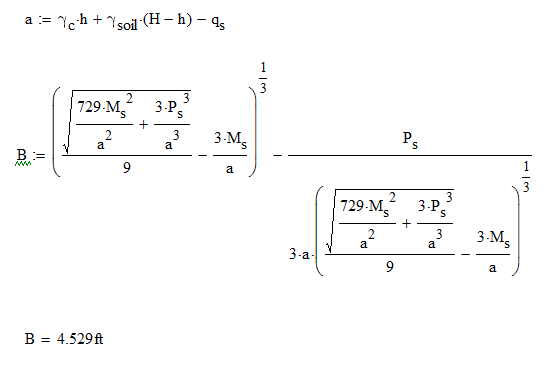
I was wondering what the best way to solve a set of equations would be. The process I was hoping to use was to define a bunch of variables (some of the varibales have unknowns) and then set them all equal to eachother and/or substitute equations into one another in order to solve for one variable. After solving everything for the variable "B" in the attached Mathcad sheet, I wanted to be able to write a final statement that is the final equation with all of the variables inserted and solve for "B." I know how to solve the final equation for qs by hand, but I wanted something more user friendly to print out and view for those who don't need to see all of the steps in calculations. The only steps I want to show would be defining all of the variables or functions, then my final equation to solve, and the solution for "B."
Is there a way to do this in Mathcad? Thank you for your time.
Labels:
- Labels:
-
Other
4 REPLIES 4


Nov 09, 2013
12:59 AM
- Mark as New
- Bookmark
- Subscribe
- Mute
- Subscribe to RSS Feed
- Permalink
- Notify Moderator
Please log in to access translation
Nov 09, 2013
12:59 AM
Can't figure out what you're trying to do, so the only suggestion is to read the help file entry on Solve Block
TTFN


Nov 09, 2013
05:04 AM
- Mark as New
- Bookmark
- Subscribe
- Mute
- Subscribe to RSS Feed
- Permalink
- Notify Moderator
Please log in to access translation
Nov 09, 2013
05:04 AM
The attached might help, though I'm not sure it does exactly what you want.
Alan


Nov 09, 2013
07:33 AM
- Mark as New
- Bookmark
- Subscribe
- Mute
- Subscribe to RSS Feed
- Permalink
- Notify Moderator
Please log in to access translation
Nov 09, 2013
07:33 AM
Your description is a bit confusing to me but I guess you are searching how to solve the equation q.s(B)=q for B.
See if the attached file can help doing so.
BTW, if you want to hide calculations from view you may consider putting them in a collapsed area.
Nov 09, 2013
09:29 AM
- Mark as New
- Bookmark
- Subscribe
- Mute
- Subscribe to RSS Feed
- Permalink
- Notify Moderator
Please log in to access translation
Nov 09, 2013
09:29 AM
Werner is right; the equation is a cubic not a quartic as I say in my worksheet. It can be solved symbolically to find the only positive solution:
Alan


