
Turn on suggestions
Auto-suggest helps you quickly narrow down your search results by suggesting possible matches as you type.
Showing results for
Please log in to access translation
Turn on suggestions
Auto-suggest helps you quickly narrow down your search results by suggesting possible matches as you type.
Showing results for
Community Tip - Visit the PTCooler (the community lounge) to get to know your fellow community members and check out some of Dale's Friday Humor posts! X
- Community
- Creo Elements Direct
- Modeling
- Modelling Express 6.0 Drill Holes
Translate the entire conversation x
Please log in to access translation
Options
- Subscribe to RSS Feed
- Mark Topic as New
- Mark Topic as Read
- Float this Topic for Current User
- Bookmark
- Subscribe
- Mute
- Printer Friendly Page
Modelling Express 6.0 Drill Holes


Sep 24, 2015
12:48 PM
- Mark as New
- Bookmark
- Subscribe
- Mute
- Subscribe to RSS Feed
- Permalink
- Notify Moderator
Please log in to access translation
Sep 24, 2015
12:48 PM
Modelling Express 6.0 Drill Holes
Hi I am new to Modelling Express this seams an obvious question but how do I drill a hole in an existing model. I have an STL from a manufaturer for a simple ABS plastic box consisting of 6 parts the base, the lid and the 4 screws. My question is how do I drill a hole in the base I have created a workplane and drawn a circle but I cannot seem to create a hole in the one side of the box. If I use punch it goes through both sides of the base. When I look online there is only reference to the drill command which is not present in modelling express. So how do I do it?
This thread is inactive and closed by the PTC Community Management Team. If you would like to provide a reply and re-open this thread, please notify the moderator and reference the thread. You may also use "Start a topic" button to ask a new question. Please be sure to include what version of the PTC product you are using so another community member knowledgeable about your version may be able to assist.
Solved! Go to Solution.
Labels:
- Labels:
-
General
ACCEPTED SOLUTION
Accepted Solutions


Sep 25, 2015
03:41 PM
- Mark as New
- Bookmark
- Subscribe
- Mute
- Subscribe to RSS Feed
- Permalink
- Notify Moderator
Please log in to access translation
Sep 25, 2015
03:41 PM
Hi Jonathan,
Here are two ways to make .to "a hole"
You can use the pull-commands.
Activate the part and make sure that the switch is set to Remove
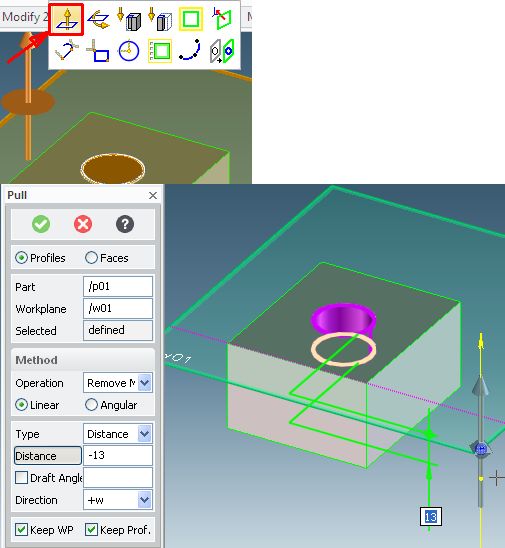
or
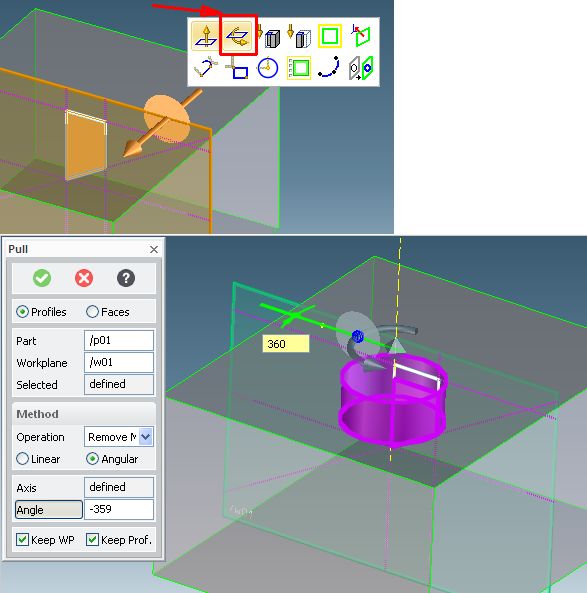
then you have also the cone point of the bore.
Have fun with the program 
(Please write info in your Signature) Sysinfo: I use Creo Elements Direct Drafting, Modeling and Express 6-8-9 ( formerly CoCreate- SolidDesigner and Drafting or ME10 )
2 REPLIES 2

Sep 25, 2015
02:41 PM
- Mark as New
- Bookmark
- Subscribe
- Mute
- Subscribe to RSS Feed
- Permalink
- Notify Moderator
Please log in to access translation
Sep 25, 2015
02:41 PM
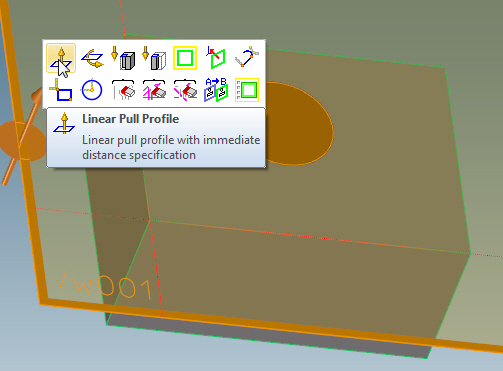
Click on a corner of the workplane and pull. If you pull away from the part, the workplane will create a cylinder, if you pull into the part, material will be removed. Also you can use the mini toolbar and click on the linear pull profile button and a menu will pop up.
Creo Element\Direct Modeling 20.6.0.0.0
Sep 25, 2015
03:41 PM
- Mark as New
- Bookmark
- Subscribe
- Mute
- Subscribe to RSS Feed
- Permalink
- Notify Moderator
Please log in to access translation
Sep 25, 2015
03:41 PM
Hi Jonathan,
Here are two ways to make .to "a hole"
You can use the pull-commands.
Activate the part and make sure that the switch is set to Remove
or
then you have also the cone point of the bore.
Have fun with the program
(Please write info in your Signature) Sysinfo: I use Creo Elements Direct Drafting, Modeling and Express 6-8-9 ( formerly CoCreate- SolidDesigner and Drafting or ME10 )

Announcements


Top Tags
