1-Visitor
January 9, 2014
Solved

Adjusting Model Sizes/Scale?

  • January 9, 2014
  • 1 reply
  • 1047 views

Received this question from an FTC team that created their lift sub-assembly from all custom designed parts...

When they tried to then include the lift onto the robot, it turned out that the lift is much-much bigger in size than the robot... so somewhere we messed up the dimensions/scales...

What can we do now? Can we re-scale the lift? so we do not have to redraw every part?

I how can I make sure that the dimension/units for the tetrix parts are the same than the ones I use for the custom parts?

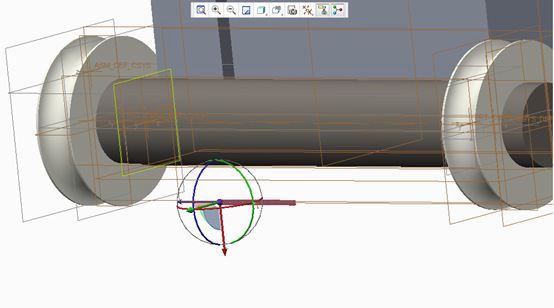
The image shows a tetrix flat bar next to the bottom of our lift...
scale.png

    Best answer by sm_01

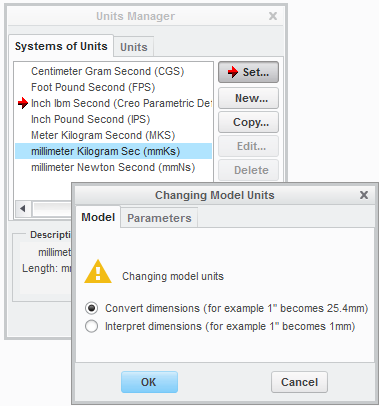
    Yes, sounds like you have mixed units in the models. To confirm, open one of you new models and check the units; File, Prepare, Model Properties and pick change for the Units.

    Could be that your model is MM and the values were input as INCH or vice-versa. In either case, an easy fix, just change the units and chose the appropriate scaling method from the Changing Model Untis window.

    units.png

    1 reply

    sm_011-VisitorAuthorAnswer
    1-Visitor
    January 9, 2014

    Yes, sounds like you have mixed units in the models. To confirm, open one of you new models and check the units; File, Prepare, Model Properties and pick change for the Units.

    Could be that your model is MM and the values were input as INCH or vice-versa. In either case, an easy fix, just change the units and chose the appropriate scaling method from the Changing Model Untis window.

    units.png