
1-Visitor
January 28, 2021
Solved

Printing types of inner thread inserts/programming

  • January 28, 2021
  • 1 reply
  • 11564 views

Hi,

I have problem with printing name (types inner inserts) from tables (values picture). I have 2 values which are not in tables: N.Ed=31kN and V.Ed=35kN and then analogues/relatives values from tables N.Rd and V.Rd in columns. So i need to print all names from (vakuankkuri) column which are meet the conditions: 

~N.Rd>N.Ed/2 and V.Rd>V.Ed/2


I have already ideas with matrix (picture matrix tables) but don't know how to solve this problem by right programming/looping. Thanks for advices.

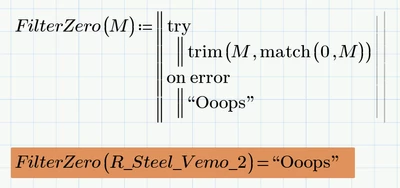
Best answer by Werner_E

In case you'd like to stay with your solution, you may simply try this:

Werner_E_0-1612195168719.png


1 reply

25-Diamond I
January 28, 2021

Please attach your worksheet.

And if you don't use the latest version of Prime (which is 6), tell us so, as otherwise you won't be able to read the files which may be posted as answers.


From what I understand, a function like the following should do the job:

Werner_E_0-1611856104844.png

P.S.: You may consider using units in your table(s). That's something that Prime can deal with pretty good.


Remus1-VisitorAuthor
1-Visitor
February 1, 2021

Hi,


I coudnt answer before because i had problem with PTC community website. 

Im using Mathcad prime 5 and I did solve this problem in another way. In my opinion also works but i need to add some comments which I dont know yet.

How i can add output text: 'need more insert/supports per element'  if i dont how now types printed:

insert.JPGsupport.JPG


It will be also good to know how to solve this problem by you way  


25-Diamond I
February 3, 2021

You may use a couple of nested if .. elseif to deal with that, but i guess its easier to use the return statement which quits the program immediately:

Werner_E_0-1612356127853.png

Personally I'd prefer turning the program into a function:

Werner_E_1-1612356192440.png

It may be useful to make a vector of all possible output matrices first and use this vector to chose the appropriate matrix simply via vector index. Again I'd prefer a functional approach:

Werner_E_2-1612356340253.png


And as you have a similar problem a second time in your sheet, why not use a function with two arguments to deal with both of them and also all other similar situations which may come along:

Werner_E_3-1612356494454.png


I am not sure what you mean with "so i need to print both of list...." but maybe making a table comes handy:

Werner_E_0-1612357002682.png


P6 worksheet attached (sorry, I forgot that you are using P5 and PTC provides no way to save in P5 format from P6)