1-Visitor
March 1, 2021
Solved

multiplying a variable in a formula
  • March 1, 2021
  • 3 replies
  • 3434 views

JA_9802927_0-1614637065220.png

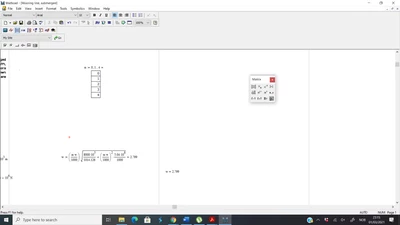
Hi, I am trying to calculate n(variable) into the formula, but I am only getting the last value. How Can I change that? so i get all the values?

Thanks

Best answer by FDS

It is always better to attach your worksheet. To solve your problem vectorize the formula.

3 replies

FDS13-AquamarineAnswer
13-Aquamarine
March 2, 2021

It is always better to attach your worksheet. To solve your problem vectorize the formula.

1-Visitor
March 2, 2021

Hi , how do i vectorise the formula?

I am new to this, I am thankful and appreciate your help.

12-Amethyst
March 3, 2021

Here is one possible method.  There may be other easier methods.


Good luck~

23-Emerald IV
March 3, 2021

Like this?

LucMeekes_0-1614779995338.png

Success!

Luc

25-Diamond I
March 3, 2021

Some remarks to what was already said:


You defined a range when you typed n:=0,1..4 but you immediately followed the definition by an evaluation (the = at the end to show the result). This is an undocumented trick to convert a range into a vector. Ranges and vectors may look similar but are quite different  beasts.

You have n^2 in your formula and n is a vector. Squaring is not defined for vectors and so Mathcad actually  could throw an error. Instead Mathcad is designed to perform an implicit vectorization in such cases which means it simply applies the operation on  every single element of the vectors. This vector in your formula is now multiplied by a scalar and another scalar is added to every vector element. And now you try to take the root of this vector which again triggers Mathcad's implicit vectorization. So the whole root expression in your formula is a vector. And this vector is multiplied with another vector (n*pi/1000) and vector multiplication IS a well defined operation and the result is a scalar (dot product). If you want the operation to be done element-wise you have to explicitly apply vectorization. How this is done was shown to you by 1aidaho.


On contrary you may note that Luc has NOT used an inline evaluation when he defined the range n. He evaluated it in a separate region. So n in his approach is still a range and can be used what a range is made for - indexing the elements of a vector or matrix. And this is exactly what Luc did. Note that he applied your formula to w[n (n is a vector index here) and not just to w. That way every vector element is calculated one after the other - you may see a range as some kind of implicit loop.


Just thought it might be necessary and helpful to explain in more details the working of the two solutions provided.