1-Visitor
March 4, 2021
Solved

List all files in a File Repository (TXW 9.1)

  • March 4, 2021
  • 3 replies
  • 5890 views

I need an infotable that has the path & filenames of all the files in a file repository, irrespective of the path.

Best answer by DmitryTsarev

@SB_9732186 It works for arbitrary directory hierarchy.


The code gets the hierarchy from the GetDirectoryStructure and then just iterates over it. Here is the InfoTable returned by GetDirectoryStructure.
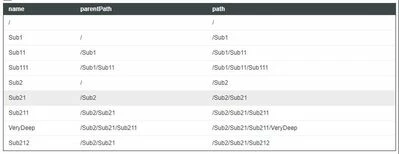
Unbenannt00.JPG

Here is a bit better commented code 🙂

var params = {
 infoTableName: "listFiles",
 dataShapeName: "FileSystemFileWithLinks"
};
// Initializing empty InfoTable with the appropriate shape
var listFiles = Resources["InfoTableFunctions"].CreateInfoTableFromDataShape(params);

// Getting the directory structure of the repo
var repoDirStructure = Things[repoName].GetDirectoryStructure();

// Iterating through all the directories in the repo
// and merging the list of files in each
for (var el in repoDirStructure.rows) {
 var listFiles2 = Things[repoName].GetFileListingWithLinks({
			path: repoDirStructure[el]["path"]
 });
 var params = {t1: listFiles, t2: listFiles2};
	listFiles = Resources["InfoTableFunctions"].Union(params);
}
result = listFiles;

 The final result returned by the service:
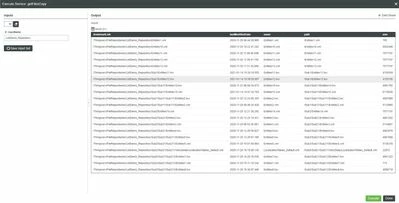
Unbenannt01.JPG

3 replies

5-Regular Member
March 4, 2021

Did you try using BrowseFileSystem service of File Repository?

1-Visitor
March 4, 2021

Hi @mnarang 


I have used BrowseFileSystem but that doesn't fit my use case.

Let me give you an example:

SB_9732186_0-1614844110980.png


The service should return an infotable:

Path                                       Filename

/one                                       file1

/one                                       file2

/one                                       file3

/two                                       file1

/two                                       file2

/two                                       file3

/three                                    file1

/three                                    file2

/three                                    file3


Thanks.

5-Regular Member
March 4, 2021

I think direct API is not there for your use case, but you can use existing API to create your service which can give you desired result. For example, BrowseDirectory or BrowseFileSystem will give you everything which is there in the repo on path /, then you need to iterate the previous output and whenever you find fileType as D, you need to execute the service again to get file listing in the directories. At the end you need to have a logic for combining the data/representation as per your use case. There can be other combination as well like ListDirectories+ListFiles, as you will be iterating data and calling this API in the loop, you need to test this solution from performance standpoint.

One more point if you have huge hierarchy of directories then this approach might not work, as you have to deep dive in the directories and execute the service in inner loops.

17-Peridot
March 4, 2021

Is it what you're looking for?

Unbenannt00.JPG


var listFiles = Things[repoName].GetFileListingWithLinks({
 path: undefined /* STRING */,
 nameMask: undefined /* STRING */
});

var repoDirStructure = Things[repoName].GetDirectoryStructure();
for (var el in repoDirStructure.rows) {
 logger.warn("repoDirStructure"+repoDirStructure[el]["path"]);
 // Merging files from all subfolders
 if (el != 0){
 var listFiles2 = Things[repoName].GetFileListingWithLinks({
 path: repoDirStructure[el]["path"]
 });
 var params = {t1: listFiles, t2: listFiles2};
 listFiles = Resources["InfoTableFunctions"].Union(params);
 }
}
result = listFiles; 


5-Regular Member
March 4, 2021

if the approach mentioned by @DmitryTsarev works for you, then it is good as it seems to be more simpler and straight forward.

Support
March 16, 2021

Hi @SB_9732186.


If you feel your question has been answered, please mark the appropriate response as the Accepted Solution for the benefit of others with the same question.


Regards.


--Sharon
