1-Visitor
June 2, 2020
Solved

how to put date widget rounded corner?

  • June 2, 2020
  • 1 reply
  • 3465 views

i am using Date widget in thingworx V-8.5 (Updated one), but i am not able to put border radius in date widget please any one help me on that.


if i am using custom CSS for this: 

  .customDate {
      border: 2px solid red;
      border-radius: 25px;
   }


then this type of screen i am getting

 

soumyabiswal_0-1591071637904.png


Best answer by PEHOWE

@soumyabiswal ,


I had a conversation with R&D and have a solution, or more correctly 3 solutions.

  • To set the color of the label field on the Date Picker
    .widget-ptcsdatepicker::part(label){
     color: orange;
    }​
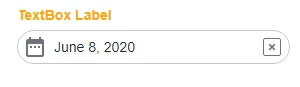
  • To set rounded corners on the existing date picker box
    /* Version one */
    .widget-ptcsdatepicker::part(date-field-text-box) {
     border-radius: 25px;
    }​


  • Version 1Version 1
  • The part field for the text-box is nested two levels deep in the shadow-roots.

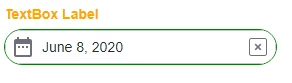
  • Add a border and set it to have rounded corners
    /* version two */
    .widget-ptcsdatepicker::part(date-field) { 
     border: 1px solid green;
     border-radius: 25px;
    }​
  • Version 2Version 2
  • This is a little different from the first.
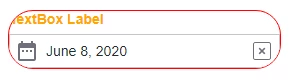
  • Specify the rounding  on the datepicker
    /* Version three */ 
    .widget-ptcsdatepicker {
     border: 1px solid red;
     border-radius: 25px;
    }​
  • Version 3Version 3

Hope this helps.

Peter


1 reply

Community Manager
June 2, 2020

Hi @soumyabiswal.


We're doing some testing with this and will get back with you once we have more information.


Regards.


--Sharon


1-Visitor
June 5, 2020

thanks fro your feedback.

please let me know any update ASAP this stopping my work.


PEHOWE17-PeridotAnswer
17-Peridot
June 8, 2020

@soumyabiswal ,


I had a conversation with R&D and have a solution, or more correctly 3 solutions.

  • To set the color of the label field on the Date Picker
    .widget-ptcsdatepicker::part(label){
     color: orange;
    }​
  • To set rounded corners on the existing date picker box
    /* Version one */
    .widget-ptcsdatepicker::part(date-field-text-box) {
     border-radius: 25px;
    }​


  • Version 1Version 1
  • The part field for the text-box is nested two levels deep in the shadow-roots.

  • Add a border and set it to have rounded corners
    /* version two */
    .widget-ptcsdatepicker::part(date-field) { 
     border: 1px solid green;
     border-radius: 25px;
    }​
  • Version 2Version 2
  • This is a little different from the first.
  • Specify the rounding  on the datepicker
    /* Version three */ 
    .widget-ptcsdatepicker {
     border: 1px solid red;
     border-radius: 25px;
    }​
  • Version 3Version 3

Hope this helps.

Peter