10-Marble
January 16, 2020
Solved

How to update a Model and retain the Model Items?

  • January 16, 2020
  • 1 reply
  • 3447 views

I'm about to start a project which will contain a single Model and 20 or more Model Items.


Occasionally the client is going to update the Model geometry. Is it possible to use the new geometry in Vuforia Studio without having to delete and recreate all the Model Items? If not, what's the best way of going about this?

Best answer by RolandRaytchev

Hi @rhudd ,

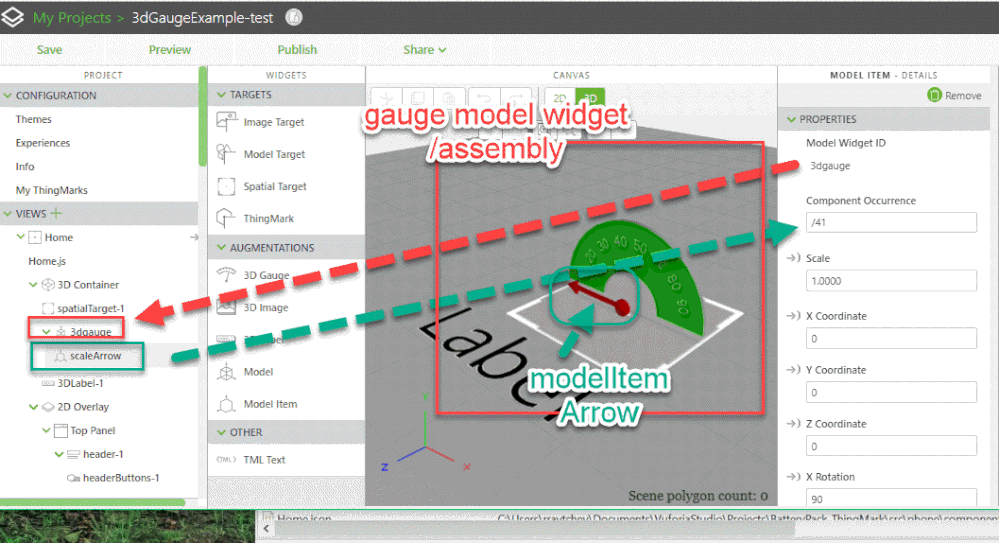
the modelItem widgets will refer to 2 things

1.) to the modelWidget Id.

2.) to the Component Occurrence property // with other words the component id path

This means that you can set the model widget referenced the the modelItems to another model file / .pvz file. This will be not a problem. Here the requirements that this work / or that this make sense (because it could work but in some configuration it will not make sense)  -> so it requires that the components  will have the same occurrence / id path as the original assembly:
 

2020-01-16_16-50-55.gif


For example I have replaced the model 3dGauge1.pvz by the model bla-bla.pvz. 

And this was working without problem because the both models contains a component with the same component occurrence /idpath / and here it make sense because it is the same geometry on the same position.


  • Another approach is  the following:

If you have a view / here I will consider the default “Home” view

So you can find then in your Vuforia Studio project folder

src\phone\components  the View.json – here in my case Home.json file

Here for example we can find:


....
"name": "twx-container-content",
 "children": [
 {
 "attributes": {
 "twx-widget": "",
 "widget-id": "3DContainer-1",
 "widget-name": "3D Container",
 "is-widget-container": "true",
 "dropshadow": "true"
 },
 "name": "twx-dt-view",
 "children": [
 {
 "name": "twx-container-content",
 "children": [
 {
 "attributes": {
 "twx-widget": "",
 "widget-id": "spatialTarget-1",
 "widget-name": "spatialTarget-1",
 "trackinglost-expression": "LostTrackEvent();",
 "rx": "-90"
 },
 "name": "twx-dt-target-spatial"
 },
 {
 "attributes": {
 "twx-widget": "",
 "widget-id": "3dgauge",
 "widget-name": "3dgauge",
 "is-widget-container": "true",
 "src": "Uploaded/3dgauge1_Med.pvz",
 "scale": "1.0000",
 "x": "0.0000",
 "y": "0.0050",
 "z": "-0.0030",
 "rx": "0.00",
 "ry": "0.00",
 "rz": "0.00"
 },
 "name": "twx-dt-model",
 "children": [
 {
 "name": "twx-container-content",
 "children": [
 {
 "attributes": {
 "twx-widget": "",
 "widget-id": "scaleArrow",
 "widget-name": "scaleArrow",
 "is-widget-container": "true",
 "model": "3dgauge",
 "idpath": "/41",
 "scale": "1.0000",
 "x": "0.0000",
 "y": "-0.0000",
 "z": "0.0000",
 "rx": "90.00",
 "ry": "0.00",
 "rz": "90.00"
 },
 "name": "twx-dt-modelitem",
 "children": [
 {
 "name": "twx-container-content"
 }
 ]
 }
...


This is text, json file where you can find all definition of widgets. Here in the snipet the moelWidget and one modelItem widget.

If you know what you want to replace you can replace also the ModelWidget id and also id path. This will make sense for example if you have 2 assemblies where the first assembly is subassembly of the second assembly and you want to replace the both model.

For example in this could make sense to replace the component occurrence

Replace the component occurrence property /41   by the idPath  /1/41


"model": "3dgauge",
"idpath": "/41",


Here the idPath /1 will refer to the subassembly  3dGauge1.pvz  which is now subassembly (with idPath=1) of bla-bla.pvz (this is now the root assembly)

"model": "bla-bla",
"idpath": "/1/41",

Here the model means the id of the model widget. If you use the same model Widget then you need to change only the idpath.

1 reply

21-Topaz I
January 16, 2020

Hi @rhudd ,

the modelItem widgets will refer to 2 things

1.) to the modelWidget Id.

2.) to the Component Occurrence property // with other words the component id path

This means that you can set the model widget referenced the the modelItems to another model file / .pvz file. This will be not a problem. Here the requirements that this work / or that this make sense (because it could work but in some configuration it will not make sense)  -> so it requires that the components  will have the same occurrence / id path as the original assembly:


2020-01-16_16-50-55.gif


For example I have replaced the model 3dGauge1.pvz by the model bla-bla.pvz. 

And this was working without problem because the both models contains a component with the same component occurrence /idpath / and here it make sense because it is the same geometry on the same position.


  • Another approach is  the following:

If you have a view / here I will consider the default “Home” view

So you can find then in your Vuforia Studio project folder

src\phone\components  the View.json – here in my case Home.json file

Here for example we can find:


....
"name": "twx-container-content",
 "children": [
 {
 "attributes": {
 "twx-widget": "",
 "widget-id": "3DContainer-1",
 "widget-name": "3D Container",
 "is-widget-container": "true",
 "dropshadow": "true"
 },
 "name": "twx-dt-view",
 "children": [
 {
 "name": "twx-container-content",
 "children": [
 {
 "attributes": {
 "twx-widget": "",
 "widget-id": "spatialTarget-1",
 "widget-name": "spatialTarget-1",
 "trackinglost-expression": "LostTrackEvent();",
 "rx": "-90"
 },
 "name": "twx-dt-target-spatial"
 },
 {
 "attributes": {
 "twx-widget": "",
 "widget-id": "3dgauge",
 "widget-name": "3dgauge",
 "is-widget-container": "true",
 "src": "Uploaded/3dgauge1_Med.pvz",
 "scale": "1.0000",
 "x": "0.0000",
 "y": "0.0050",
 "z": "-0.0030",
 "rx": "0.00",
 "ry": "0.00",
 "rz": "0.00"
 },
 "name": "twx-dt-model",
 "children": [
 {
 "name": "twx-container-content",
 "children": [
 {
 "attributes": {
 "twx-widget": "",
 "widget-id": "scaleArrow",
 "widget-name": "scaleArrow",
 "is-widget-container": "true",
 "model": "3dgauge",
 "idpath": "/41",
 "scale": "1.0000",
 "x": "0.0000",
 "y": "-0.0000",
 "z": "0.0000",
 "rx": "90.00",
 "ry": "0.00",
 "rz": "90.00"
 },
 "name": "twx-dt-modelitem",
 "children": [
 {
 "name": "twx-container-content"
 }
 ]
 }
...


This is text, json file where you can find all definition of widgets. Here in the snipet the moelWidget and one modelItem widget.

If you know what you want to replace you can replace also the ModelWidget id and also id path. This will make sense for example if you have 2 assemblies where the first assembly is subassembly of the second assembly and you want to replace the both model.

For example in this could make sense to replace the component occurrence

Replace the component occurrence property /41   by the idPath  /1/41


"model": "3dgauge",
"idpath": "/41",


Here the idPath /1 will refer to the subassembly  3dGauge1.pvz  which is now subassembly (with idPath=1) of bla-bla.pvz (this is now the root assembly)

"model": "bla-bla",
"idpath": "/1/41",

Here the model means the id of the model widget. If you use the same model Widget then you need to change only the idpath.

rhudd10-MarbleAuthor
10-Marble
January 16, 2020

Hi @RolandRaytchev 


Thanks for your detailed reply, this makes a lot more sense now. I will use your first approach. 😊


The only thing I don't understand is what the Component Occurrence numbers in Vuforia Studio represent. They don't seem to reflect the sBOM ID Path parameter, as this PTC article suggests.


I've attached an example I just tried. The value is Illustrator makes sense, I don't see why Vuforia Studio isn't the same. Are you able to clarify this?


Component Occurrence.jpg

21-Topaz I
January 17, 2020

Hi @rhudd ,


thank you for your feedback!

Yes, I think this is a little confusing.

So let explain.

If you have Creo Parametric  assembly with 2 components TEST1 and TEST2

Let say the feature id /component Id in Creo Parametric is TEST1  12 and TEST2 is 19

In this case in Creo the Path Id is TEST1 -> /12 and  for TEST2 -> /19

I think if you save as pvz file this should be also mirrored in the BOM as we can see in Creo Parametric , but ....

when you open the pvz file in illustrate and create from there a Figure e.g. to define a sequence - this unfortunately will change the BOM and the component Path Id - often adding a preceding /0  for the root -Illustration and changing the Creo Feature/AsmCompPath id to some smaller numbesr  

so that now the path there is 

TEST1 pathId -> /0/1

TEST2 PathId -> /0/2

I just observed  that this will change the id. Did not check exact what is the logic behind this change.

So that in this case if we know the name of the parts and follow the sBOM Path example:

/Illustration/CAM_FOLLOWER.ASM/FOLLOWER.ASM/FOLLOWER.PRT

We can identify the correct corresponding component and recalculate it with some significant programming work

For example we can extract the bom in Creo Prametric with Creo Parametric TOOLKIT or via saving of the model tree as text 

Then we can extract the bom from the pvz e.g. via Creo View Toolkit

A later we can compare the both trees and update e.g. Home.js. -> but this will requires as already mentioned  a significant amount of work to implement this approach 

How to extract a bom from a pvz is mention in the :

How to extract the components with properties from a pvz file