Turn on suggestions
Auto-suggest helps you quickly narrow down your search results by suggesting possible matches as you type.
Showing results for
Please log in to access translation
Turn on suggestions
Auto-suggest helps you quickly narrow down your search results by suggesting possible matches as you type.
Showing results for
Community Tip - Did you know you can set a signature that will be added to all your posts? Set it here! X
- Community
- PLM
- Windchill Discussions
- How to manage action menu on organization based
Translate the entire conversation x
Please log in to access translation
Options
- Subscribe to RSS Feed
- Mark Topic as New
- Mark Topic as Read
- Float this Topic for Current User
- Bookmark
- Subscribe
- Mute
- Printer Friendly Page
How to manage action menu on organization based


Jul 09, 2025
01:25 PM
- Mark as New
- Bookmark
- Subscribe
- Mute
- Subscribe to RSS Feed
- Permalink
- Notify Moderator
Please log in to access translation
Jul 09, 2025
01:25 PM
How to manage action menu on organization based
Version: Windchill 13.0
Use Case: I need to change the shortcut buttons in the folders based on organization. How can I manage the FolderManagement-actionModels.xml file based on organizations?
Description:
I have two organizations and I need to manage the folder shortcut buttons in each organization separately. When I modify the FolderManagement-actionModels.xml file it reflect all organizations. How can I separate the xml file organization based?
Labels:
- Labels:
-
Bus_System Administration
-
Other
6 REPLIES 6


Jul 09, 2025
02:08 PM
- Mark as New
- Bookmark
- Subscribe
- Mute
- Subscribe to RSS Feed
- Permalink
- Notify Moderator
Please log in to access translation
Jul 09, 2025
02:08 PM
I am pretty sure what you are asking for is not possible. If you are managing multiple orgs in same instance of Windchill, there are somethings they need to agree upon. If they cannot agree, you might have to split into two separate Windchill instances.


Jul 09, 2025
04:52 PM
- Mark as New
- Bookmark
- Subscribe
- Mute
- Subscribe to RSS Feed
- Permalink
- Notify Moderator
Please log in to access translation
Jul 09, 2025
04:52 PM
It might be possible to use a custom filter. I have one that hides if the invoked from container is a Project.:
WTContainerRef cr = criteria.getInvokedFromContainer();
// add in the getOrganizationName() method to get the org name
// and filter base on that
String orgName = cr.getReferencedContainer().getOrganizationName();
if (orgName.equals("Org1")) {
	status = UIValidationStatus.HIDDEN;
} else {
	status = UIValidationStatus.ENABLED;
}
Jul 10, 2025
07:40 AM
- Mark as New
- Bookmark
- Subscribe
- Mute
- Subscribe to RSS Feed
- Permalink
- Notify Moderator
Please log in to access translation
Jul 10, 2025
07:40 AM
I was not thinking of extensive customization but a filter could be an easy solution since you can apply it to any action you wanted and its is configured in the xml files that @maakbulut was asking about. They would have to trace out all actions that they wanted to hide and apply that filter to all definitions.

Jul 10, 2025
09:21 AM
- Mark as New
- Bookmark
- Subscribe
- Mute
- Subscribe to RSS Feed
- Permalink
- Notify Moderator
Please log in to access translation
Jul 10, 2025
09:21 AM
Hi all.
My question is if you need to just play with the ribbon menu where the actions are as shortcuts or you really need to hide the action from the menu at all.
If you want to just show shortcut actions in the ribbon menu based on organization, it is not possible based on organization.
If you really need to hide the action from the action menu then an own custom filter is the solution.
PetrH


Jul 09, 2025
06:36 PM
- Mark as New
- Bookmark
- Subscribe
- Mute
- Subscribe to RSS Feed
- Permalink
- Notify Moderator
Please log in to access translation
Jul 09, 2025
06:36 PM
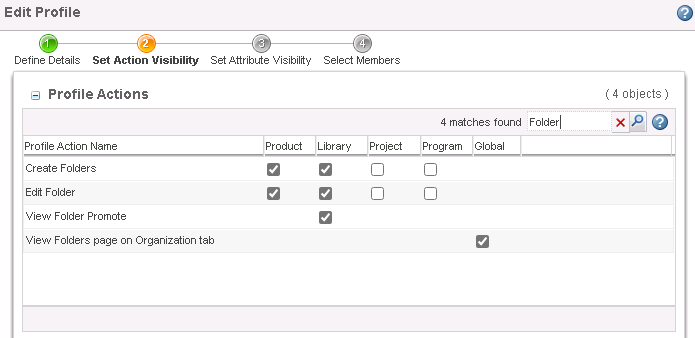
Maybe another option is to use Standard Profiles at the organization level?
I'm not clear if you are trying to hide a PTC action or adding your own. If adding your own, this help center page shows you how to add your actions to the Standard Profile options.
Step 8 at the end of this article shows an example of controlling custom GUI actions using Profiles.
https://www.ptc.com/en/support/article/CS211115
If these are PTC's default actions, then would some of these actions work in the standard profile? (see attached picture) You can turn them on in one organization and off in the other. Then assign users to the profiles according to organization.
Not sure if it is possible to automatically assign users to profiles.
Otherwise, @RandyJones's UI validator is probably the way to go because it isn't linked to the user's assigned profiles.


Aug 12, 2025
02:07 PM
- Mark as New
- Bookmark
- Subscribe
- Mute
- Subscribe to RSS Feed
- Permalink
- Notify Moderator
Please log in to access translation
Aug 12, 2025
02:07 PM
Hi @maakbulut,
I wanted to see if you got the help you needed.
If so, please mark the appropriate reply as the Accepted Solution. It will help other members who may have the same question.
Of course, if you have more to share on your issue, please pursue the conversation.
Thanks,
Anurag