
Turn on suggestions
Auto-suggest helps you quickly narrow down your search results by suggesting possible matches as you type.
Showing results for
Please log in to access translation
Turn on suggestions
Auto-suggest helps you quickly narrow down your search results by suggesting possible matches as you type.
Showing results for
Community Tip - Need to share some code when posting a question or reply? Make sure to use the "Insert code sample" menu option. Learn more! X
- Community
- PLM
- Windchill Discussions
- Is there a way I can restrict user from modifying ...
Translate the entire conversation x
Please log in to access translation
Options
- Subscribe to RSS Feed
- Mark Topic as New
- Mark Topic as Read
- Float this Topic for Current User
- Bookmark
- Subscribe
- Mute
- Printer Friendly Page
Is there a way I can restrict user from modifying CAD part in workspace without checkout. Currently windchill allows to modify if we select continue in creo conflict window. But changes are saved to windchill commonspace only when we checkout and checkin.


Jul 05, 2016
07:35 AM
- Mark as New
- Bookmark
- Subscribe
- Mute
- Subscribe to RSS Feed
- Permalink
- Notify Moderator
Please log in to access translation
Jul 05, 2016
07:35 AM
Is there a way I can restrict user from modifying CAD part in workspace without checkout. Currently windchill allows to modify if we select continue in creo conflict window. But changes are saved to windchill commonspace only when we checkout and checkin.
Is there a way I can restrict user from modifying CAD part in workspace without checkout. Currently windchill allows to modify if we select continue in creo conflict window. But changes are saved to windchill common space only when we checkout and checkin.I have everything which is not checked out should be ready only or locked.
Solved! Go to Solution.
Labels:
- Labels:
-
CAD Data Mgmt
ACCEPTED SOLUTION
Accepted Solutions


Jul 05, 2016
08:27 AM
- Mark as New
- Bookmark
- Subscribe
- Mute
- Subscribe to RSS Feed
- Permalink
- Notify Moderator
Please log in to access translation
Jul 05, 2016
08:27 AM
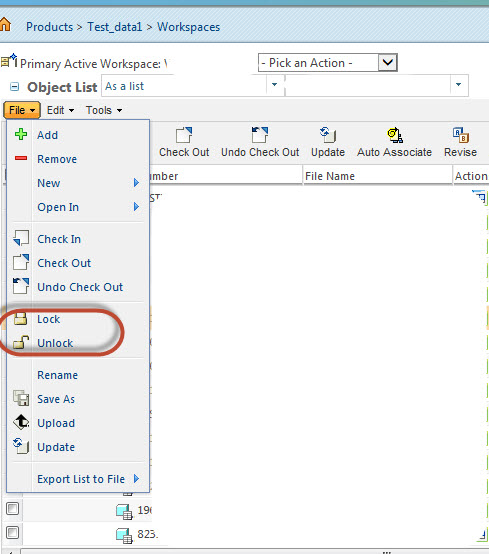
I think you're talking about 'locking' workspace objects. The screenshots below were with Windchill 10.1.
For the active workspace within Creo, you can manually select objects to lock:
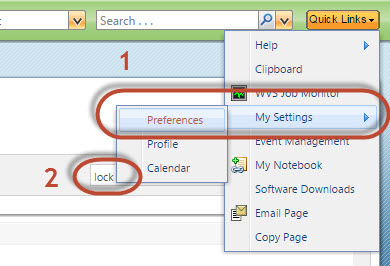
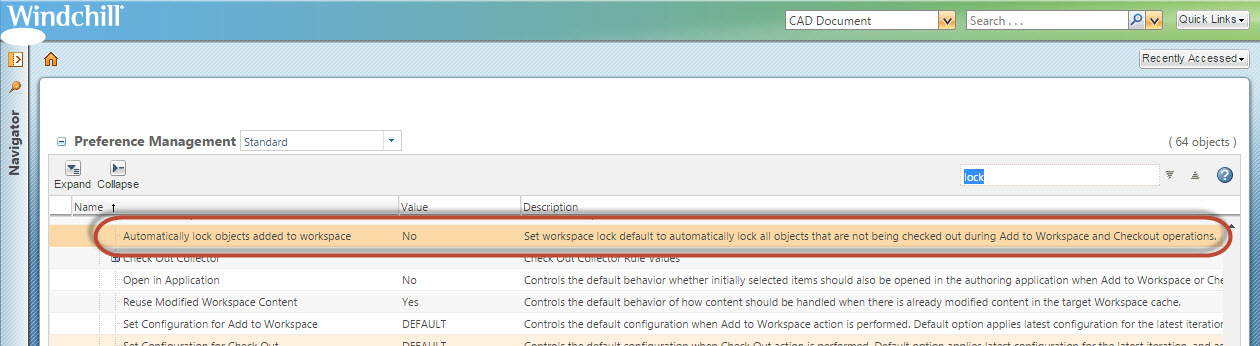
You can change the user's Windchill settings to lock objects automatically while being added to a workspace:
2 REPLIES 2
Jul 05, 2016
08:27 AM
- Mark as New
- Bookmark
- Subscribe
- Mute
- Subscribe to RSS Feed
- Permalink
- Notify Moderator
Please log in to access translation
Jul 05, 2016
08:27 AM
I think you're talking about 'locking' workspace objects. The screenshots below were with Windchill 10.1.
For the active workspace within Creo, you can manually select objects to lock:
You can change the user's Windchill settings to lock objects automatically while being added to a workspace:


Jul 19, 2016
04:41 AM
- Mark as New
- Bookmark
- Subscribe
- Mute
- Subscribe to RSS Feed
- Permalink
- Notify Moderator
Please log in to access translation
Jul 19, 2016
04:41 AM
Use this with caution,
If other team members are modifying parts.
Our local work space is not synchronised until we unlock the parts which are added to work space.


