
Turn on suggestions
Auto-suggest helps you quickly narrow down your search results by suggesting possible matches as you type.
Showing results for
Please log in to access translation
Turn on suggestions
Auto-suggest helps you quickly narrow down your search results by suggesting possible matches as you type.
Showing results for
Community Tip - You can change your system assigned username to something more personal in your community settings. X
- Community
- PLM
- Windchill Discussions
- Re: Power BI integration with Windchill
Translate the entire conversation x
Please log in to access translation
Options
- Subscribe to RSS Feed
- Mark Topic as New
- Mark Topic as Read
- Float this Topic for Current User
- Bookmark
- Subscribe
- Mute
- Printer Friendly Page
Power BI integration with Windchill


May 19, 2021
11:06 AM
- Mark as New
- Bookmark
- Subscribe
- Mute
- Subscribe to RSS Feed
- Permalink
- Notify Moderator
Please log in to access translation
May 19, 2021
11:06 AM
Power BI integration with Windchill
Hey everyone,
I am a beginner with Windchill and have a question about getting query data from the PTC Windchill server and directly pushing the information to Power BI.
I've been doing some research and have seen some other posts on this website mentioning the use of the REST API, however I have not seen a definitive solution to this.
My question is if anybody has done this integration if they can share how they have done it or give me some pointers?
Thanks in advance.
Labels:
10 REPLIES 10


May 20, 2021
12:50 PM
- Mark as New
- Bookmark
- Subscribe
- Mute
- Subscribe to RSS Feed
- Permalink
- Notify Moderator
Please log in to access translation
May 20, 2021
12:50 PM
Hi @AD_9933743
That's a great idea, you can pull data from Windchill into PowerBI using REST Services and you can do the same in MSExcel etc.
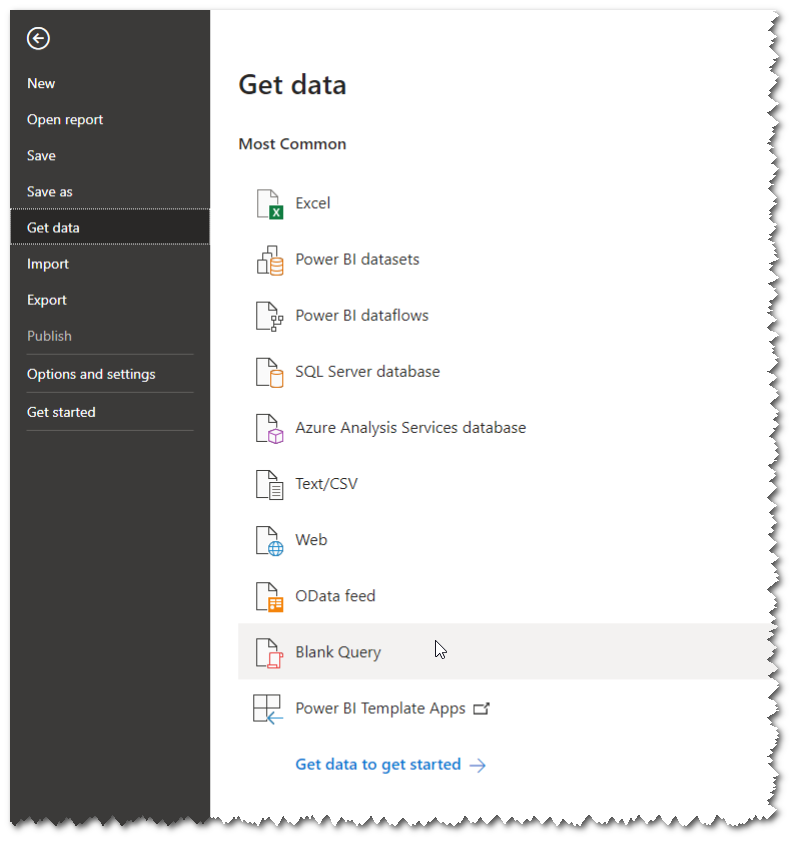
1. Start with a blank web query in PowerBI
2. Use the Advanced Editor to write web query from scratch

3. Only need to call the REST Service (using an OTB odata REST here) and provide an authentication
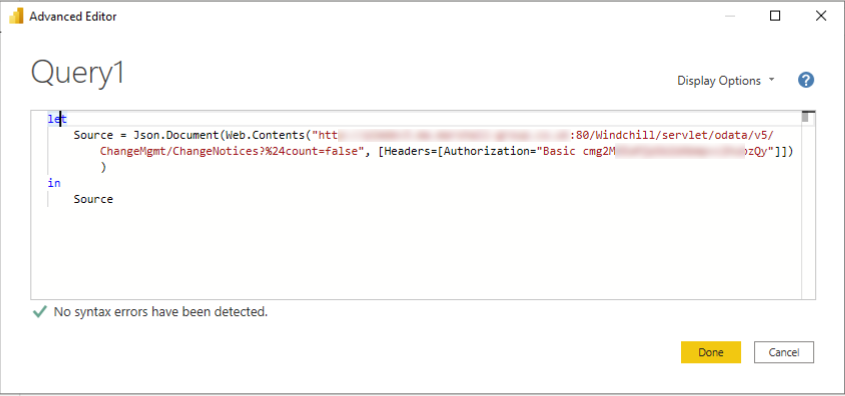
let
    Source = Json.Document(Web.Contents("https://<myhost>:80/Windchill/servlet/odata/v5/ChangeMgmt/ChangeNotices?%24count=false", [Headers=[Authorization="Basic <mybasicauth>"]]))
in
    Source
4. Transform and present the data how you want in the PowerBI UI
How would go about having a REST endpoint push? Once it's in Power BI you can refresh to pull the latest data anyway.
Main downside to this method is storing credentials in the pbi web query, if you want to share the analysis then publish it, instead of sharing the Power BI file itself


May 20, 2021
01:48 PM
- Mark as New
- Bookmark
- Subscribe
- Mute
- Subscribe to RSS Feed
- Permalink
- Notify Moderator
Please log in to access translation
May 20, 2021
01:48 PM
How are you generating that basic auth hash?
May 20, 2021
03:22 PM
- Mark as New
- Bookmark
- Subscribe
- Mute
- Subscribe to RSS Feed
- Permalink
- Notify Moderator
Please log in to access translation
May 20, 2021
03:22 PM
I followed this post more or less
https://community.ptc.com/t5/Windchill/BI-Tools-and-Windchill/m-p/589122#M58699


Apr 04, 2025
05:43 AM
- Mark as New
- Bookmark
- Subscribe
- Mute
- Subscribe to RSS Feed
- Permalink
- Notify Moderator
Please log in to access translation
Apr 04, 2025
05:43 AM
Maybe a bit late to the party.
If you meant the randomlike string in the headers... that is just a base64 string.
Basic Authentication has the following setup:
Authorization: Basic <Username>:<Password>In ASCII every character is 8 bits(extended version) while Base 64 has a 6 bit character. So your
<Username>:<Password>
is put on a long binary string, chopped is pieces of 6 bits and showed the coresponding base64 character.
Where sometimes = or == is added at the end to fix lengths to have a vailid number of bytes is the end.
There are a lot of base64 converter on the internet you can just try it your self

Apr 08, 2025
09:13 AM
- Mark as New
- Bookmark
- Subscribe
- Mute
- Subscribe to RSS Feed
- Permalink
- Notify Moderator
Please log in to access translation
Apr 08, 2025
09:13 AM
Hi @jw_CS
thanks for information.
I would just add that there is easy way with direct database connection. You do not have to use the RESTapi
In Windchill Report Management you just create a query that you would like to use in the PowerBI
then use the sql output as an input for the PowerBI reporting.
Provide the database connection and that's all.
Then you can work with the results as you need.
PetrH

Apr 11, 2025
12:55 PM
- Mark as New
- Bookmark
- Subscribe
- Mute
- Subscribe to RSS Feed
- Permalink
- Notify Moderator
Please log in to access translation
Apr 11, 2025
12:55 PM
I'm in no way an expert in this!
This is what i expect is the case: The Windchill SQL database have a dedicated user that connect's with the database. The Windchill Report Management make use of that.
So if you want the data out of the database. You need OR a personal login to the database OR the windchill database user OR Let the data flow Via Windchill (REST API) (but i'm not into that so i don't know)
If you have access to the database and need the query that Windchill uses. You can get these(if alloud from the organization) See: https://www.ptc.com/en/support/article/CS135285
Apr 14, 2025
04:51 AM
- Mark as New
- Bookmark
- Subscribe
- Mute
- Subscribe to RSS Feed
- Permalink
- Notify Moderator
Please log in to access translation
Apr 14, 2025
04:51 AM
@HelesicPetrI read your message as a question, but it is a good solution
So ignore my response 😉
May 20, 2021
02:12 PM
- Mark as New
- Bookmark
- Subscribe
- Mute
- Subscribe to RSS Feed
- Permalink
- Notify Moderator
Please log in to access translation
May 20, 2021
02:12 PM
Thank you so much for your detailed response @rhart !
Like @TomU I am also wondering where you generated the basic authorization hash key from. I seem to not be able to find it in my PTC Windchill web client. Also, when utilizing the odata REST service, is there any sort of setup required? Or is the functionality built into Windchill? Any help would be much appreciated.
Thanks!
May 20, 2021
03:35 PM
- Mark as New
- Bookmark
- Subscribe
- Mute
- Subscribe to RSS Feed
- Permalink
- Notify Moderator
Please log in to access translation
May 20, 2021
03:35 PM
Just whichever browser you prefer in dev mode can find it, following the hints in the link above.
Log in to Windchill then try the REST Service url in the address bar using a tab in the same session, if you get a json file back, REST is already setup.

Apr 18, 2023
09:42 PM
- Mark as New
- Bookmark
- Subscribe
- Mute
- Subscribe to RSS Feed
- Permalink
- Notify Moderator
Please log in to access translation
Apr 18, 2023
09:42 PM
I try this but is not working, maybe is it just me? any additional tip?
Thanks


