
Turn on suggestions
Auto-suggest helps you quickly narrow down your search results by suggesting possible matches as you type.
Showing results for
Please log in to access translation
Turn on suggestions
Auto-suggest helps you quickly narrow down your search results by suggesting possible matches as you type.
Showing results for
Community Tip - You can Bookmark boards, posts or articles that you'd like to access again easily! X
- Community
- PLM
- Windchill Discussions
- Workflow Definer window is blank - no errors
Translate the entire conversation x
Please log in to access translation
Options
- Subscribe to RSS Feed
- Mark Topic as New
- Mark Topic as Read
- Float this Topic for Current User
- Bookmark
- Subscribe
- Mute
- Printer Friendly Page
Workflow Definer window is blank - no errors
.png "kregimbald")

Sep 25, 2013
09:38 AM
- Mark as New
- Bookmark
- Subscribe
- Mute
- Subscribe to RSS Feed
- Permalink
- Notify Moderator
Please log in to access translation
Sep 25, 2013
09:38 AM
Workflow Definer window is blank - no errors
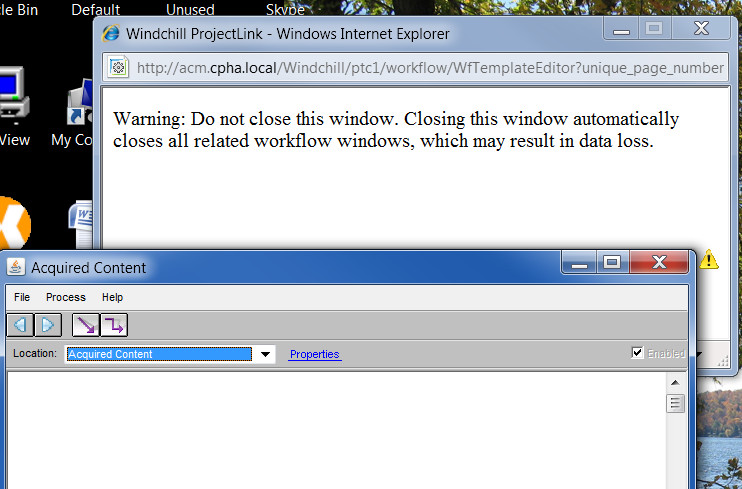
I am trying to access the Workflow Definer to view the graphic layout of the workflow. The initial template window appears warning not that it should not be closed. A warning then appears asking if I want to run the application. When I click "run" the workflow window opens but it is blank. It does have a java icon beside it but there is no error.
I am using Windchill 10.1 on IE 8. I was told to install Java 32 bit (1.6.0_21) and this would resolve the issue. Unfortunately, this is not the case.
Anyone have any suggestions as to what might be causing this? By the way, another user is able to view the workflow. We cannot see any difference in our setup.
Thanks
KR
Solved! Go to Solution.
Labels:
- Labels:
-
Other
ACCEPTED SOLUTION
Accepted Solutions
Sep 30, 2013
03:59 PM
- Mark as New
- Bookmark
- Subscribe
- Mute
- Subscribe to RSS Feed
- Permalink
- Notify Moderator
Please log in to access translation
Sep 30, 2013
03:59 PM
Tried this but it didn't fix the problem. IT support is still investigating but they're leaning towards a different video card.
7 REPLIES 7


Sep 25, 2013
10:12 AM
- Mark as New
- Bookmark
- Subscribe
- Mute
- Subscribe to RSS Feed
- Permalink
- Notify Moderator
Please log in to access translation
Sep 25, 2013
10:12 AM
Did you try to clear the Java cache on your workstation? Also I thought that Java needed to be a much higher datecode for Windchill 10.1. Try update 37.
Brian


Sep 25, 2013
10:16 AM
- Mark as New
- Bookmark
- Subscribe
- Mute
- Subscribe to RSS Feed
- Permalink
- Notify Moderator
Please log in to access translation
Sep 25, 2013
10:16 AM
This is likely an incompatibility between the Java Plug-In and your video card and/or driver.
If installing the latest available driver for your video card doesn't help, then you're left with disabling some or all of the Java Plug-In's attempts at hardware acceleration via the video card.
See http://docs.oracle.com/javase/7/docs/webnotes/tsg/TSG-Desktop/html/java2d.html or, more specifically for Java 6, http://docs.oracle.com/javase/6/docs/technotes/guides/2d/flags.html. Specifically note -Dsun.java2d.d3d=false.
Any such properties are applied via the Java Plug-In via the Java Plug-In's Control Panel.
Sep 30, 2013
03:20 PM
- Mark as New
- Bookmark
- Subscribe
- Mute
- Subscribe to RSS Feed
- Permalink
- Notify Moderator
Please log in to access translation
Sep 30, 2013
03:20 PM
It appears that the actual video card is causing a problem. Currently have an ATI video card and apparently it works on an Intel card. So have to replace the card.

Sep 25, 2013
12:06 PM
- Mark as New
- Bookmark
- Subscribe
- Mute
- Subscribe to RSS Feed
- Permalink
- Notify Moderator
Please log in to access translation
Sep 25, 2013
12:06 PM
All line to user and system Java Runtime Environment Settings.
Java Control Panel
Java tab
Click View
Click add
-Dsun.java2d.d3d=false -Dsun.java2d.noddraw=true
Sep 30, 2013
03:48 PM
- Mark as New
- Bookmark
- Subscribe
- Mute
- Subscribe to RSS Feed
- Permalink
- Notify Moderator
Please log in to access translation
Sep 30, 2013
03:48 PM
We are using ATI cards here...all we had to do was apply the Java settings from above and it worked.
Sep 30, 2013
03:59 PM
- Mark as New
- Bookmark
- Subscribe
- Mute
- Subscribe to RSS Feed
- Permalink
- Notify Moderator
Please log in to access translation
Sep 30, 2013
03:59 PM
Tried this but it didn't fix the problem. IT support is still investigating but they're leaning towards a different video card.


Oct 01, 2013
07:05 AM
- Mark as New
- Bookmark
- Subscribe
- Mute
- Subscribe to RSS Feed
- Permalink
- Notify Moderator
Please log in to access translation
Oct 01, 2013
07:05 AM


