Hi @avillanueva,
It's a 5 mins activity, which follows the Principle of Least Privilege, which you should really follow from a security perspective whenever giving users rights.
You would need to define what “read-only” means because it could mean several things
A. You could go in Composer, see all Entities or only some type of Entities – one choice to make
B. You could go in Composer and be able to see entities, but not be able to see property values – another choice to make.
This are the steps. :
- For each user you need to set the Composer rights properly – what he sees from the Composer interface:
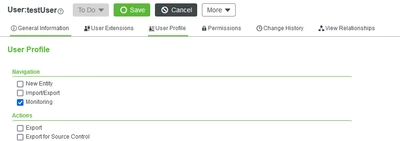 2. Create a user group that contains all these users. Let’s name it GuestUsers
3. Create an Organization that contains the GuestUsers user group. Let’s name it GuestOrganization.
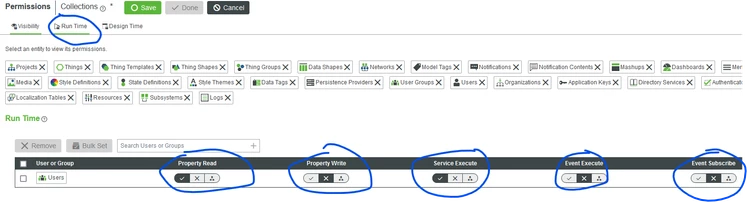
4. In the Permissions, Collections section, you can select all Collection types (or the ones you need – option A above) and to the following
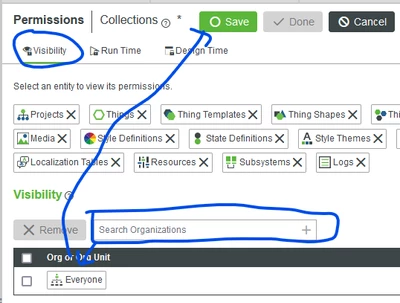
a. Set Visibility for all entity types, at once for the GuestOrganization. This will allow users to see the entity names in Composer (nothing more).
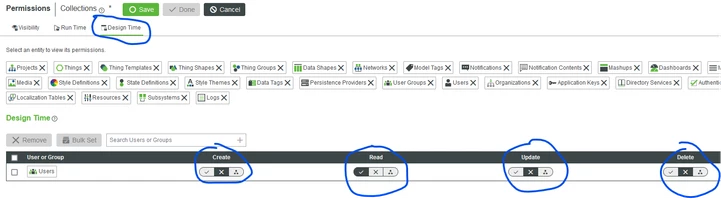
b. Set DesignTime Permission for all entity types, at oncem for the GuestUsers group. This will allow users to be able to click on the entity in Composer and see everything, EXCEPT property values.
c. ONLY IF NEEDED - Set Runtime Permissions for all entity types, at once for the GuestUsers group. This will allow users to see also property values – and execute any service from the entity. We need the ServiceExecute just because the Composer when loading an entity in Composer it uses a Service to load all the values – does not read them directly.