

How to Display a Mashup in an iFrame in a 3rd-Party App from ThingWorx 8.0?
Summary
ThingWorx help has a good article on how to configure ThingWorx to allow a mashup to be displayed inside an iFrame on a third-party application. For example, you might want to contextualize business data inside a Microsoft Dynamics, SAP, Salesforce, or ServiceMax work order by including a ThingWorx mashup right there on the work order in your CRM tool. Your users get the benefits of ThingWorx, without having to leave the application that organizes their service workflows.
The instructions linked above help you configure what's sent back in the x-frame-options header. The web development community is moving beyond the x-frame-options header, though, and is phasing in the use of Content Security Policies, instead. As I'll demonstrate below, it appears ThingWorx 8.x is moving in that direction, too. ThingWorx now sends a content-security-policy header with a value of, "frame-ancestors 'self'".
I've followed the configuration guidelines from the help article, "Allowing Embedded Mashups in iFrames." The x-frame-options header is coming back as expected, that is, "ALLOW-FROM https://friendly-site.example.com."
In Firefox, the new content-security-policy header is causing me to get an interesting message in the console - "Content Security Policy: Ignoring ‘x-frame-options’ because of ‘frame-ancestors’ directive." In Chrome, I get, "Refused to display 'https://myinstance.thingworx.com/Thingworx/Runtime/index.html#mashup=Demo.Chevron.Main&appKey={{my-app-key}}&x-thingworx-session=true' in a frame because an ancestor violates the following Content Security Policy directive: "frame-ancestors 'self'".
Here's what the iFrame looks like in Firefox inside the page on the 3rd-party application:
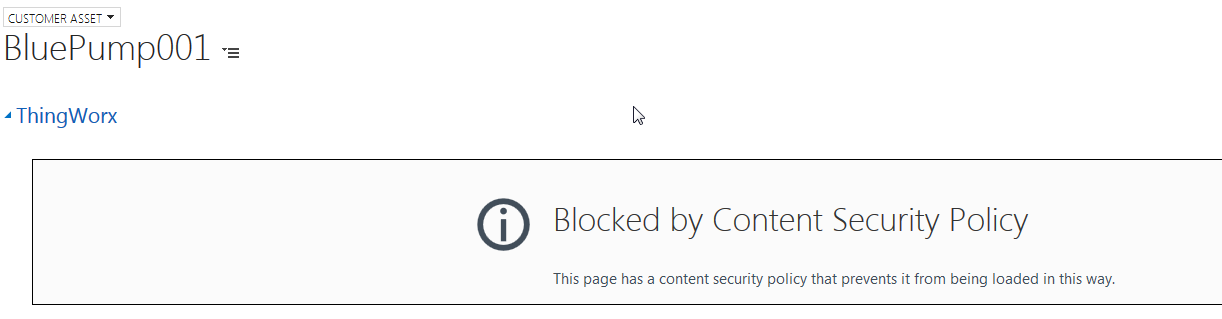
Here's my question - how do I configure ThingWorx to send something other than, "frame-ancestors 'self'," in the content-security-policy header?
Details
Environment
- ThingWorx 8.0.2-b67
- Tomcat 8.5.13
- Google Chrome Version 60.0.3112.113 (Official Build) (64-bit)
- Firefox Developer Edition 56.0b8 (32-bit)
- Postman for Chrome Version 5.2.0
Configuration
I followed the instructions in the ThingWorx help article linked above. Here's the relevant section from web.xml for my Tomcat instance:
<!-- CUSTOM FILTERS -->
<filter>
<filter-name>httpHeaderSecurity</filter-name>
<filter-class>org.apache.catalina.filters.HttpHeaderSecurityFilter</filter-class>
<async-supported>true</async-supported>
<init-param>
<param-name>antiClickJackingEnabled</param-name>
<param-value>true</param-value>
</init-param>
<init-param>
<param-name>antiClickJackingOption</param-name>
<param-value>ALLOW-FROM</param-value>
</init-param>
<init-param>
<param-name>antiClickJackingUri</param-name>
<param-value>https://friendly-site.example.com</param-value>
</init-param>
</filter>
<filter-mapping>
<filter-name>httpHeaderSecurity</filter-name>
<url-pattern>/*</url-pattern>
<dispatcher>REQUEST</dispatcher>
</filter-mapping>
Headers Returned with Various Requests
I think the content-security-policy header is new in ThingWorx 8.x, and that ThingWorx is setting the value of that header. I'll show why in the table below. I made three GET requests from POSTMan:
- A mashup in ThingWorx 8.0.2-b63
- A mashup in ThingWorx 7.0.1-b482
- A request for the Tomcat start page (no ThingWorx requests)
Here are the various headers I got back:
| Header | Mashup Request-TWX 8.0.2-b63 | Mashup Request-TWX 7.0.1-b482 | GET Tomcat 8.5.13 Front Page |
|---|---|---|---|
| accept-ranges | bytes | bytes | text/html;charset=UTF-8 |
content-length | 5265 | 5281 | N/A |
| content-security-policy | frame-ancestors 'self' | N/A | N/A |
| content-type | text/html | text/html | N/A |
| date | Wed, 06 Sep 2017 12:17:08 GMT | Wed, 06 Sep 2017 12:17:15 GMT | Wed, 06 Sep 2017 12:17:11 GMT |
| etag | W/"5265-1504669330000" | W/"5281-1504699189000" | N/A |
| last-modified | Wed, 06 Sep 2017 03:42:10 GMT | Wed, 06 Sep 2017 11:59:49 GMT | N/A |
| x-content-type-options | nosniff | N/A | nosniff |
| x-frame-options | ALLOW-FROM https://friendly-site.example.com | SAMEORIGIN | ALLOW-FROM https://friendly-site.example.com |
| x-xss-protection | 1; mode=block | N/A | 1; mode=block |
| server | N/A | Apache-Coyote/1.1 | N/A |
| transfer-encoding | N/A | N/A | chunked |
Keep in mind - I configured the Tomcat 8.5.13 server to return the value you see in x-frame-options above. I didn't change web.xml on the 7.x instance.
From the experiments in the table above, I've drawn the following conclusions:
- ThingWorx 8.x returns a content-security-policy header. ThingWorx 7.x does not. The header is therefore new in ThingWorx 8.x.
- The request for a ThingWorx 8.x mashup returned a content-security-policy header, but the request to the Tomcat 8.5.13 server hosting in did not. ThingWorx 8.x is therefore setting the header value, and then returning it. It's not being created at the Tomcat level.
Different Browsers Handle the content-security-policy Header Differently
I experimented with different browsers, because they handle headers differently. The Mozilla Developers' Network has a table that lists how different browsers handle various values of the content-security-policy header:
 - HTTP _ MDN.png)
Temporary Workaround
Luckily, Internet Explorer ignores the frame-ancestors value in the content-security-policy header (and apparently, everything else but, "sandbox"). This means we can temporarily use Internet Explorer to display the page that contains our mashup. I looks like Edge is incorporating more and more values, though, so future versions of Microsoft browsers may not allow this workaround.
What I've Tried
I looked around for Tomcat filters that can configure the content-security-policy header. The HTTPSecurityHeaderFilter we use to configure the x-frame-options header doesn't appear to have any control over the content-security-policy header. There are third-party libraries out there that modify the header, but installing an extra library next to ThingWorx is not a best practice. Frameworks like Spring give you tools for configuring that header, but I can't go that deep into the stack.
I've looked and looked for a way to manipulate that header, but am coming up short. Any help setting the value of that header is appreciated.