
12-Amethyst
November 28, 2024
Solved

Infotable Type : Is data table

  • November 28, 2024
  • 1 reply
  • 1682 views

Hi,


i was going to use info tables to store data like the max and min water level per hour , every hour new row is add to the info table with the max and min value of the level , all of this is fine but i know that info tables use ram in case of persist and log, and i want to do both, so i am thinking of selecting "infotable type" option to set it to "Is data table" because i think my thing worx version does not has the datatable creating option, so does this option "Is Data Table" will make this infotable property act as datatable and store the values in the database and not the ram ? also should i select persist and log normally or there is something here ?
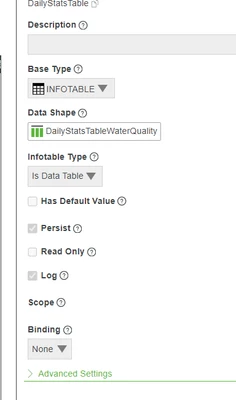
IA_10816220_0-1732783544260.png


Best answer by Constantine

Depending on the number of your sensor readings, a straight query might work well. For example, if you get one reading per hour, then this query takes ~30ms on my laptop:

let rawData = me.QueryNumberPropertyHistory({ 
 propertyName: 'max',
 maxItems: 720,
 // TODO: Add date filters here
});
let withDates = Resources["InfoTableFunctions"].DeriveFields({
	types: 'STRING,NUMBER',
	t: rawData,
	columns: 'date,value',
	expressions: 'timestamp.toLocaleDateString(),value'
});
let result = Resources["InfoTableFunctions"].Aggregate({
	t: withDates,
	columns: 'value',
	aggregates: 'MAX',
	groupByColumns: 'date'
});

With this you don't need to create extra properties, schedulers, subscriptions, etc.

1 reply

Rocko
19-Tanzanite
November 28, 2024

1) It rarely makes sense to persist AND log. You should consider using a Value Stream for this type of data and only log them.

You will have to create a value stream entity, assign your thing to that value stream, and then set the property to "logged".

This will also allow you to query historical values of the water level e.g. by using QueryPropertyHistory service.

Do not store Time series data in a Data Table.

Here's a guideline when to use which storage mechanism. Also read this.


Reminder: Whenever you assign create a value stream, also think about when to remove (purge) data from the value stream to avoid filling up disk space.


2) As the popup on the question mark explains "Is Data Table" will only add a couple of standard fields which come with a datatable to the property:

Rocko_0-1732788458467.png

TBH I never used this on a property but only in the result definition of a Service, when you want to return rows from a Data Table to be used in a mashup. In this case "Is Data Table" controls if you can see the DataTable standard columns (key, location, source, source type, tags and timestamp) in the "Returned Data" of the service in the mashups Data tab.

12-Amethyst
November 28, 2024

so from what I understand I should only use log and only use info table to store the data needed to be shown on mashups ?

and if i selected "is data table" this doesn't mean it will be stored in database or hard desk but it will also store in ram ?! because it will help me a lot  if i can store it in database and not memory , i am planning on storing the data with the timestamp i want without considering the timestamp it is stored in the database with, 

Rocko
19-Tanzanite
November 28, 2024

I would not use Infotable at all but keep your max and min water level per hour as individual, logged properties on the thing.


"is data table" does not really define how your values are stored. A Data Table is an entity of its own, it is a Thing with Base Thing Template "DataTable". You would have to create it explicitly and insert into it explicitly.

With Value Streams you don't have to care about that, when you update the property value is it written to the database with the current timestamp automatically.