Solved
RolandRaytchevAnswer
21-Topaz I
April 23, 2020
Hi
the answer is yes, it is possible.
2 options:
1.) option 1. )my favorite - if you anyways use a service from Thingworx you can define a second service where you call the first service/ or direct value query (e.g. QueryNumberProperty ) and filter it with query where you pass your filter parameters. As example you can check the following topic ( it is more complex example as your case):
External Data - Date&Time format
Problem with Time Series Chart
you can call you service later with some code like this below
$scope.app.runMyTWXService = function() {
 	var TWXmodelID = 'PlatformSubsystem';
 	var serviceName = 'GetAllStateDefinitions';
 	var parameters = {'propertyName': 'Temp', 'maxItems': 10};
 	//twx.app.fn.triggerDataService(TWXmodelID, serviceName, parameters);
//return twx.app.fn.triggerDataService(TWXmodelID, serviceName, '{}');
return $scope.app.mdl[TWXmodelID].svc[serviceName].data;
};
//

var values= $scope.app.runMyTWXService();
 console.log("value in $scope.app.getListStates()");
console.warn(values)//print the values in the console STRG-Shift-I
2.) You can call the data and filter it in the javaScript loop / not so sufficient but for a simple case as in your example it could work fine:
//function which calls QueryNumberPropertyHistory
//with parameters
$scope.app.runMyTWXService = function() {
 var TWXmodelID = 'TES_stream';
 var serviceName = 'QueryNumberPropertyHistory';
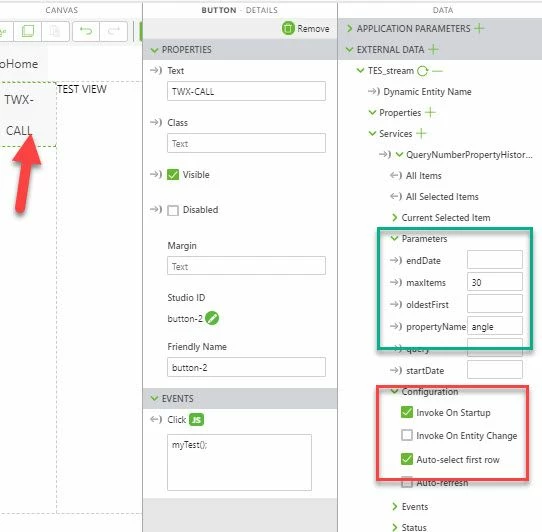
 var parameters = {'propertyName': 'angle', 'maxItems': 30};
 twx.app.fn.triggerDataService(TWXmodelID, serviceName, parameters)
};
// myTest is called by UI button for testing see picture
$scope.myTest=function(){
$scope.app.runMyTWXService();
 $timeout(function()
 {console.log('retData')
 var retData=$scope.app.mdl['TES_stream'].svc['QueryNumberPropertyHistory'].data
 $scope.RESULT={}
 $scope.myFilter_min=50
 //any value to demonstrate a filter function here value should be > as min value
 var count=0;
 retData.forEach(function(value){
 console.log("value["+ (count++) +"]="+JSON.stringify(value))
 if(value['value'] > $scope.myFilter_min) $scope.RESULT=value;
//the first value which exceed the min filter
}) },600)

 $timeout(()=>{console.warn("$scope.RESULT="+JSON.stringify($scope.RESULT))},2000)
};
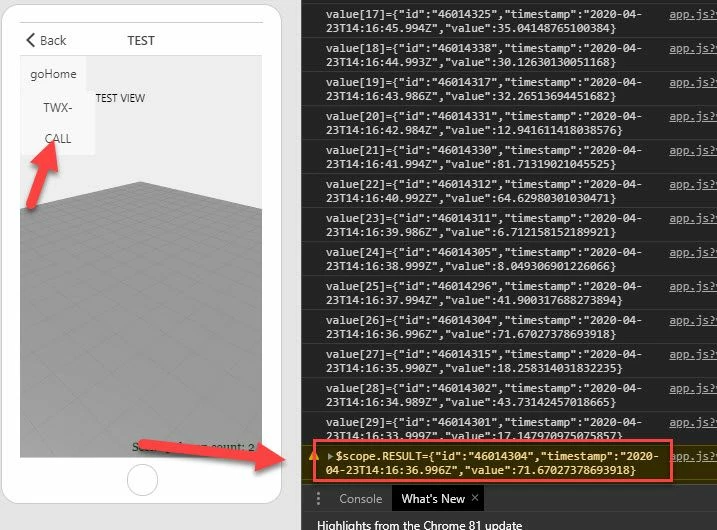
Then we can check e.g. the resutl in console:
For such static tables you can also pass the data as parameter in external data and set the configuration to call it on statup - in this case you can call the service result directly :
var retData=$scope.app.mdl['TES_stream'].svc['QueryNumberPropertyHistory'].data